Record Actions
The Create Record, Update/Create Record, Search Records, and Delete Record native actions describe the functions for creating and maintaining data used in Turbine application records. These actions together are also commonly referred to as CRUD.
Use Bulk mode when the target is a Performance Application and you must write or delete many records in one action. Use Using the Big Data Native Action when you transform large files with PySpark. Those paths are not the same. Bulk mode and Performance Applications are supported for the Vulnerability Response Management (VRM) solution. They are not supported on Turbine On-Prem. Search Records does not have Bulk mode.
Bulk mode is behind a feature flag and must be enabled; to enable this feature, contact Swimlane Support. Bulk mode is not supported on Turbine On-Prem.
title: Record Actions slug: record-actions docTags: createdAt: Mon Aug 11 2025 11:13:48 GMT+0000 (Coordinated Universal Time)
The Create Record, Update/Create Record, Search Records, and Delete Record native actions describe the functions for creating and maintaining data used in Turbine application records. These actions together are also commonly referred to as CRUD.
CRUD Actions in Playbooks
To access these native actions, follow these steps:
- From the playbook builder, click Add an action.
- From the ACTION panel, in the Action drop-down menu, select one of the desired CRUD options.
The following table shows the action and associated icon.
Icon | Record Action |
|---|---|
| Create Record |
| Update/Create Record aka Upsert |
| Search Record |
| Delete Record |


The Create and Update/Create Record actions have the ability to configure inputs, outputs, and restrictions to your record.
Restrictions can be modified on the record as well.
Restrictions and Outputs
Create and Update/Create Record actions have a Restrictions tab where you can restrict application records to specific groups and/or users.
If you navigate to the Restrictions tab on a Create action, and you have not configured any restrictions, there is a status indicating that no restrictions have been applied. Values you can add when adding a user are: email address, username, display name, or id. Under either the Groups or Users sections, click Clear All to remove all that section's restrictions. If you want to delete just a single group or user, click on the ellipsis to the right of the field, then click Delete.
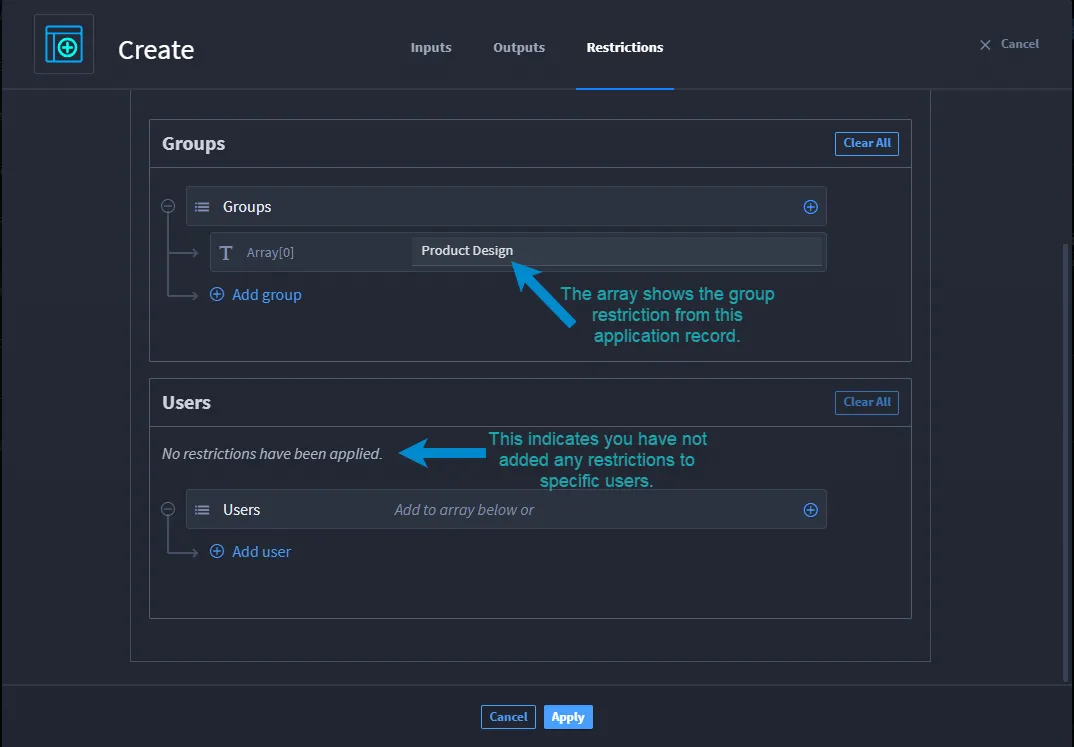
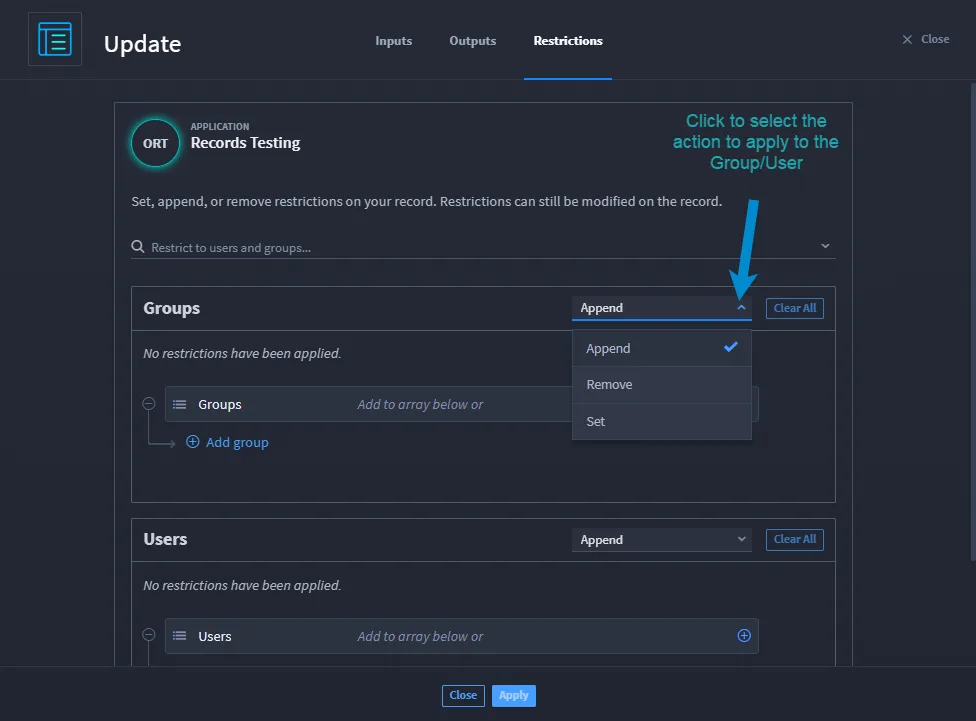
On the Create/Update record, you do more than add a group/user. From the Restrictions tab, you have the options to Append, Remove, and Set options.
On any of the CRUD actions, if you want to use any outputs outside of this playbook, navigate to the Outputs tab and promote the desired output. See Outputs for more information.
The Create Record, Update/Create Record, Search Records, and Delete Record native actions describe the functions for creating and maintaining data used in Turbine application records. These actions together are also commonly referred to as CRUD.
Use Bulk mode when the target is a Performance Application and you must write or delete many records in one action. Use Using the Big Data Native Action when you transform large files with PySpark. Those paths are not the same. Bulk mode and Performance Applications are supported for the Vulnerability Response Management (VRM) solution. They are not supported on Turbine On-Prem. Search Records does not have Bulk mode.
Bulk mode is behind a feature flag and must be enabled; to enable this feature, contact Swimlane Support. Bulk mode is not supported on Turbine On-Prem.
Choose Your Path
Goal | Where to go |
|---|---|
Add a record action on Canvas | |
Create one record | |
Create many records in a Performance Application | |
Update or create many records | |
Delete many records | |
Search a Performance Application | Search Records — Condition Builder lists indexed fields only |
Add a Record Action
- Open a playbook in Canvas.
- Open the add panel and select Actions.
- Drag Create Record, Update/Create Record, Search Records, or Delete Record onto a + on the flow.
- Select the node, then select Configure.
CRUD Actions in Playbooks
The following table shows the action and associated icon. Keep the published icon table at merge.
Create Record and Update/Create Record can configure inputs, outputs, and restrictions.
Restrictions and Outputs
Create Record and Update/Create Record include a Restrictions tab where you can restrict application records to specific groups or users.
Restrictions is not available when Bulk mode is on. The tab tooltip is Restrictions are not supported in bulk mode. Configure restrictions on a single-record run, or apply them outside bulk.
On any of the CRUD actions, if you want to use outputs outside this playbook, open the Outputs tab and promote the desired output. See Outputs.
Bulk Mode
Use Bulk mode on Create Record, Update/Create Record, or Delete Record when the target is a Performance Application.
Action | What Bulk mode does |
|---|---|
Create Record | Maps Bulk Input Source (file only) and Create fields for many rows. |
Update/Create Record | Maps Bulk Input Source (array of objects or file), then Update existing record or Update or create record. You can also select Append array or multiselect or Remove from array or multiselect. |
Delete Record | Maps Bulk Input Source (file or array of objects) and tracking-id for many rows. Tabs are Inputs and Outputs only. |
Select an application lists Performance Applications when Bulk mode is on. Import a Performance Application from Manage Applications and Applets if the list is empty.
On Create Record, empty Create fields are prefilled with $input.<field key>. Treat that mapping as a template and review it before you apply.
Search Records on a Performance Application
Search Records does not have Bulk mode. The action is the same as the published topic. When the selected application is a Performance Application, Condition Builder lists only indexed (searchable) fields. Non-searchable custom fields do not appear.
See Search Records.