Add Parsing Detail to the Suspicious Emails Task
You have now set up a VirusTotal task to map output from VirusTotal into your Import Suspicious Emails application. Next, you set up the parsing detail in the Swimlane Import Suspicious Email task that will grab the IP address from the emails that come in and input them into the IP(s) from Body field.
To add parsing detail:
- From the global navigation menu, select Integrations and then open the Import Suspicious Emails task.
On Integration/Import Suspicious Emails, click the Outputs tab and then expand the Create/Update Records mappings.
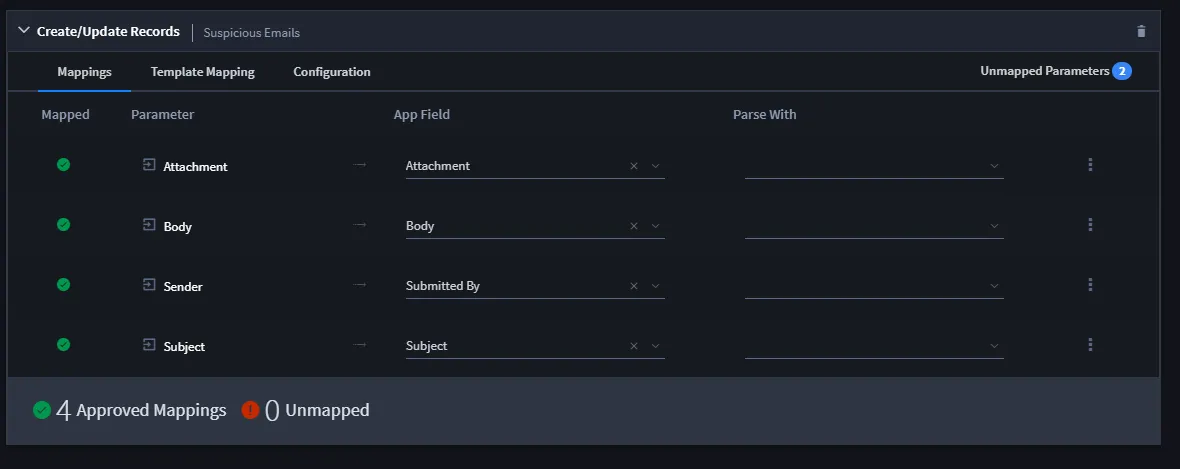
- Update the Body parameter to map to the IP(s) from Body field.
Access the ellipsis pulldown menu for the Body parameter and select Add Configuration.
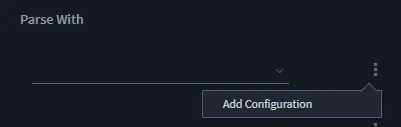
- This adds an additional, configurable mapping to the task.
- Select Regex from the Parse With field dropdown, and then click the pencil icon to access the Regex Editor.
- Within the Regex Editor, enter the following code in the Regular Expression and then click OK:
- (\d+\.\d+\.\d+\.\d+)
-
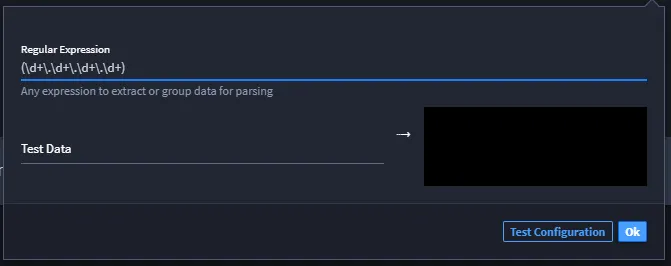
- Review the mappings and then click Save.
Related Links
Configure Task InputConfigure Task Input
IntegrationsIntegrations
Output MappingOutput Mapping
Create or Edit a TaskCreate or Edit a Task