Turbine On-Prem 26.3.3 Release
September 8th, 2026
Turbine is evolving into a powerful automation platform that combines intelligent development, enterprise-grade controls, and operational scale in one experience. With Hero AI now capable of making coordinated changes across multiple flows, richer management experiences for playbooks and AI agents, flexible identity management, time-based automation, more precise data retrieval, and built-in safeguards for application scale.
Turbine is moving beyond simply helping teams build automations, it is helping them build faster, manage complexity, and confidently scale automation across the enterprise.
What's New in This Release?
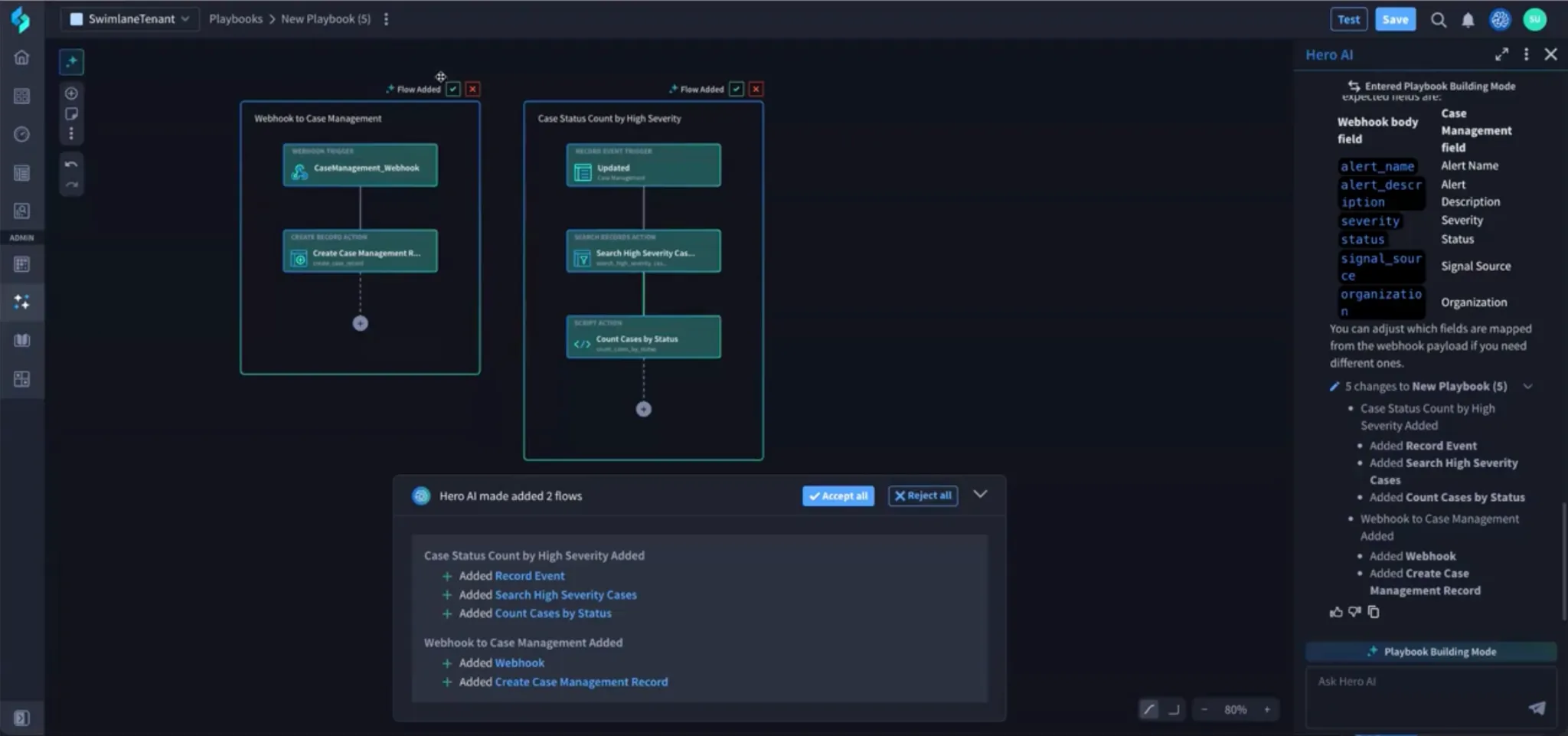
Playbook Generator: Edit Multiple Flows in a Playbook
The Hero AI playbook generator agent can now edit multiple flows within a single playbook in one request.
Select the flows you want to change through the Canvas UI or describe them in natural language, and the building agent applies coordinated edits across those flows. This makes it faster to build and maintain multi-flow playbooks without switching between flows and prompting the agent separately for each one.
For more information, see Create and Modify Playbooks with Hero AICreate and Modify Playbooks with Hero AI.
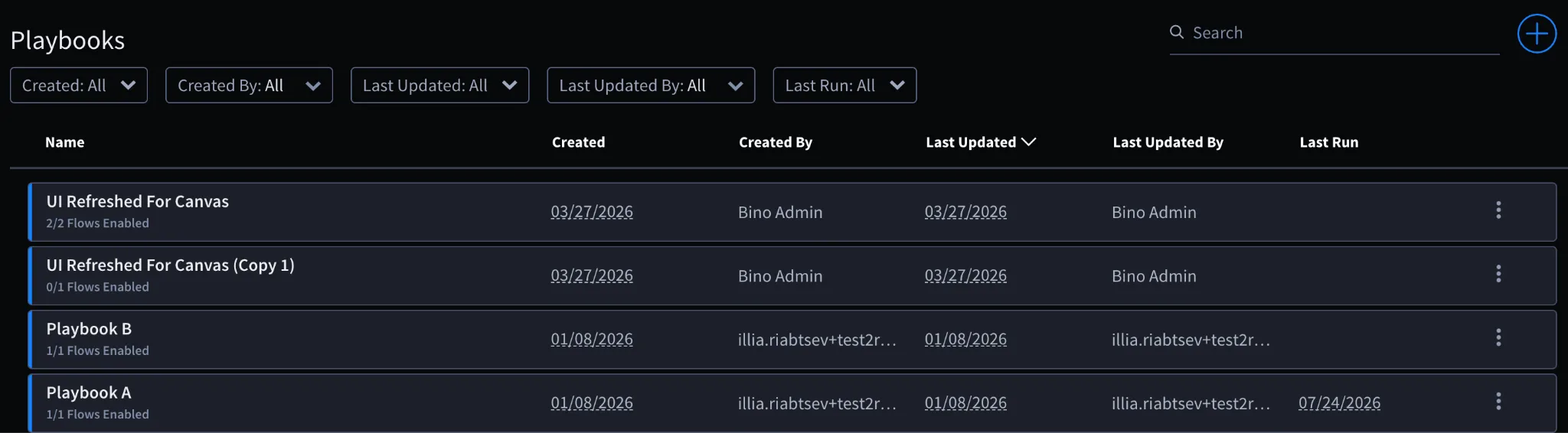
Enhanced List Experience for Playbooks, Components, and AI Agents
The Playbook, Component, and AI Agent list pages have been redesigned to make searching, navigation, and content management easier.
The new experience brings these pages in line with the Operational Health experience and surfaces more useful information directly in the lists, helping users quickly find the content they need and understand what they are working with.
For more information, see Playbooks OverviewPlaybooks Overview, ComponentsComponents, and AI Agents in OrchestrationAI Agents in Orchestration.
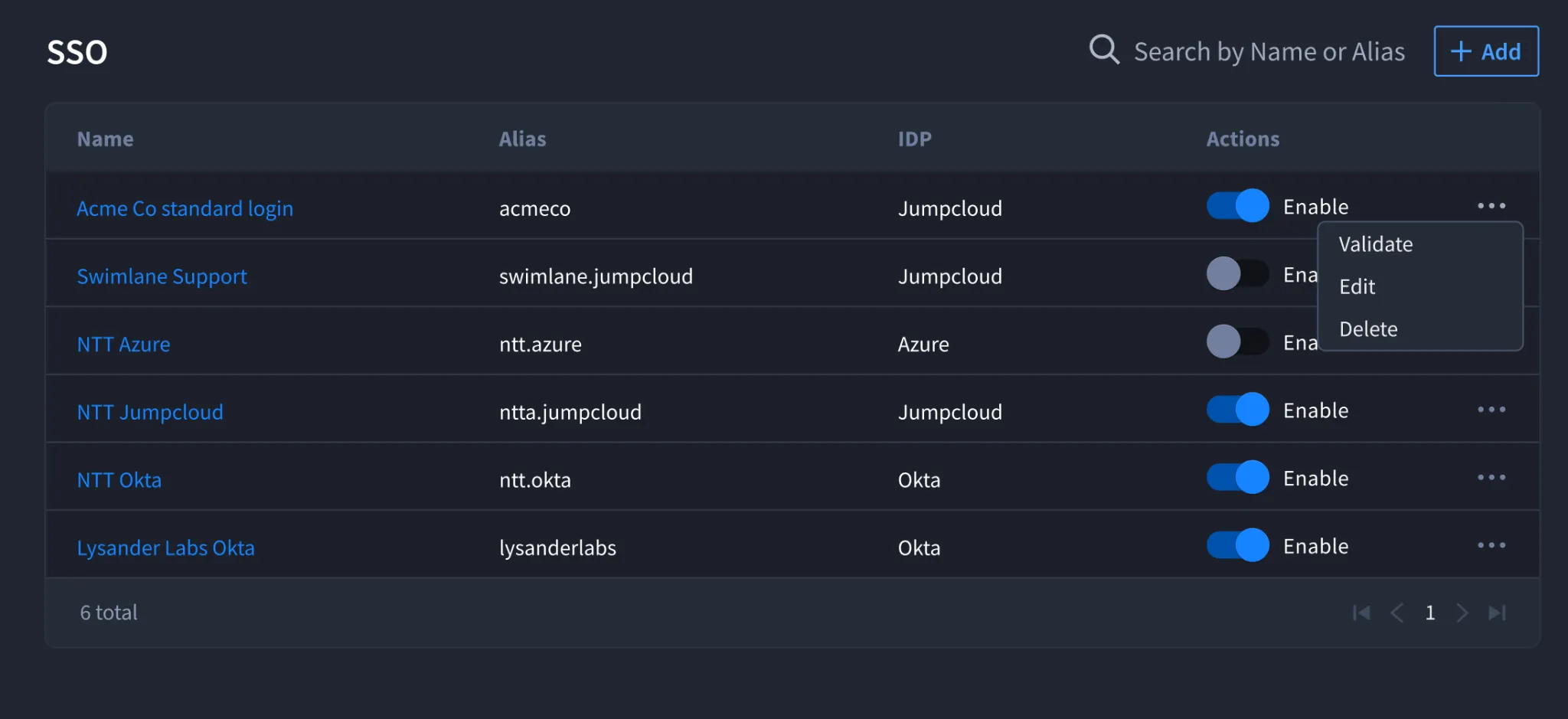
Support for Multiple SSO Identity Providers Per Account
Turbine now supports multiple SSO identity providers within a single account, allowing organizations to authenticate users through multiple SAML providers, including Azure AD, Okta, Ping, and Google.
Account administrators can configure and manage multiple identity providers, test SAML connections, and associate users and groups with the appropriate provider. Multiple directory services are also supported, making this especially useful for MSSPs, organizations with multiple business units, and environments that use separate identity sources.
This gives administrators greater flexibility to align Turbine authentication with their existing enterprise identity architecture.
Multiple SSO is currently available behind a feature flag. Contact Swimlane Support to enable it.
Action required — IdP signing certificate: Starting in Turbine 26.3.0, every SAML SSO configuration must include a valid Identity Provider (IdP) signing certificate. This requirement applies to all SAML configurations — including accounts that use a single identity provider — and is not limited to Multi-SSO.
- Existing user logins continue to work if a configuration does not yet have a certificate.
- You cannot edit or save an existing SAML configuration until you add a valid IdP signing certificate.
- New SAML configurations require a certificate before they can be saved.
- SAML response signature verification is always enforced and cannot be disabled.
Upload the IdP public signing certificate under Identity Provider Settings for each SAML configuration. Supported formats include .pem and .cert.
For steps, timeline, and FAQs, see Enable SAML for SSOEnable SAML for SSO. For Multi-SSO setup, also see Directory ServicesDirectory Services, UsersUsers, and Customize Your User ProfileCustomize Your User Profile.
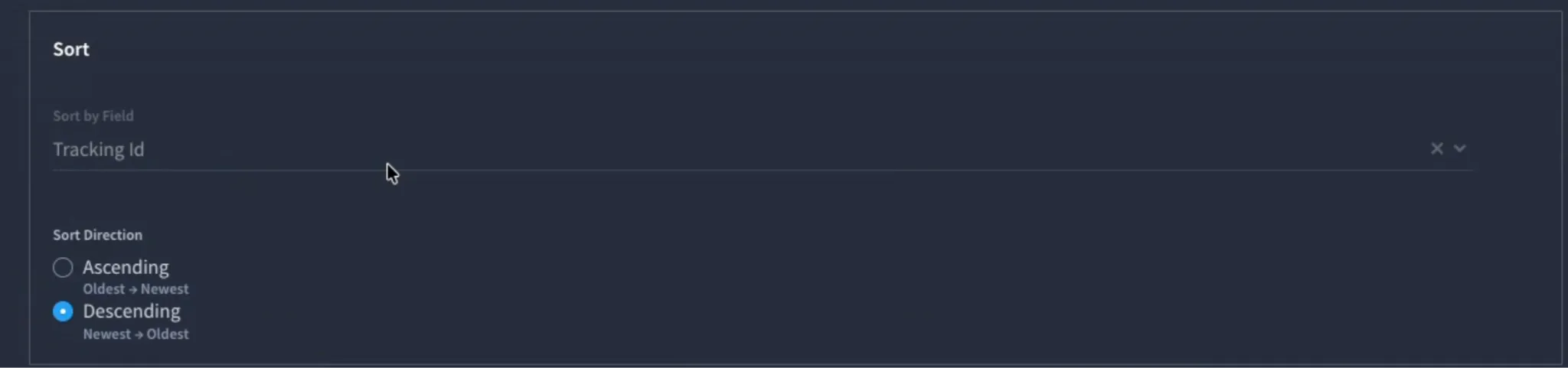
Sort Direction in Search Records and Export Records Native Actions
The Search Records and Export Records native actions now support explicit sorting by Tracking ID, including ascending and descending order.
Previously, playbook authors could filter, select fields, and limit results, but had limited control over the order of returned records. This often required retrieving additional records and reordering them using Transform Data or scripts.
With configurable sort direction, playbooks can retrieve records in the expected sequence directly from the action—making data processing more efficient, particularly for high-volume and AI SOC workflows.
For more information, see Search RecordsSearch Records and Export RecordExport Record.
Trigger Playbook Flows at a Specific Time
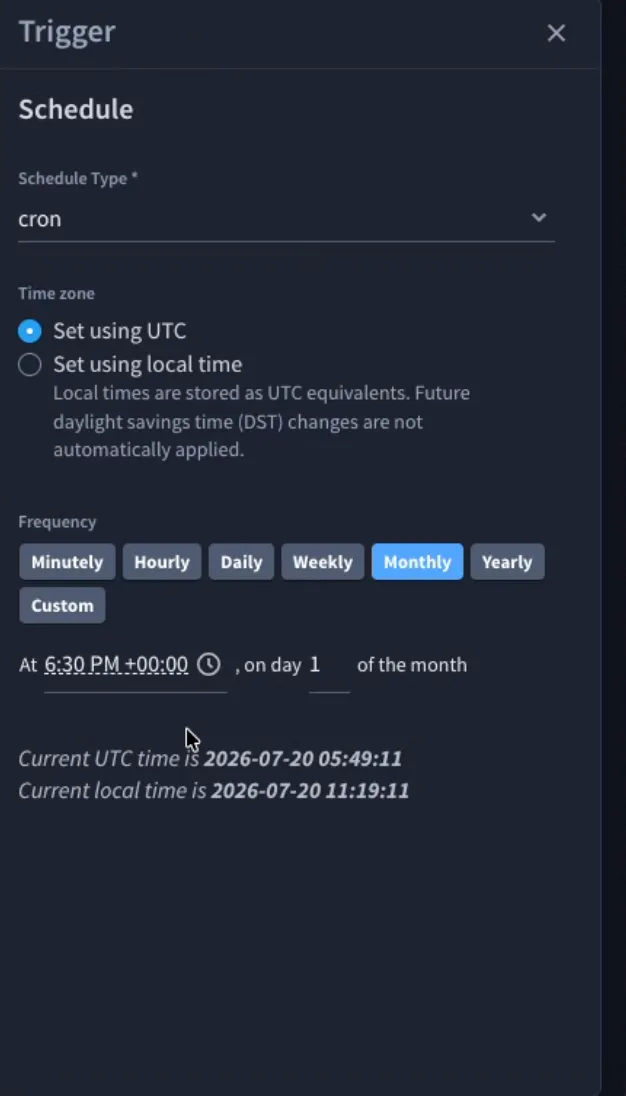
Turbine can now trigger a playbook flow at a specific time based on a date/time field value.
Configure a date/time field with an optional delay and select the playbook and flow to run when that time is reached. Turbine automatically creates the trigger and starts the selected flow at the calculated time.
This capability introduces the foundation for SLA-driven automation, allowing workflows to take action based on when something is due. Additional SLA capabilities, including an SLA field, are planned for future releases.
This trigger is configured through the date/time field and is not available as a standalone trigger when building a new automation in Canvas.
For more information, see TriggersTriggers and Select Fields and Assign Field PropertiesSelect Fields and Assign Field Properties.
Application Builder: Configurable Field Limit and Monitoring
Application Builder now provides configurable field limits and real-time visibility into field usage, helping protect platform performance and Elasticsearch indexing as applications grow.
Administrators can define a maximum number of fields per application at the tenant level, with a default limit of 500. Builders can see their current field usage directly in Application Builder—for example, 320 / 500—as they add or remove controls.
If an application exceeds the configured limit, Turbine prevents the application from being saved and clearly explains how to resolve the issue.
This gives administrators greater control over platform scale while helping builders understand and manage application capacity as they design.
For more information, see Application BuilderApplication Builder and Tenant System SettingsTenant System Settings.
Addressed Issues
Canvas
- Operational Health Showed Runs Whose Data Was Already Purged: Fixed an issue where playbook and component runs older than the 14-day IO data retention period still appeared in Operational Health but could not be opened because their trigger data had been pruned. Runs past the retention period are no longer returned in Operational Health.
- Nested Loop Error Showed Multiple Actions as Failed: Fixed an issue where a failure in a loop inside another loop caused the Playbook Runs page to show all actions in the run as failed when only one had failed. The run now shows only the actions that actually failed.
- Loop Retry Success Still Marked the Loop as Failed: Fixed an issue where a task inside a Loop that failed and then succeeded on retry still marked the overall loop or component as failed. Loop and run status now reflect a successful retry instead of treating the earlier failed attempt as the final result.
- Script Action Returned Wrong Values for Negative Indexes on Nested Lists: Fixed an issue where the Script action returned incorrect values for negative indexing into nested structures such as lists of lists or lists of dictionaries (for example, -1 returned the second-to-last item). Negative indexing on nested lists now returns the correct values.
- Create Variables Stored a Cleared Array as Null: Fixed an issue where clearing the value of an array variable in the Create Variables action stored it as null instead of an empty array, causing downstream counts to be off by one. Cleared array variables now remain an empty array.
- Search Records Returned Nothing When the Application Was Set Dynamically: Fixed an issue where the Search Records native action returned no records when the application was selected dynamically through a playbook property instead of being hardcoded. Search Records now returns the expected records when the application is set from a playbook property.
- Action Description Failed to Save With a Colon or Special Character: Fixed an issue where entering a colon or certain special characters in an action Description produced a YAML parse error and did not persist the change, even though a success message appeared. Action descriptions with colons and special characters now save correctly.
- Ungrouping a Component Did Not Update Transformation References: Fixed an issue where ungrouping a component did not update the expression references in Transformation blocks, leaving stale references. Transformation references are now updated correctly when you ungroup a component.
- Connector Test Input Was Not Cleared When an Input Was Deleted: Fixed an issue where deleting a custom input used in the connector test panel left the input value in the test request even though it was no longer visible in the UI. Deleted inputs are now removed from the test request.
- Independent Component Failures Were Missing From Operational Health: Fixed an issue where a component that succeeded but was then timed out by its parent playbook was recorded inconsistently, so an independent component failure could be missing from the Operational Health page. Component run outcomes now appear consistently in Operational Health.
Records
- Rich Text and Comment Cursor Jumped to the Start During Co-Editing: Fixed an issue where the cursor jumped to the start of a rich text or comment field when a co-editing update from another user arrived while you were typing. The cursor now stays in place when co-edit updates come in.
- Comment Being Edited Was Lost When Another User Posted a Comment: Fixed an issue where text you were typing in an existing comment was erased when another user saved a new comment on the same record, forcing you to retype it. In-progress comment edits are now preserved when other comment updates arrive.
- Conditional Formatting Colors Were Not Applied to All Columns: Fixed an issue where conditional formatting color patterns were not applied consistently across all columns on application records. Conditional formatting colors now apply correctly across all columns.
Content Library / SSP
- Importing One Invalid Playbook Failed the Entire Import: Fixed an issue where importing an SSP failed the whole batch when a single playbook failed validation, and the platform did not identify which playbook was invalid. Valid playbooks now import successfully and the invalid playbook is identified.
- Unable to Pull Content from a Remote Git Repository: Fixed an issue where a Content Library remote Git repository remained locked after validation, so customers could not pull content from the remote. Content Library Git integration no longer leaves the repository permanently locked, and pull from remote works as expected.
Connectors
- Graph API Test Connection Reported Failure for Valid Credentials: Fixed an issue where Test Connection for a Graph API asset returned a failure (for example, 403 Forbidden) even when the OAuth credentials were valid and real actions succeeded. Test Connection for Graph API assets now reflects actual connectivity.
Known Issues
- Record Restrictions Collapsed Groups That Share a Name: When Multiple SSO is enabled and groups from different directory sources share the same name, Bulk Edit Restrictions search can show source-qualified labels (for example, Marketing from each directory). After you select and apply those groups, the saved restriction can show a single group name without the source, so you cannot tell which directory groups were applied. Workaround: Keep group names unique across directory sources when using record restrictions. If groups already share a name, confirm the restriction on the record after apply and re-select the intended groups if needed.
- Renaming an LDAP Group in Turbine Created a Duplicate Group Without Roles: If you rename an LDAP-provisioned group in Turbine, the next LDAP sync creates a new group with the original LDAP name. Newly synced users join that new group, which has no role assignments, instead of the renamed group. Workaround: Do not rename LDAP-provisioned groups in Turbine. Rename the group in the directory service so the next sync maps to the same group. If a group was already renamed in Turbine, assign the required roles to the new group created by LDAP sync.