Select Fields and Assign Field Properties
You select fields and assign field properties as you build your application. This section covers the Application and Applet fields and the options they provide for setup on the FIELD PROPERTIES tab.
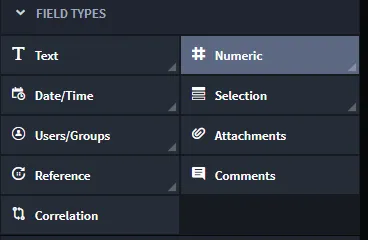
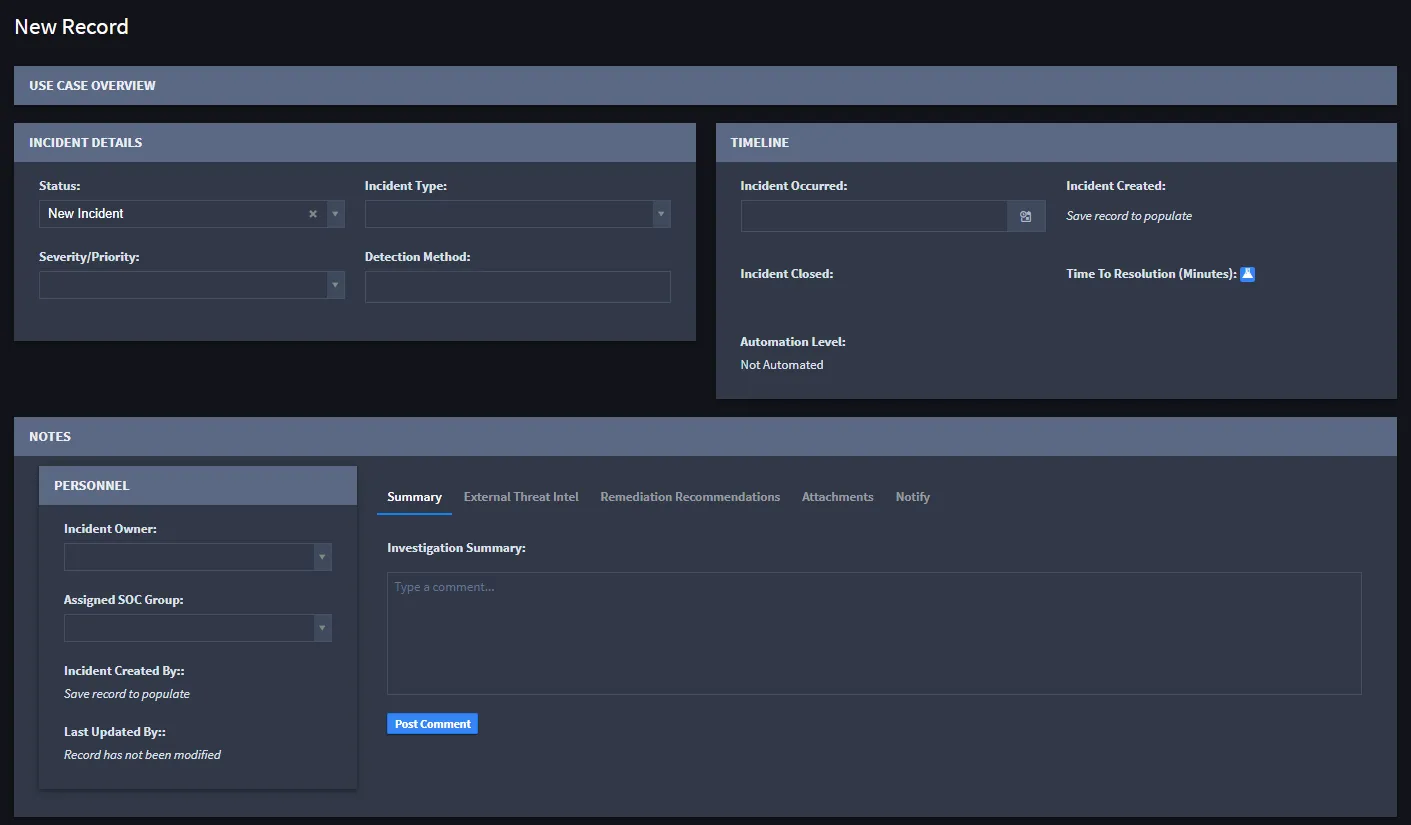
The fields you use to build your application are the fields that users will access when they create or edit records in Swimlane. Here is a screenshot of a new Swimlane record with multiple fields available to fill out.
Field Keys
Field Keys function as aliases for fields. They allow for consistent data ingestion, product upgrades, and imports of applications across different environments.
Field Keys are validated for uniqueness against other Field Keys and field Display Names within an application (they can be the same as their corresponding Display Name). They can be a maximum of 32 characters and can only contain:
- Lower-case letters.
- Numbers.
- Hyphens.
- Underscores.
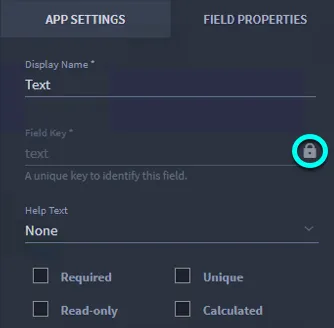
When you first create a field, Swimlane names the Field Key based on the field Display Name. Upper-case letters are converted to lower-case, spaces are replaced with dashes, and non-alphanumeric characters are removed. You can change the field key value at this time, if desired.
Administrators can change field keys within Application Builder by de-selecting the lock icon. The field key value, once unlocked, can be changed. This lock allows changes to the Display Name of field to be made without affecting the field key value.
If an application is imported from an older version of Swimlane and duplicate Key Field values would be created based on the established Display Name values, integers will be added the field to prevent duplication (for example, field, field2). If the Field Key exceeds 32 characters, it is truncated at 29 characters, with integers added to the end as needed.
Application Field Limit
Each search-indexed field that you add counts toward the tenant Application Field Limit (default 500). When the limit is reached, additional field types that count toward the limit are unavailable until you remove fields or an administrator increases the limit under Tenant Settings > System.
For the counter, count rules, and save validation behavior, see Application Builder. For the tenant setting and permissions, see Tenant System Settings.
DateTime Field Triggers
Starting in Turbine 26.3.0, you can configure a Date/Time field so that a playbook flow runs when the field value (plus an optional offset) is reached. This capability is Phase 1 of SLA Tracking: time-based playbook triggering only. Dedicated SLA field types arrive in later releases.
DateTime field triggers apply only to Date/Time fields (dateTime input type). They are not available for date-only fields or system fields such as First Created or Last Updated.
What Happens When You Configure a DateTime Field Trigger
- You set an Offset, Unit, and target playbook / flow on the Date/Time field in Application Builder.
- When you save the application, Turbine adds a DateTime field trigger to the selected flow automatically.
- When a record is created or updated with a Date/Time value, Turbine schedules a run for that record at the computed fire time.
- When the fire time is reached, the selected flow runs for that record. Runs currently appear with trigger type Delay Trigger (canvas label is DateTime field trigger).
- The run receives the full record (schema and field values), so later steps can map fields from the DateTime field trigger output like a record event trigger—not tracking ID only.
The DateTime field trigger on the playbook canvas is system-managed. You cannot add it from the standard canvas Add panel. Configure and change it from the application field settings. See Triggers#datetime-field-trigger.
Record Data Available to Downstream Steps
When the DateTime field trigger fires, Turbine passes the complete application record into the playbook run:
- Field values and schema are available for mapping in subsequent actions.
- Mapping works like a record event trigger: select fields from the trigger output instead of fetching the record from tracking ID alone.
- The tracking ID is still present as part of the record data.
See also Triggers#record-data-passed-to-the-playbook.
Configure a DateTime Field Trigger on a Date/Time Field
- Open the application in Application Builder.
- Select a Date/Time field.
- On the FIELD PROPERTIES tab, expand Advanced.
- Under Trigger Playbook, click Configure.
- In the Configuration dialog, set:
- Offset — whole number of minutes or hours relative to the field value.
- Unit — Minutes or Hours.
- Choose playbook — the playbook that will run.
- Flow — the flow within a solution playbook (or create a new flow). Classic playbooks do not require a separate flow selection. The flow cannot already be used by a playbook button, correlation, or another DateTime field trigger.
- Click Save in the dialog.
- Save the application so Turbine can sync the DateTime field trigger onto the selected flow.
Tooltip on Trigger Playbook: Automatically trigger a playbook flow from this field by configuring the target playbook, flow, and optional offset.
Flow Sharing Rules
Starting in Turbine 26.3.3, Application Builder allows playbook buttons and correlation to share a flow. A DateTime field trigger must use a flow by itself.
Assignment | Can share one flow? |
|---|---|
Two or more playbook buttons | Yes |
A playbook button and correlation | Yes |
A DateTime field trigger and any other trigger on the same flow | No. Choose an unused flow, or create a new flow. |
If save fails with Duplicate flow assignments across triggers, the DateTime field trigger is on a flow that another trigger already uses. Change the Flow value, then save the application.
Offset Behavior
Offset | Meaning |
|---|---|
0 | Fire at the Date/Time field value. |
Positive (for example, 2 Hours) | Fire after the field value. |
Negative (for example, -30 Minutes) | Fire before the field value. |
Rules:
- Offset must be a whole number.
- Absolute duration cannot exceed 7 days (UI hint: Cannot exceed 7 days).
- Dialog units are Minutes and Hours only.
Record Create, Update, and Delete Behavior
Record change | DateTime field trigger scheduling |
|---|---|
Create with a Date/Time value | Schedules a pending run for that record and field. |
Update that changes the Date/Time value | Reschedules (or cancels and recreates) the pending run using the new value and configured offset. |
Update that clears the Date/Time value | Cancels the pending run for that record and field. |
Delete the record | Cancels any pending DateTime field trigger run for that record. |
Field and Playbook Lifecycle
Change | Result |
|---|---|
Delete the Date/Time field (or clear its DateTime field trigger configuration) | Pending schedules for that field are cancelled; the DateTime field trigger is removed from the linked flow. |
Delete or disable the linked playbook or flow | Turbine clears the DateTime field trigger configuration from affected application fields and warns about impact before you confirm. |
Cut or copy flows that use a DateTime field trigger | Cut and Copy are disabled for flows that have a DateTime field trigger. |
Phase 1 Scope
- Supports time-based triggering from a Date/Time field value (± offset).
- Does not introduce dedicated SLA field types or full SLA tracking workflows; those are planned for later releases.
See Also
- Triggers — DateTime field trigger overview and canvas behavior
- Configuring Playbooks — playbook configuration entry points
- Application Builder — building applications and fields
- Schedule Triggers — cron and recurring schedules (separate from DateTime field triggers)