Tenant System Settings
You can view or change the following from the System settings window:
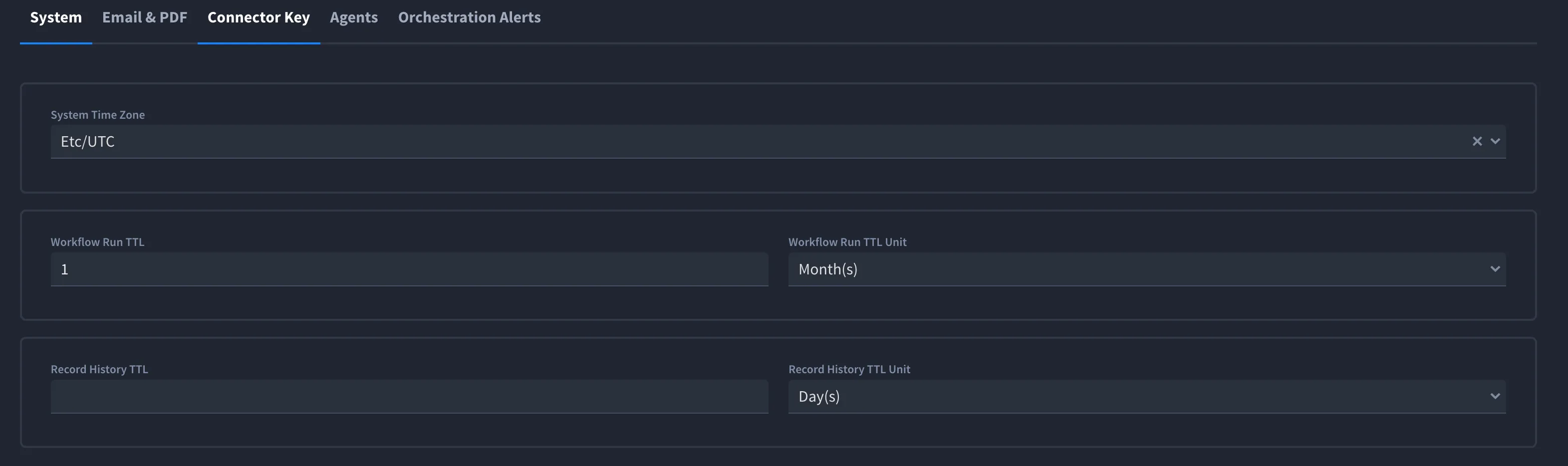
- System Time Zone: This field allows you to set the system's time zone, ensuring all time-based operations, logs, and events are aligned with your local time. From the drop-down menu, select the appropriate time zone for your organization, such as "Etc/UTC" as shown in the image below.
- Workflow Run TTL (Time to Live): This setting determines how long completed workflow runs are retained before they are automatically deleted. It helps manage storage and maintain system performance by removing outdated workflow data. For example, if the TTL is set to 1 and the unit is set to Month(s), workflow runs will be retained for one month.
- Workflow Run TTL Unit: This field allows you to specify the time unit (Days, Weeks, or Months) for the Workflow Run TTL. In the image, the unit is set to Month(s), meaning workflow runs will be retained for the TTL value of 1 month.
- Record History TTL (Time to Live): This setting controls how long the history of records (such as changes and actions performed on records) is stored before being purged automatically. This prevents database bloat by removing unnecessary historical data. In the image, the Record History TTL value is empty, meaning no automatic purging is set, and record history will be retained indefinitely.
- Record History TTL Unit: This specifies the time unit (Days, Weeks, or Months) for the Record History TTL. In the image, the unit is set to Day(s). When a value is entered, the system will retain record history for the specified number of days before purging.
Application Field Limit
The Application Field Limit setting controls the maximum number of search-indexed fields that applications and applets can contain within the tenant. The default value is 500.
To configure the field limit:
- Navigate to Tenant Settings.
- Select the System tab.
- Enter the maximum number of fields in the Application Field Limit field.
- Save your changes.
The configured limit applies to all applications and applets within the tenant. When you add fields in Application Builder or when you select fields and assign field properties, the tenant limit applies to search-indexed fields. See Application BuilderApplication Builder and Select Fields and Assign Field PropertiesSelect Fields and Assign Field Properties.
Permissions
- With legacy RBAC, only Super Admins can modify this setting.
- With Enhanced RBAC, users must have the Tenant Settings > Protected Limit permission.
Best Practices:
- Set meaningful TTL values to balance data retention with storage efficiency.
- Regularly review and adjust TTL settings to align with organizational policies and system performance needs.
- Avoid leaving TTL values empty unless there is a specific need to retain data indefinitely.
- Configure the Application Field Limit based on your organization's requirements to help maintain application performance and search indexing efficiency.