Vulnerability Response Management Workflows
Use VRM workflows to move vulnerability data from ingestion through enrichment, case management, remediation, and reporting.
Choose Your Path
Goal | Go To |
|---|---|
Follow finding data from ingestion to enrichment | |
Understand asset, exception, and case processing | |
Trace remediation and ticket synchronization | |
Monitor automation and reporting |
Workflow Summary
Stage | Primary Automation | Outcome |
|---|---|---|
1 | Ingest source data | Accept findings and assets from CSV input, a webhook, or connector-specific integration logic. |
2 | Create ingestion pages | Split large finding sets into file-backed page records for asynchronous processing. |
3 | Normalize and filter | Map source records to the Turbine Schema and remove known or excluded findings. |
4 | Enrich and score | Associate assets, retrieve vulnerability intelligence, calculate risk, and apply exceptions. |
5 | Write and group findings | Create or update findings and prepare related findings for case creation. |
6 | Create and update cases | Link grouped findings to cases and keep case risk and status synchronized. |
7 | Create remediation items | Route remediation work to owners and IT service management channels. |
8 | Synchronize and report | Update ticket and finding status, identify records requiring attention, and generate reporting records. |
Ingest Vulnerability Data
VRM supports multiple entry paths that converge on the same enrichment pipeline.
Entry Path | Flow | Use |
|---|---|---|
Finding CSV | Ingest CSV (Button) | Reads a finding CSV attachment from VRM - CSV Import and creates ingestion pages. |
Asset CSV | Ingest Asset CSV | Reads asset rows, maps source columns, and submits asset pages for writing. |
Webhook or integration | Ingest Vulnerability Finding via Webhook | Accepts a finding payload and emits it into the standard finding pipeline. |
See Ingestion FlowIngestion Flow for the published ingestion overview.
Page and Process Findings
- Write Ingestion Page creates an ingestion page record and attaches the JSON page file.
- Process Ingestion Page Records selects queued page records on a schedule.
- Ingestion Page to Enrichment Pipeline filters inbound findings and maps source fields to the Turbine Schema.
- The flow submits each normalized finding to Enrichment Pipeline or Close Finding, based on finding state.
The page size controls how many findings are stored in each ingestion page. The package uses VRM - Ingestion Page to track page state, finding count, source, and attached data. Queued ingestion pages are processed on the configured schedule.
See Creating Ingestion PagesCreating Ingestion Pages for page status and monitoring details. See Processing and EnrichmentProcessing and Enrichment for the published processing sequence.
Filter and Deduplicate Findings
The filtering stage prevents unchanged findings from repeatedly entering enrichment.
- VRM - Get Findings CSV Export retrieves the latest known-finding export or generates a fresh export.
- VRM - Inbound Findings Filter compares incoming findings with known findings.
- Filter - Remove Known Findings removes matches and applies configured exclusion logic.
- VRM - Filtering Activity records processing time, memory use, excluded findings, and unseen findings.
- VRM - Export Results identifies the current export used for later comparisons.
See Filtering and DeduplicationFiltering and Deduplication for tuning recommendations.
Enrich and Score Findings
The Enrichment Pipeline flow processes each normalized finding in this order:
- Extend the vulnerability finding schema with solution-specific data.
- Deduplicate the finding within the processing run.
- Map the finding to an existing asset or prepare asset data.
- Retrieve intelligence for supported vulnerability identifiers.
- Calculate the Turbine Risk Score.
- Apply active vulnerability exceptions.
- Determine automated grouping behavior.
- Create or update the Vulnerability Finding record.
The separate Swimlane Intelligence Retrieval flow retrieves vulnerability metadata and exploit information on demand, merges the results, and updates the finding.
To reprocess a finding, open the Vulnerability Finding record and run Re-Enrich Finding. The flow repeats asset association, vulnerability enrichment, risk scoring, exception evaluation, grouping, and the finding update.
Associate Findings and Assets
VRM - Map Asset to Finding attempts to associate a finding with a vulnerability asset by using available identifiers. The component prioritizes the primary asset identifier and can also evaluate MAC addresses, hostnames, and IP addresses.
After association:
- The finding receives asset criticality, zone, remediation owner, and remediation channel data.
- Calculate Asset Risk Scores updates aggregate asset risk on a schedule.
- Update Findings from Asset propagates relevant asset changes to open findings.
- Refresh Asset Metadata and VRM - Calculate Asset Metadata recalculate metadata used by findings and dashboards.
Asset risk processing runs on the configured schedule.
Apply Exceptions
VRM - Manage - Vulnerability Exceptions searches enabled, unexpired exception records that match the current finding. A matching exception changes the finding state so that the finding can be excluded from standard remediation and SLA calculations.
Exception criteria can include vulnerability identifiers, asset identifiers, asset zones, sources, risk-score ranges, and effective dates.
See Exception ManagementException Management for exception configuration and evaluation details.
Group Findings and Create Cases
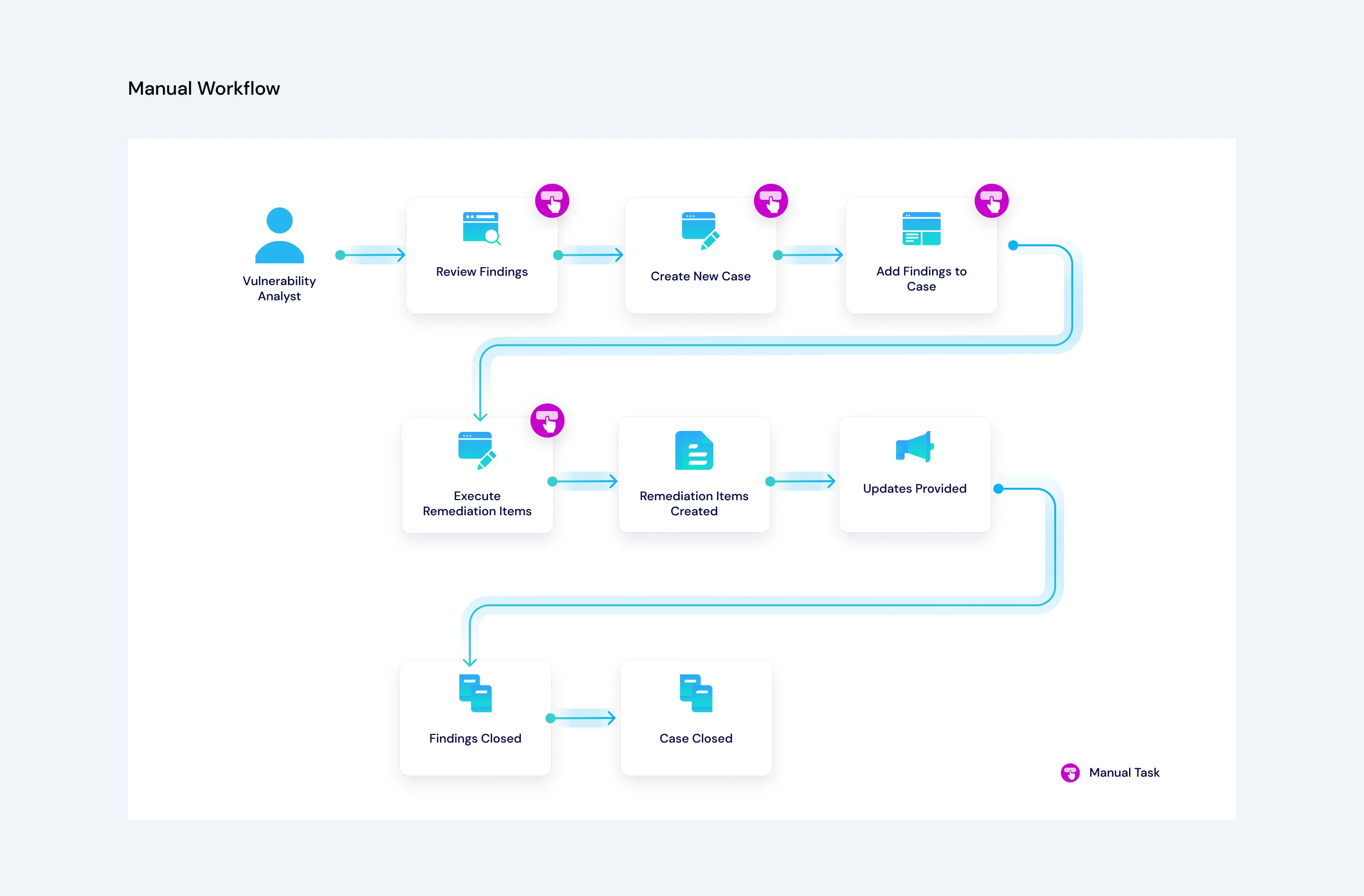
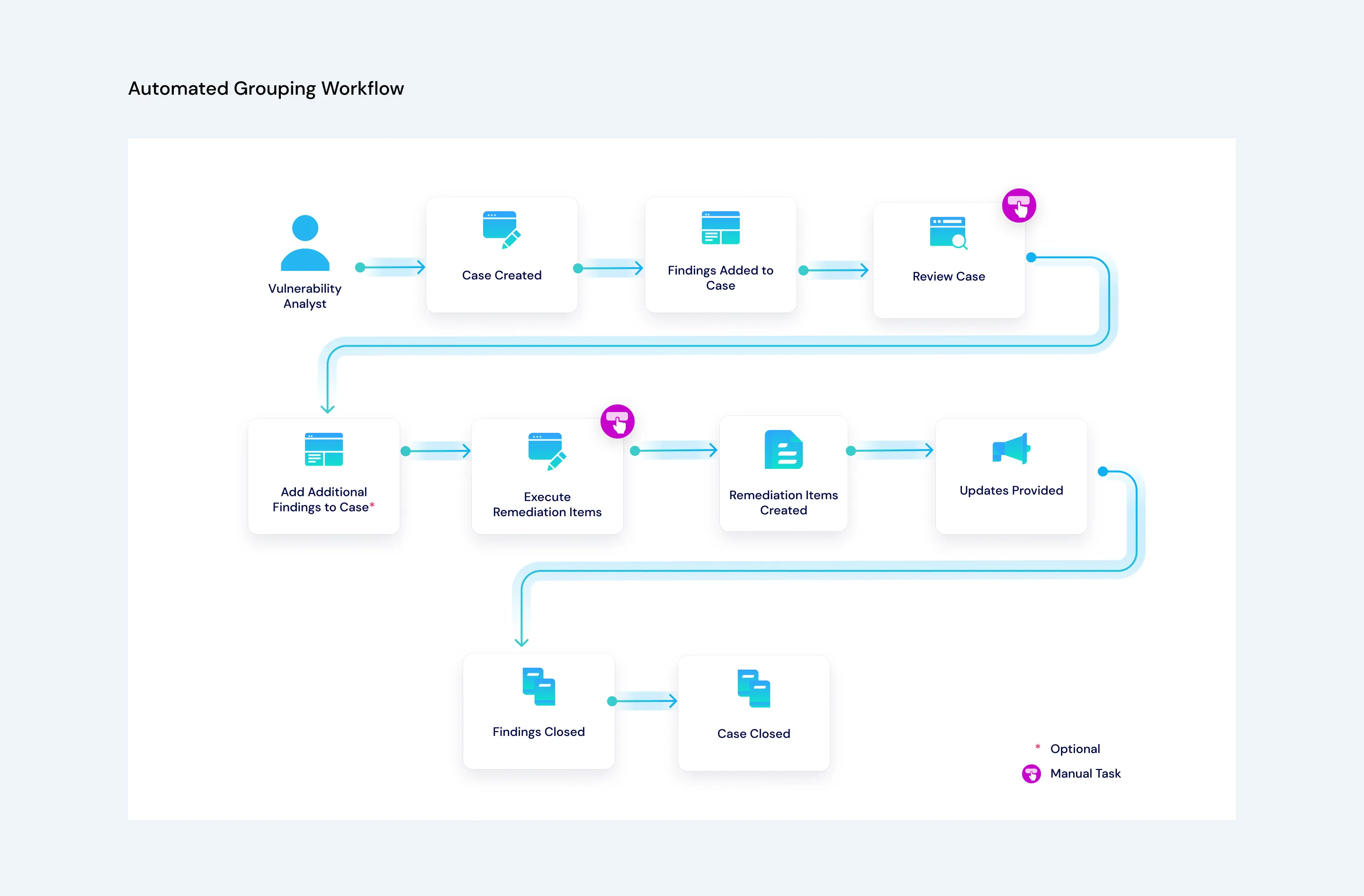
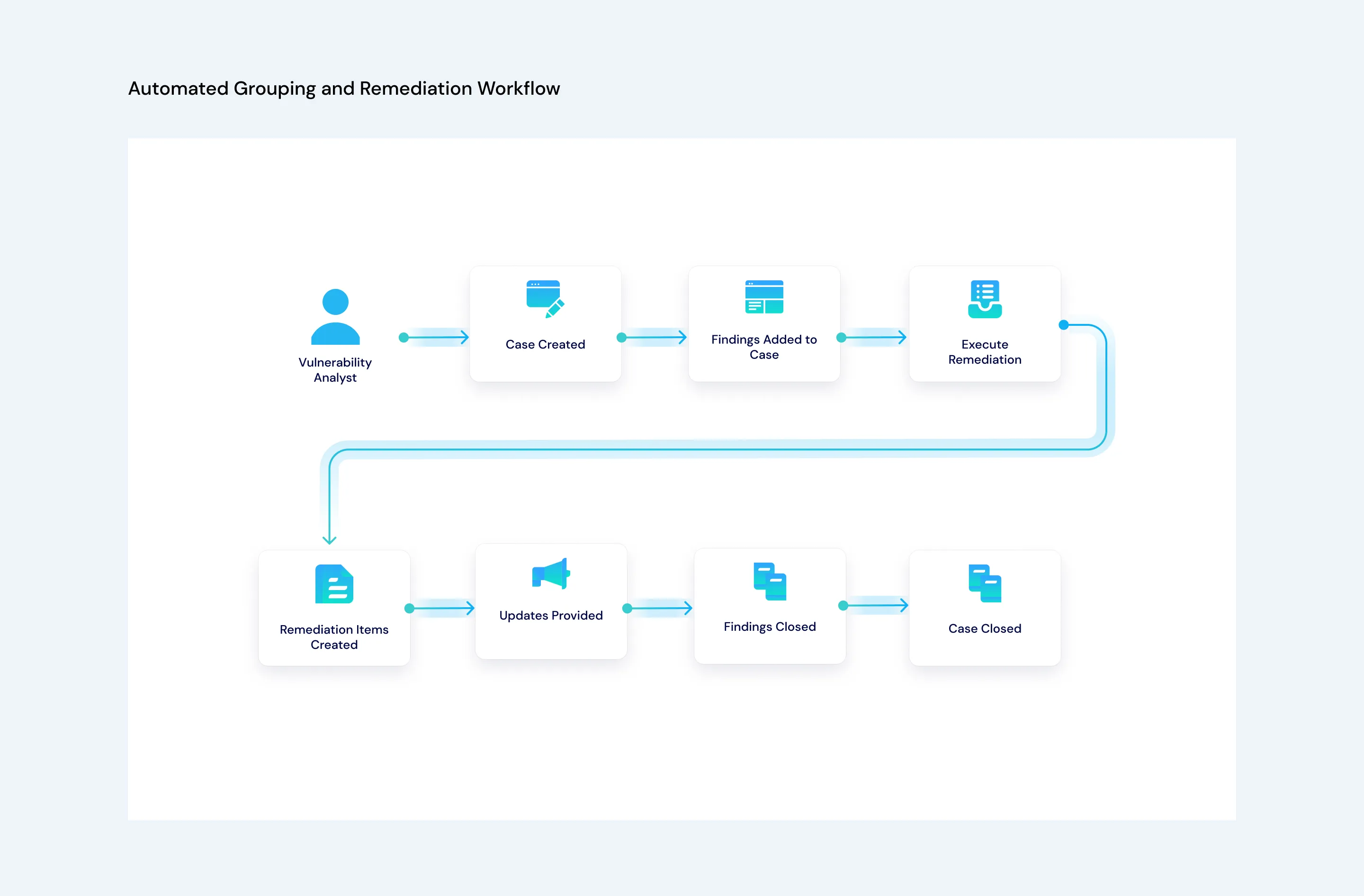
VRM provides three case-management paths.
Path | Automation | Analyst Involvement |
|---|---|---|
Manual | Manual Case Creation and Create New Case | Select findings, create a case, and initiate remediation when ready. |
Automated grouping | Case Creation and VRM - Automate Grouping | Review the generated case and create remediation items. |
Automated grouping and remediation | VRM - Automate Grouping and VRM - Automate Remediation | Monitor automatically created cases and remediation items. |
Manual Workflow
Automated Grouping Workflow
Automated Grouping and Remediation Workflow
Supporting flows keep the case current:
- Case Tracking-ID Changed updates finding state when a finding receives a case tracking ID.
- Manual Case Creation - Case Tracking ID updated replaces the temporary group ID with the case tracking ID.
- Update Case Risk Score recalculates one case.
- Update Case Risk Scores recalculates open cases on a schedule.
Automated case creation and open-case risk recalculation run on configured schedules.
See Vulnerability Case ManagementVulnerability Case Management for case fields, grouping modes, and remediation actions.
Create and Track Remediation
- Create Remediation Items creates work records from a case and its associated findings.
- Automatically Create ITSM Ticket submits eligible new items when automatic routing is enabled.
- Manually Create ITSM Ticket submits an item after a user initiates the action.
- Check ITSM Ticket Status polls open tickets on a schedule.
- Update Finding/Case Status from Remediation Item propagates ticket state to findings and cases.
- Close ITSM Ticket updates the remediation item when the external work is closed.
- Close Finding writes the resolved finding state.
The package supports delaying external ticket creation until the user initiates Create ITSM Ticket. The exact behavior depends on the variables configured in the remediation component. Ticket-status checks run on the configured schedule.
See Creating and Managing Remediation ItemsCreating and Managing Remediation Items and ITSM Response Data Model (Ticket Creation and Updating)ITSM Response Data Model for record and interface details.
Identify Records Requiring Attention
Record-triggered flows evaluate Requires Attention for:
- Vulnerability Asset
- Vulnerability Case Management
- Vulnerability Finding
- Vulnerability Remediation Item
Each flow evaluates required data and automation state, updates the flag only when it changes, and stores supporting documentation on the record. Use the Requires Attention View dashboard to locate records that can block downstream automation.
Generate Reporting Data
The VRM - Reporting playbook runs four scheduled flows:
Flow | Output |
|---|---|
Exceptions Reporting | Exception metric records |
Remediation Items Reporting | Remediation metric records |
Asset Reporting | Asset metric records |
Findings Reporting | Finding metric records |
The scheduled flows write records to VRM - Reporting. The VRM - Reporting dashboard uses these records for current and historical views.
Configure the Turbine Tenant Credentials asset before enabling the reporting playbook.
Monitor the Workflow
Use the following views:
- VRM Utilities Dashboard for ingestion and enrichment queues.
- VRM - Ingestion Page for page-level status and errors.
- VRM - Filtering Activity for deduplication and filtering metrics.
- Requires Attention View for records blocked by missing data or failed automation.
- VRM - Reporting for historical and aggregate metrics.
See Monitoring Ingestion and EnrichmentMonitoring Ingestion and Enrichment for operational monitoring guidance.
Next Steps
- Use VRM Applications and DashboardsVRM Applications and Dashboards to identify where each workflow stores its results.
- Use VRM Playbooks and ComponentsVRM Playbooks and Components to review playbook flows, component dependencies, and outputs.