AI SOC for MSSP
Use this guide set to deploy, operate, and validate AI SOC in a managed service provider (MSSP) model with client tenants and a central tenant.
MSSP Mode Overview
AI SOC for MSSP is an optional solution designed for multi-tenant architectures. While the AI SOC Core serves as the foundational solution running within each client tenant, the AI SOC for MSSP augments it with specialized multi-tenant capabilities. The MSSP Client Extension uses synchronization features to update the Central Tenant with Case Management records, Threat Intelligence Artifact Cache (TIAC) records, and periodic SOC reporting aggregates, creating a centralized Single Pane of Glass view. Rather than replacing the client's local Case Management, it facilitates centralized visibility and introduces MSSP-specific workflows.
How AI SOC for MSSP Works
AI SOC for MSSP deployment uses three solution layers:
Solution Layer | Install Tenant | Purpose |
|---|---|---|
AI SOC Core Solution | Client tenant | Base AI SOC applications, workflows, dashboards, and playbooks (26.2.0 or later) |
AI SOC MSSP Client Extension | Client tenant | Syncs case records, full TIAC records, and reporting aggregates from client to central tenant |
AI SOC MSSP Central Solution | Central tenant | Receives client records and maintains central case, TI cache, and SOC reporting views |
AI SOC MSSP Client Extension uses two paths to the central tenant. Case Management records and SOC reporting aggregates go over the central Ingest Record from Client webhook. Threat Intelligence Artifact Cache records are created or updated over the Swimlane API using PrivateToken. What resides in the central tenant is the Threat Intelligence Artifact Cache (TI cache), Central Case Management, and Central SOC Reporting.
Architecture of MSSP Mode
Tenant Role | Primary Responsibility | Typical Data Scope |
|---|---|---|
Client tenant | Detect, triage, investigate, and resolve customer alerts | Single customer records and tenant-local operations |
Central tenant | Aggregate synchronized records across clients | Multi-client oversight and centralized reporting views |
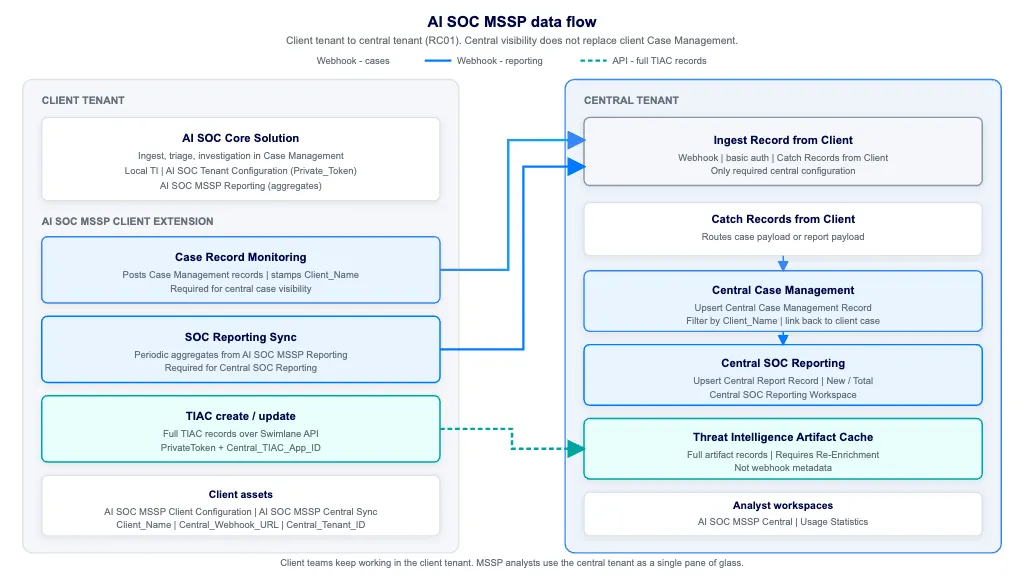
The Ingest Record from Client webhook receives two kinds of records: Case Management records and SOC reporting records. Full Threat Intelligence Artifact Cache records use the Swimlane API (PrivateToken), not the webhook. Client teams continue work in the client tenant; central is a single pane of glass.
Tenant Roles
Client Tenant
- Receives and processes customer alerts using standard AI SOC workflows.
- Runs triage and investigation in Case Management.
- Configures core AI SOC Tenant Configuration (including Private_Token) from AI SOC Core Solution.
- Configures AI SOC MSSP Client Configuration and AI SOC MSSP Central Sync so case records, reporting aggregates, and TIAC records reach the central tenant (Central_Webhook_URL, Client_Name, Central_Tenant_ID, Central_TIAC_App_ID, webhook basic auth, and PrivateToken).
- Includes TIA Central Sync Fields on the client Threat Intelligence application (Support tab, Threat Intelligence Metadata) so central TIAC create and update can write required metadata fields.
- Disables the Enrich TIA Record (Create) flow in Core playbook AI SOC Main so the client does not re-enrich TIA observables that already exist in central Threat Intelligence Artifact Cache.
- Runs Case Record Monitoring so Case Management updates post to the central webhook. This webhook path is required for case sync.
- Runs AI SOC MSSP - Reporting and SOC Reporting Sync so periodic reporting aggregates post to the same central webhook. This path is required for Central SOC Reporting.
- Synchronizes new or re-enriched Threat Intelligence (TI) data from the client tenant to the central tenant's Threat Intelligence Artifact Cache (TIAC) as full TIAC records (create or update) over the API.
Central Tenant
- Aggregates data across client tenants for MSSP oversight.
- Uses the Ingest Record from Client webhook to receive case and report payloads (no separate central MSSP configuration assets in current packages). The only required central configuration is webhook authentication; playbooks, workspaces, and applications install with the package.
- Provides centralized record visibility in Central Case Management.
- Stores multi-tenant TI cache data in Threat Intelligence Artifact Cache.
- Can mark TI cache records for client-side re-enrichment when enrichment must be refreshed.
- Provides Central SOC Reporting and the Central SOC Reporting Workspace for cross-client aggregates, plus Usage Statistics.
Flow Overview
- Client tenant ingest and investigation workflows create or update records.
- Case Record Monitoring sends Case Management records to the central Ingest Record from Client webhook.
- SOC Reporting Sync periodically sends reporting aggregates to the same webhook.
- Client TI automation creates or updates full Threat Intelligence Artifact Cache records in the central tenant over the API.
- Central Catch Records from Client routes webhook payloads to Upsert Central Case Management Record or Upsert Central Report Record.
- MSSP analysts use central applications and dashboards for cross-client monitoring.
- Client teams continue remediation and case handling in their own tenant workflows.
Choose Your Path
If You Need To... | Use This Guide |
|---|---|
Configure client and central tenants (assets, webhook, sync) | Configure AI SOC for MSSPConfigure AI SOC for MSSP |
Perform first deployment and baseline validation | Getting Started for MSSPGetting Started for MSSP |
Add an additional customer environment | Onboard a Client TenantOnboard a Client Tenant |
Work day to day in the central tenant | Use AI SOC for MSSP CentralUse AI SOC for MSSP Central |
Confirm data propagation and resolve sync failures | Validate and Troubleshoot MSSP SyncValidate and Troubleshoot MSSP Sync |
Related AI SOC Guides
If You Want To... | Go To |
|---|---|
Run first investigation workflows in a client tenant | Getting StartedGetting Started |
Configure base AI SOC tenant assets (PAT, TI, correlation) | Installing and Configuring AI SOC SolutionInstalling and Configuring AI SOC Solution and Configure Custom AssetsConfigure Custom Assets |
Learn AI SOC applications and dashboards | AI SOC ApplicationsAI SOC Applications and DashboardsDashboards |
Review operational and troubleshooting guidance | Operations and GuidanceOperations and Guidance and TroubleshootingTroubleshooting |