WIZ
Introduction
This guide tells you how to authenticate the Wiz connector in Swimlane using OAuth 2.0 Client Credentials.
You will collect the required Wiz credentials, confirm the correct Wiz endpoints for your tenant, and configure the connector in Swimlane.
Prerequisites
Wiz Access Requirements
You must have Wiz permissions to:
- Identify the region where your Wiz tenant resides
- Create or request an API client (Client ID and Client Secret) for Wiz OAuth 2.0
- Confirm which identity provider (IdP) your Wiz tenant uses (Amazon Cognito or Auth0)
Required Credentials
During setup, you will collect:
- API Endpoint URL
- Client ID
- Client Secret
- Token URL
- Audience
API Endpoint URL
The Wiz Integration API has a single URL for all the actions.
https://api.<region>.app.wiz.io/graphql
You can use the above URL and replace it with the region where your tenant resides, e.g. us1, us2, eu1, or eu2.
Example: https://api.us1.app.wiz.io/graphql
Token URLs
There are two possible Token URLs depending on your service account's identity provider:
IdP | Token URL | Token URL (gov tenants) |
|---|---|---|
Amazon Cognito | https://auth.app.wiz.io/oauth/token | https://auth.gov.wiz.io/oauth/token |
Auth0 | https://auth.wiz.io/oauth/token | https://auth0.gov.wiz.io/oauth/token |
Audience
Choose a relevant Audience from the following:
IdP | Audience |
|---|---|
Amazon Cognito | wiz-api |
Auth0 | beyond-api |
Wiz Setup
Take the following steps to collect your Wiz OAuth credentials:
- Identify your Wiz tenant region (for example: us1, us2, eu1, or eu2).
- Obtain the Wiz API Client ID and Client Secret for your tenant.
- Confirm whether your tenant uses Amazon Cognito or Auth0 as the identity provider.
- Select the correct Token URL and Audience value based on the identity provider.
Connector configuration in Swimlane
- Log in to Turbine.
- From the left-hand navigation pane, click ORCHESTRATION and click Assets. Asset homepage opens.
- Click + icon to open the Configure your Connector Asset window.
- Select Wiz from the Asset type list.
- Fill in the Asset Settings and Asset Input as shown:
Field | Description | Required/Optional |
|---|---|---|
url | API Endpoint URL for your tenant region (https://api.<region>.app.wiz.io/graphql) | Required |
token_url | Token URL based on your IdP (Cognito/Auth0) | Required |
client_id | Client ID from Wiz | Required |
client_secret | Client Secret from Wiz | Required |
audience | Audience based on your IdP (wiz-api or beyond-api) | Required |
first | Use it as a pagination argument to refine your results. Possible values 1-5000. The default will be 500 if not mentioned. | Optional |
verify_ssl | Enable/Disable SSL Verification | Optional |
http_proxy | Optional proxy configuration | Optional |
Fields with * marks are required.
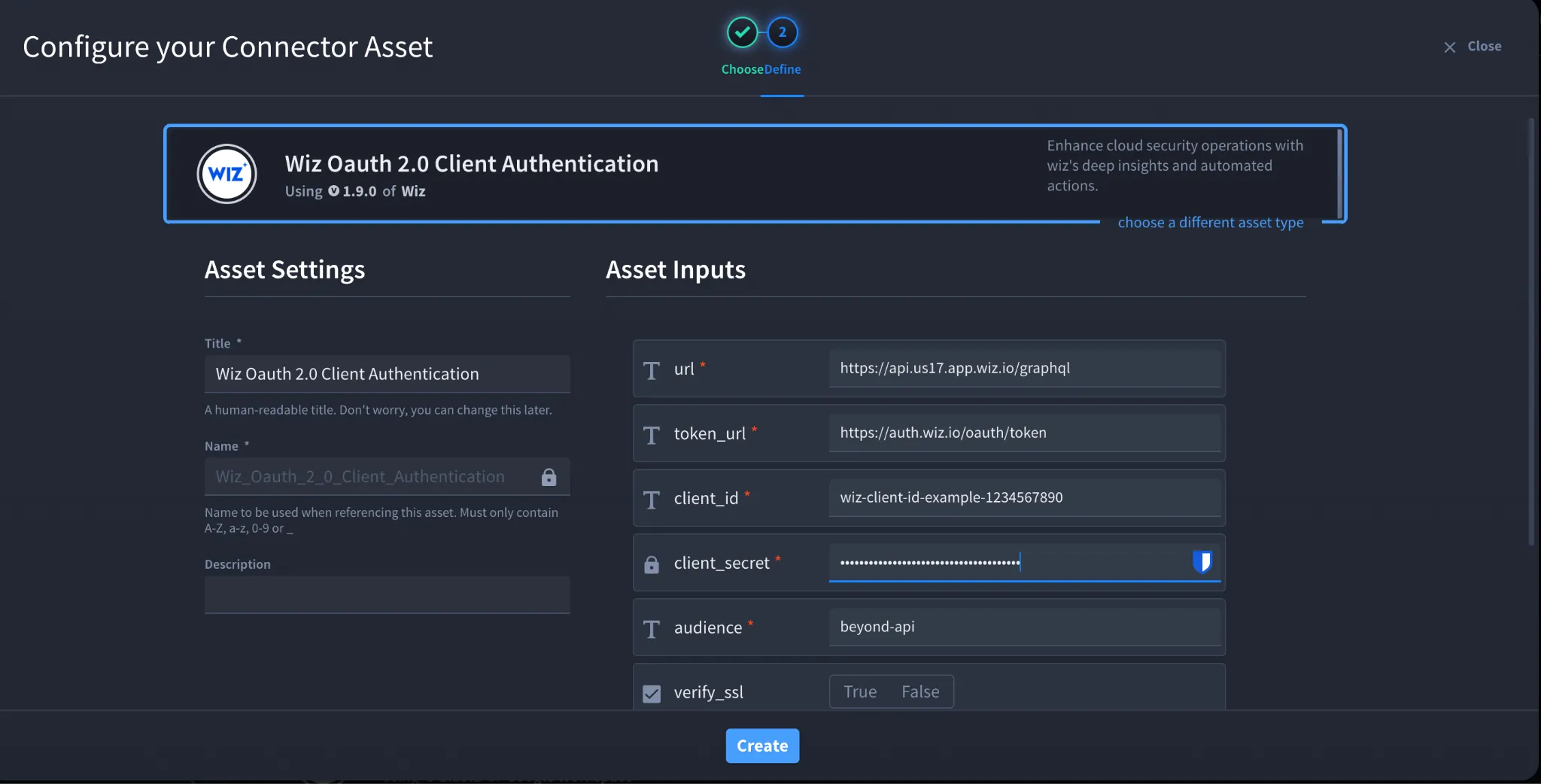
- Click Create.
Troubleshooting
If you encounter a 401 or 403 error:
- Verify the Token URL matches your tenant's identity provider (Cognito vs Auth0).
- Verify the Audience value matches your identity provider.
- Confirm the API Endpoint URL region matches your Wiz tenant region.Regenerate the Client Secret if it has expired and update the asset in Swimlane.
You have successfully authenticated the Wiz Connector in Swimlane.