Rapid7 Insight Threat Command
Introduction
This guide explains how to authenticate the Rapid7 Insight Threat Command connector in Swimlane using HTTP Basic Authentication.
Prerequisites
Before configuring the connector, ensure you have:
- A valid Rapid7 Insight Threat Command account
- Access to the Rapid7 Threat Command portal
- Permission to generate and manage API credentials
- Access to the Rapid7 Insight Threat Command API endpoint
Required Credentials
During setup, you will collect:
Credential | Description |
|---|---|
URL | Rapid7 Insight Threat Command API URL |
Username | Rapid7 Insight Threat Command username |
API Key / Password | API key generated in Rapid7 |
Verify SSL | Optional SSL verification setting |
HTTP Proxy | Optional proxy configuration |
Rapid7 Insight Threat Command Setup
Log in to Rapid7 Insight Platform
- Open the Rapid7 Insight Platform: https://insight.rapid7.com/
- Log in using your Rapid7 credentials.
Access Threat Command
- From the Rapid7 dashboard, open Threat Command.
- Navigate to: Settings → API Access Or User Settings → API Keys (The exact menu may vary depending on your tenant configuration.)
Generate an API Key
- Click Create API Key or Generate Key.
- Enter:
- API Key Name
- Description (optional)
- Select the required permissions for API access.
- Click Save or Generate.
- Copy and securely store the generated API Key.
The API Key will be used as the password value in Swimlane.
Identify the API URL
The default API endpoint format is typically:
https://api.insight.rapid7.com
or the tenant-specific Threat Command API URL provided by Rapid7.
Record this value for Swimlane configuration.
Connector Configuration in Swimlane
- Log in to Turbine.
- From the left-hand navigation pane, click ORCHESTRATION.
- Click Assets.
- Asset homepage opens.
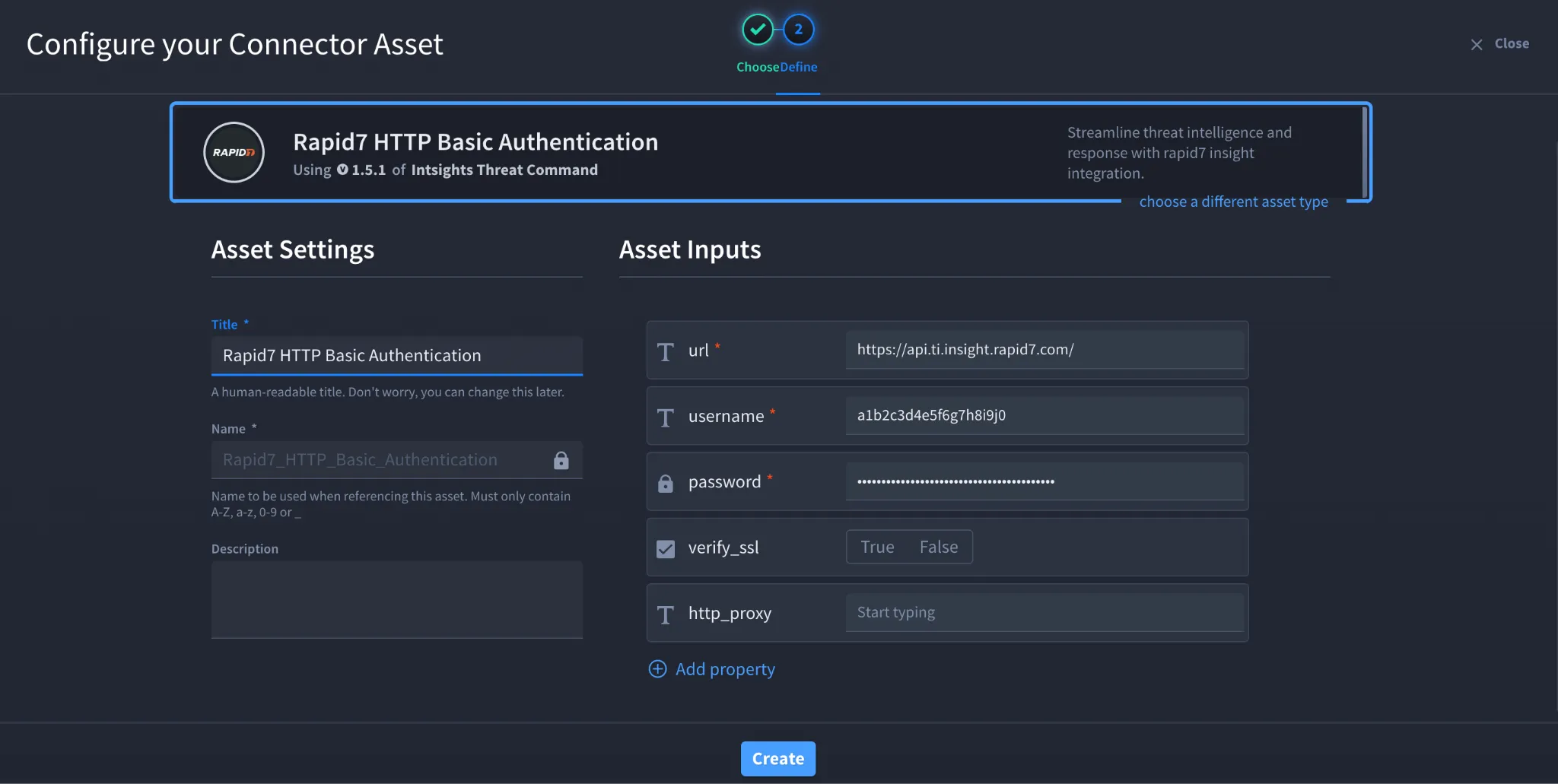
- Click the plus (+) icon to open the Configure your Connector Asset window.
- Select Rapid7 Insight Threat Command from the Asset type list.
- Fill in the Asset Settings and Asset Input as shown:
Field | Description | Required/Optional |
|---|---|---|
url | Rapid7 Insight Threat Command API URL | Required |
username | Rapid7 Insight Threat Command username | Required |
password | Rapid7 API Key (automatically encoded by connector) | Required |
verify_ssl | Enable/Disable SSL Verification | Optional |
http_proxy | Optional proxy configuration | Optional |
Fields marked with * are required.
- Click Create.
- The connector uses HTTP Basic Authentication
- The API Key should be entered directly into the password field
- Do not manually Base64 encode the API Key
- Swimlane automatically handles authentication encoding
Troubleshooting
Authentication Failed (401 Unauthorized)
Verify:
- Username is correct
- API Key is valid
- API Key has not expired
- API URL is correct
- User has sufficient API permissions
SSL Errors
If SSL verification fails:
- Verify the server certificate chain
- Confirm proxy/firewall inspection settings
- Temporarily disable verify_ssl for testing if permitted by your organization
Connection Timeout
Verify:
- Firewall rules allow outbound HTTPS traffic
- Proxy configuration is correct
- Rapid7 API endpoint is reachable from Swimlane
You have successfully authenticated the Rapid7 Insight Threat Command connector in Swimlane.
Sources
- Rapid7 Insight Threat Command Connector Documentation: https://docs.swimlane.com/connectors/rapid7-insight-threat-command
- Rapid7 Threat Command Documentation: https://docs.rapid7.com/threat-command/
- Rapid7 Insight Platform: https://insight.rapid7.com/