Rapid7 InsightDR V2
Introduction
This guide tells you how to authenticate the Rapid7 InsightIDR V2 connector in Swimlane using API Key authentication. You will generate a Rapid7 API key, identify your InsightIDR region, collect the required identifiers, and configure the connector in Swimlane.
Prerequisites
Rapid7 Access Requirements
You must have Rapid7 permissions to:
- Access the Rapid7 Insight Platform
- Generate Platform API keys
- Access InsightIDR investigations and saved queries
- View your Insight Platform region
Required Credentials
During setup, you will collect:
- Rapid7 InsightIDR API Base URL
- Rapid7 API Key
- Rapid7 Region
Authentication Method Overview
The Rapid7 InsightIDR V2 connector supports API Key Authentication using the X-Api-Key header.
Rapid7 Setup
Take the following steps to generate a Rapid7 API Key:
- Log in to the Rapid7 Insight Platform.
- Navigate to the API Keys management page.
- Click Generate API Key or Create API Key.
- Provide a name and select the appropriate scope or permissions if prompted.
- Generate the key.
- Copy the API key and store it securely.
Take the following steps to identify your InsightIDR Region:
- Log in to your InsightIDR account.
- Look at the URL in the browser address bar on the home page.
- Identify the region value from the URL.
- Use the corresponding regional API base URL for your Swimlane asset.
Supported Base URL Format
Rapid7 InsightIDR APIs use regional API endpoints. The base URL typically follows this format:
https://{region}.api.insight.rapid7.com
Common Regional Examples
Region | Base URL Example |
|---|---|
US | https://us.api.insight.rapid7.com |
EU | https://eu.api.insight.rapid7.com |
CA | https://ca.api.insight.rapid7.com |
AU | https://au.api.insight.rapid7.com |
US2 | https://us2.api.insight.rapid7.com |
Connector configuration in Swimlane
- Log in to Turbine.
- From the left-hand navigation pane, click ORCHESTRATION and click Assets.
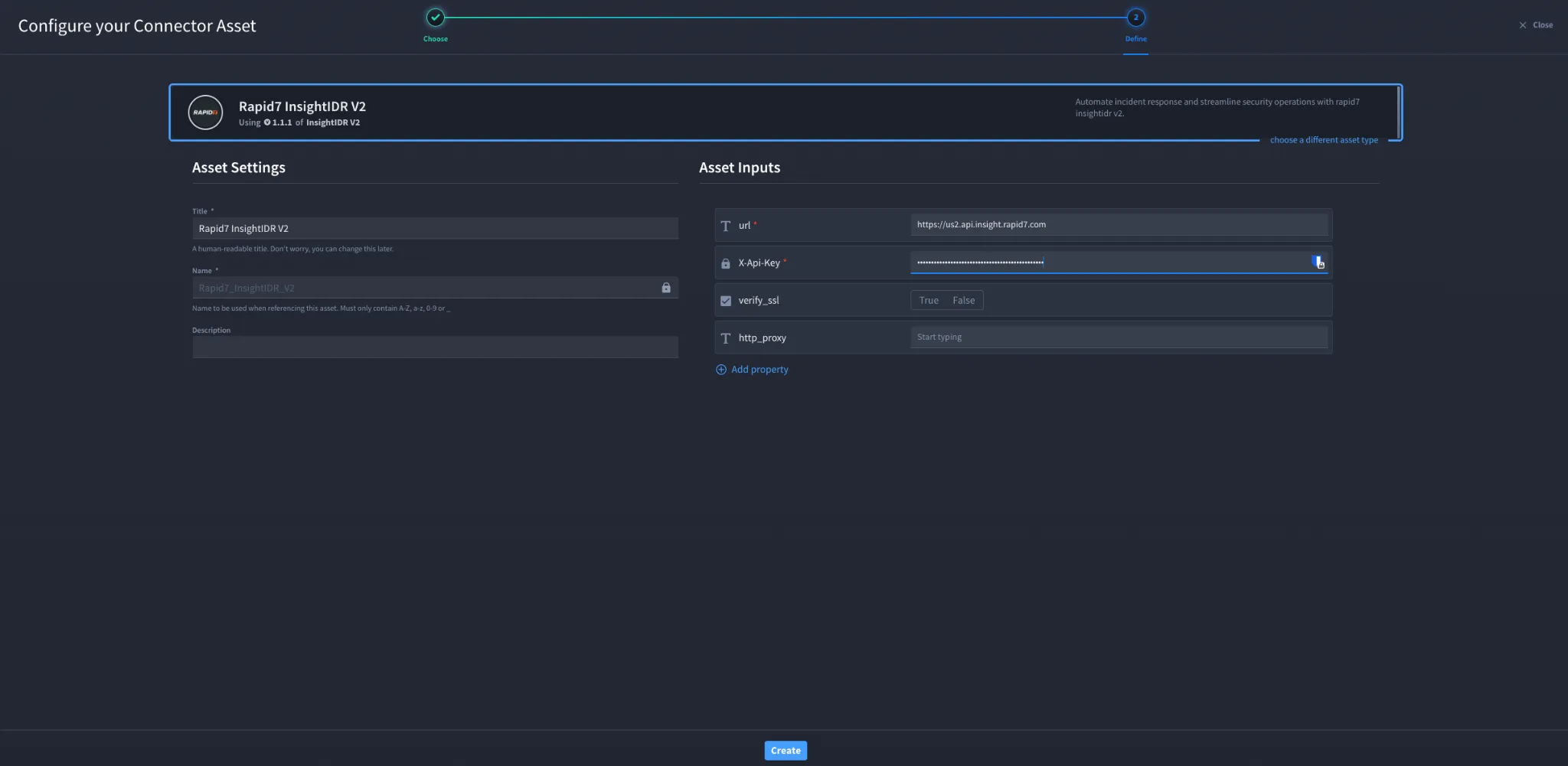
- Click the plus icon to open the Configure your Connector Asset window.
- Select Rapid7 InsightIDR V2 from the Asset type list.
- Fill in the Asset Settings and Asset Input as shown below.
Configuration – API Key Authentication
Field | Description | Required/Optional |
|---|---|---|
url | Rapid7 InsightIDR API base URL for your region | Required |
X-Api-Key | Rapid7 API key | Required |
verify_ssl | Enable or disable SSL verification | Optional |
http_proxy | Optional proxy configuration | Optional |
Troubleshooting
If authentication fails:
- Verify that the X-Api-Key value is correct and active.
- Ensure the URL uses the correct regional endpoint for your account.
- Confirm the API key has sufficient permissions for InsightIDR operations.
- Check SSL verification and proxy settings if requests fail to connect.
- If you receive authorisation errors, regenerate the API key and update the Swimlane asset.
You have successfully authenticated the Rapid7 InsightIDR V2 connector in Swimlane.
Sources
- Rapid7 InsightIDR API Documentation: https://help.rapid7.com/insightidr/en-us/api/v2/docs.html
- Rapid7 Manage Platform API Keys: https://docs.rapid7.com/insight/managing-platform-api-keys/
- Rapid7 Product APIs and Regions: https://docs.rapid7.com/insight/product-apis/