Qualys Vulnerability Scanner
Introduction
This guide explains how to authenticate the Qualys Vulnerability Scanner connector in Swimlane using HTTP Basic Authentication.
You will obtain your Qualys API endpoint, confirm your API credentials, and configure the connector in Swimlane.
Prerequisites
Qualys Access Requirements
Ensure that you have:
- A Qualys VMDR (or supported Qualys platform) account.
- A user account with permission to access the Qualys API.
- A valid Qualys username and password.
- The Qualys API endpoint (based on your Qualys platform/SOC).
If your Qualys account uses VIP Two-Factor Authentication (2FA), you can still use the Qualys API. Two-factor authentication is only required when logging in to the Qualys web portal and is not used for API authentication.
Required Credentials
During setup, you will collect:
- Qualys API URL
- Username
- Password
Qualys Setup
Take the following steps to identify your Qualys API URL:
- Log in to your Qualys account.
- Note the URL displayed in your browser.
- Use the appropriate API endpoint for your Qualys platform.
Example:
https://qualysapi.qualys.com
Customers hosted in other Qualys platforms (EU, India, Canada, etc.) should use the API endpoint provided for their region.
Verify API Access
- Log in to the Qualys portal.
- Navigate to Help or Account Information (location varies by platform).
- Verify that your account has API access enabled.
- If API access is unavailable, contact your Qualys administrator.
Connector Configuration in Swimlane
- Log in to Turbine.
- From the left-hand navigation pane, click ORCHESTRATION > Assets.
- The Assets page opens.
- Click the plus (+) icon to create a new connector asset.
- Select Qualys Vulnerability Scanner from the Asset type list.
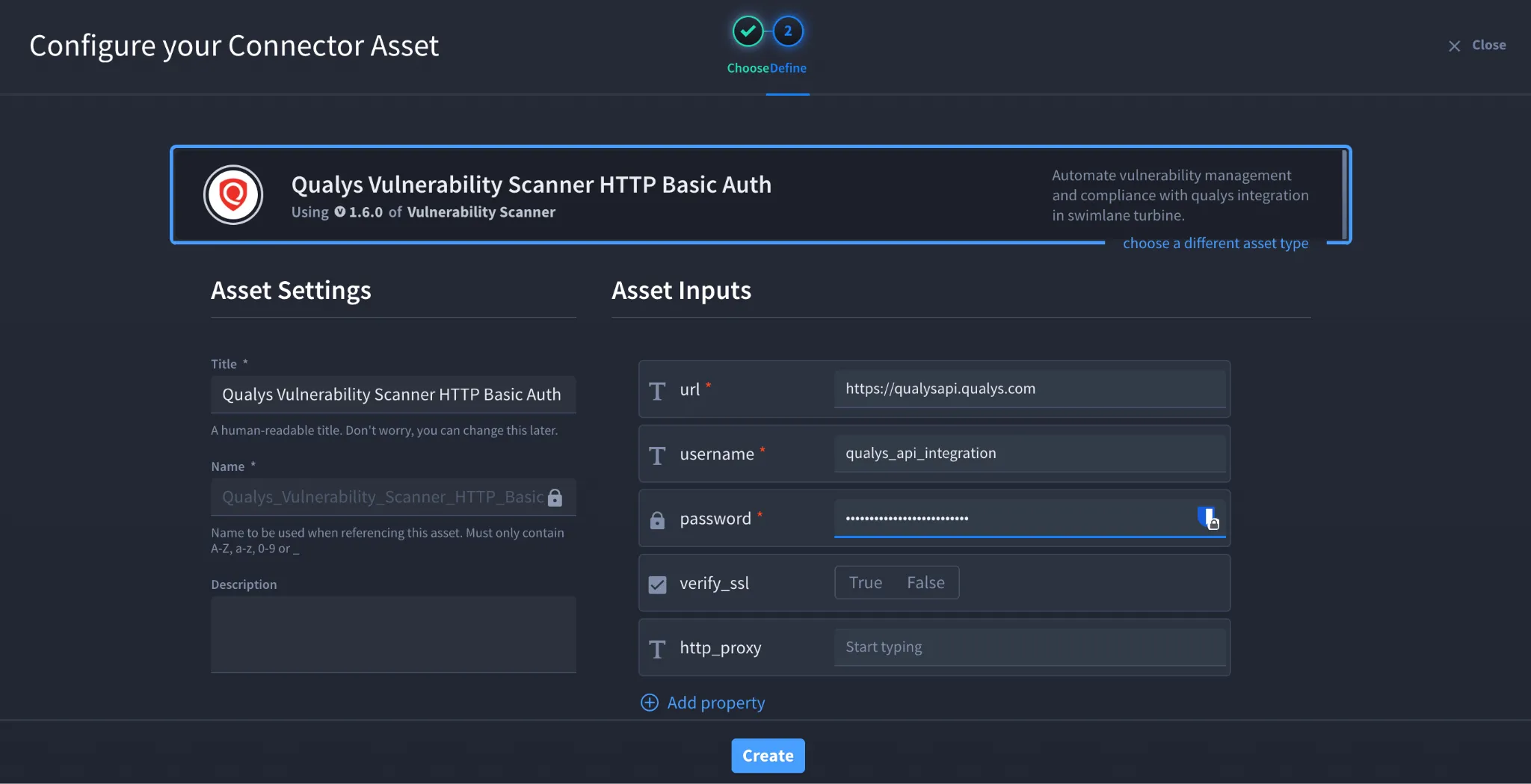
- Configure the asset using the following values:
Field | Description | Required/Optional |
|---|---|---|
url | Qualys API endpoint | Required |
username | Qualys username | Required |
password | Qualys password | Required |
verify_ssl | Verify the server SSL certificate | Optional |
http_proxy | Proxy server used to route requests | Optional |
Fields marked with * are required.
- Click Create.
Troubleshooting
Authentication Failed (401 Unauthorized)
Verify that:
- The username and password are correct.
- The account is active.
- API access is enabled for the account.
- The correct Qualys platform URL is configured.
Permission Denied (403 Forbidden)
Verify that:
- Your user account has permission to access the Qualys API.
- The account has sufficient privileges to retrieve vulnerability information.
Unable to Connect
Verify that:
- The Qualys API URL is correct.
- Your firewall or proxy allows outbound HTTPS connections.
- The Qualys platform is reachable.
SSL Certificate Errors
If SSL verification fails:
- Verify that the Qualys endpoint presents a trusted SSL certificate.
- Confirm that any corporate proxy is not replacing the certificate.
- Disable verify_ssl only for testing if permitted by your organization's security policy.
Result
You have successfully authenticated the Qualys Vulnerability Scanner connector in Swimlane.
Sources
- Qualys API Documentation https://docs.qualys.com/en/vm/api/
- Qualys API User Guide https://docs.qualys.com/
- Qualys Platform Documentation https://www.qualys.com/documentation/