PagerDuty
Introduction
This guide tells you how to authenticate the PagerDuty connector in Swimlane using an API Key.
You will generate a PagerDuty API Access Key, collect the required endpoint URL, and configure the connector in Swimlane.
Prerequisites
PagerDuty Access Requirements
You must have:
- A PagerDuty account.
- Account Administrator permissions to create API Access Keys.
- Access to the PagerDuty REST API.
Required Credentials
During setup, you will collect:
- API URL
- API Key
PagerDuty Setup
Take the following steps to generate an API Key:
- Log in to your PagerDuty account.
- Click Integrations from the top navigation menu.
- Select API Access Keys.
- Click Create New API Key.
- Enter the following information:
- Description – Enter a meaningful name for the API key.
- API Key Type – Select General Access REST API Key.
- Click Create Key.
- Copy and securely save the generated API Key. This value will be used in Swimlane.
Take the following steps to identify the API URL:
The PagerDuty REST API endpoint is:
Use this value as the URL when configuring the Swimlane connector.
Connector configuration in Swimlane
- Log in to Turbine.
- From the left-hand navigation pane, click ORCHESTRATION and click Assets.
- Asset homepage opens.
- Click the plus icon to open the Configure your Connector Asset window.
- Select PagerDuty from the Asset type list.
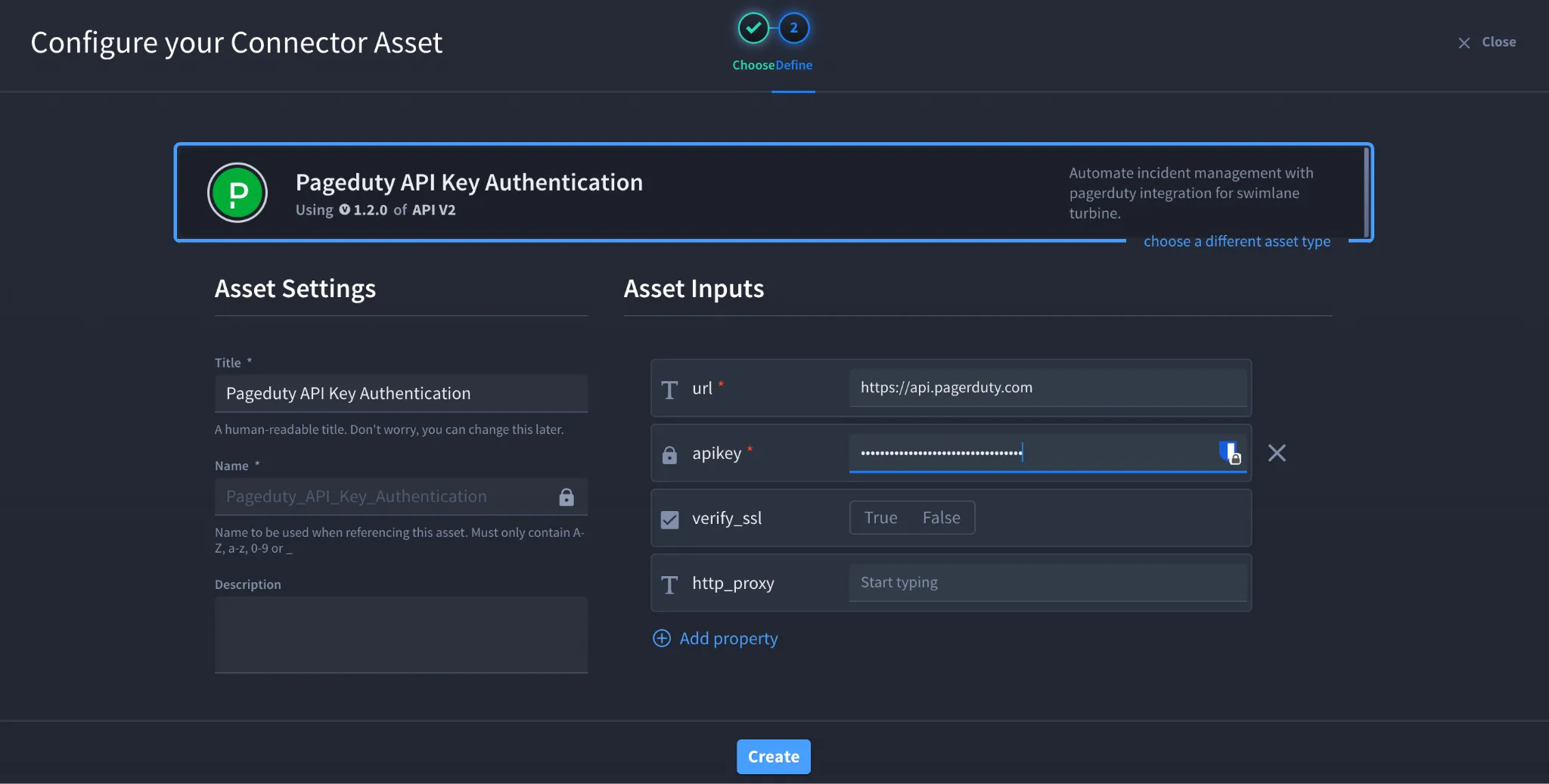
- Fill in the Asset Settings and Asset Input as shown:
Field | Description | Required/Optional |
|---|---|---|
url | PagerDuty API URL (https://api.pagerduty.com) | Required |
apikey | PagerDuty REST API Key | Required |
verify_ssl | Enable/Disable SSL verification | Optional |
http_proxy | Optional proxy configuration | Optional |
Fields with * marks are required.
- Click Create.
Troubleshooting
If authentication fails:
- Verify that the API key is active and has not been revoked.
- Ensure you are using a General Access REST API Key.
- Confirm the URL is https://api.pagerduty.com.
- Verify your PagerDuty account has permission to access the required API resources.
- Ensure any proxy or firewall allows outbound HTTPS connections to the PagerDuty API.
Result
You have successfully authenticated the PagerDuty connector in Swimlane.
Sources
- PagerDuty REST API Authentication: https://developer.pagerduty.com/docs/ZG9jOjExMDI5NTQ3-authentication
- PagerDuty API Access Keys: https://support.pagerduty.com/main/docs/api-access-keys
- PagerDuty Developer Documentation: https://developer.pagerduty.com/docs/