Mimecast
Introduction
This guide tells you how to authenticate the Mimecast Security connector in Swimlane.
You can authenticate using one of the following methods:
- OAuth 2.0 Client Credentials
- HMAC Authentication
You will identify the correct Mimecast base URL for your region, collect the required credentials, and configure the connector in Swimlane.
Prerequisites
Mimecast Access Requirements
You must have Mimecast permissions to:
- Create or access API credentials used for OAuth 2.0 or HMAC authentication
- Confirm your Mimecast region and base URL
- Provide Admin access or required permissions to your Mimecast account or credentials wherever applicable to make the connector actions working.
Required Credentials
During setup, you will collect the following based on your authentication method:
Authentication Method | Required Credentials | Notes |
|---|---|---|
OAuth 2.0 Client Credentials | URL, Client ID, Client Secret | OAuth 2.0 client credentials authentication. |
HMAC Authentication | URL, Access Key, App ID, App Key, Secret Key | HMAC authentication. |
Mimecast Base URL
You will need to use a Mimecast Base URL. Use the following table to identify the correct API endpoint for your region.
api.mimecast.com is required and is used for initial account discovery.
Region | API Endpoint | Check for Update URLs |
|---|---|---|
Australia | au-api.mimecast.com | https://updates-au.mimecast.com/update/descriptors/mfo/latest |
Europe (excluding Germany) | eu-api.mimecast.com | https://updates-uk.mimecast.com/update/descriptors/mfo/latest |
Germany | de-api.mimecast.com | https://updates-de.mimecast.com/update/descriptors/mfo/latest |
Offshore | jer-api.mimecast.com | https://updates-jer.mimecast.com/update/descriptors/mfo/latest |
REQUIRED | api.mimecast.com | N/A - Used for initial account discovery. |
South Africa | za-api.mimecast.com | https://updates-za.mimecast.com/update/descriptors/mfo/latest |
United States | us-api.mimecast.com | https://updates-us.mimecast.com/update/descriptors/mfo/latest |
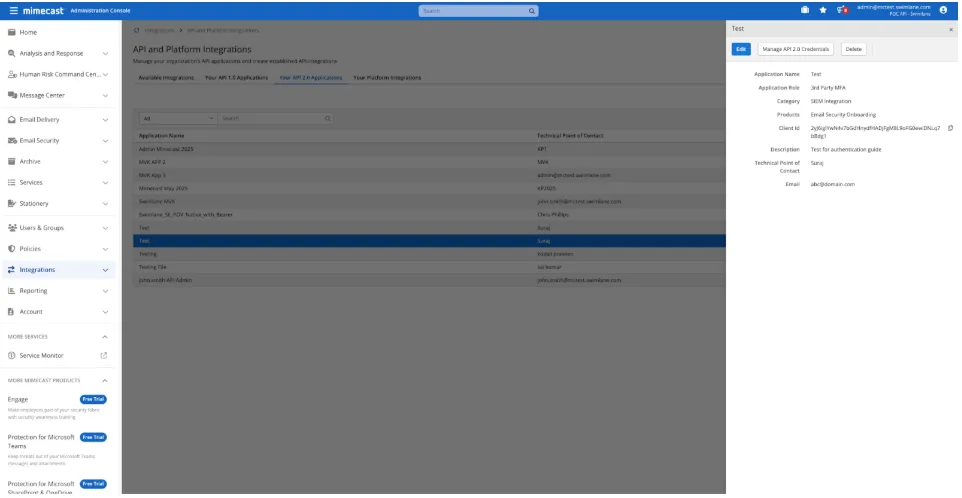
OAuth 2.0 Client Credentials
This guide uses OAuth 2.0 client credentials to authenticate API requests.
Required credentials
Collect the following values from Mimecast:
- Client ID
- Client Secret
- URL (Mimecast Base URL for your region)
HMAC Authentication
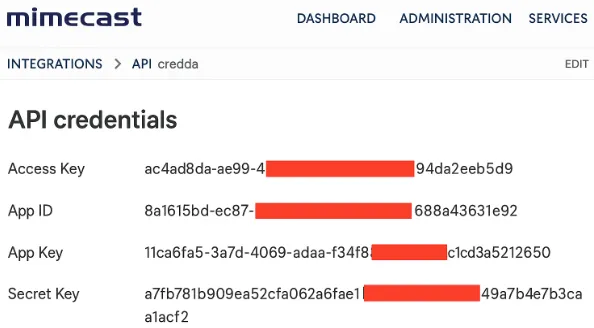
This authentication method allows you to authenticate using HMAC credentials.
Required credentials
Collect the following values from Mimecast:
- Access Key
- App ID
- App Key
- Secret Key
- URL (Mimecast Base URL for your region)
Access and Secret Expiration
To set Access/Secrets to never expire you must update the authentication cache TTL setting in the service user's effective authentication profile to Never Expire.
Connector configuration in Swimlane
- Log in to Turbine.
- From the left-hand navigation pane, click ORCHESTRATION and click Assets.
- Asset homepage opens.
- Click the plus icon to open the Configure your Connector Asset window.
- Select Mimecast Security from the Asset type list.
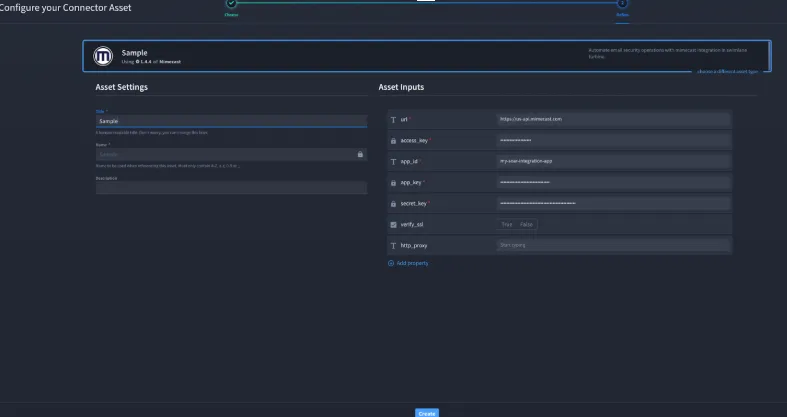
Configuration - Mimecast HMAC
Authenticates using HMAC. Fill in the Asset Settings and Asset Input as shown:
Field | Description | Required/Optional |
|---|---|---|
url | A URL to the target host. | Required |
access_key | Access Key | Required |
app_id | App ID | Required |
app_key | App Key | Required |
secret_key | Secret Key | Required |
verify_ssl | Verify SSL certificate | Optional |
http_proxy | A proxy to route requests through. | Optional |
Fields with * marks are required.
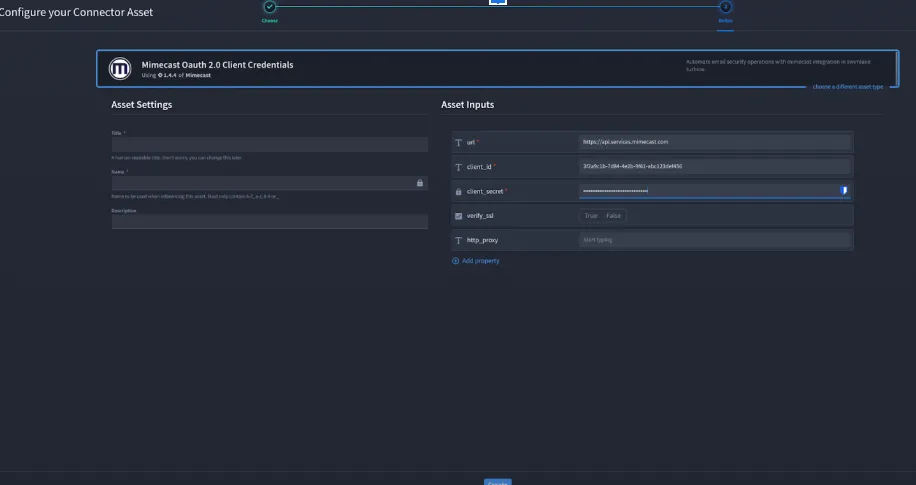
Configuration - Mimecast Oauth 2.0 Client Credentials
Authenticates using oauth 2.0 client credentials. Fill in the Asset Settings and Asset Input as shown:
Field | Description | Required/Optional |
|---|---|---|
url | A URL to the target host. | Required |
client_id | The client ID | Required |
client_secret | The client secret. | Required |
verify_ssl | Verify SSL certificate | Optional |
http_proxy | A proxy to route requests through. | Optional |
Fields with * marks are required.
- Click Create.
Action API Permissions
You need different permissions for each of the actions to run. Please refer to the API documentation to know more.
Troubleshooting
If you encounter an authentication error:
- Verify url matches your region base URL
- Verify credentials are correct and active
- Verify account has Admin access or required permissions
- if using HMAC, verify Access Key, App ID, App Key, and Secret Key are from same set of credentials
- If required, configure http_proxy and verify outbound connectivity
You have successfully authenticated the Mimecast Security Connector in Swimlane.