Microsoft Graph API
Introduction
This guide explains how to authenticate the Microsoft Graph API connector in Swimlane using one of the following authentication methods:
- OAuth 2.0 Client Credentials (Application permissions)
- Password Grant (Delegated permissions)
- Refresh Token Grant (Delegated permissions with MFA)
You will create an Azure app, assign permissions, collect the required identifiers, and configure the connector inside Swimlane.
Prerequisites
Azure Access Requirements You must have Azure permissions to:
- Register applications in Azure Active Directory
- Assign API permissions (Application + Delegated)
- Grant admin consent
- View tenant, subscription, and directory information
- Create client secrets
Required Credentials
During setup, you will collect:
- Client ID
- Client Secret
- Tenant ID
- Token URL
- Scope
- (For delegated auth) Username & Password
- (For refresh token flow) Refresh Token
Authentication Methods Overview
OAuth 2.0 Client Credentials
Used for non-MFA accounts and for most server-to-server automations.
You will need:
- Client ID
- Client Secret
- Tenant ID
- Token URL (must include Tenant ID)
- Scope(s)
OAuth 2.0 Refresh Token Grant
Use this when:
- The Office 365 account has MFA enabled
- You need a long-lived token flow based on user authentication
You will need:
- Client ID
- Client Secret
- Refresh Token
- Redirect URI (added during Azure App Registration)
Azure Setup
Take the following steps to register the application:
- Go to Azure Portal > Azure Active Directory > App Registrations.
- Click New Registration.
- Enter an application name.
- Select Accounts in this organizational directory only.
- Click Register.
Take the following steps to assign the API permissions:
- Open the API Permissions tab.
- Click Add a permission.
- Add the required permissions (recommended):
- User.ReadWrite.All
- Calendars.ReadWrite
- Directory.ReadWrite.All
- Directory.AccessAsUser.All
- SecurityEvents.Read.All
- SecurityEvents.ReadWrite.All
- Mail.ReadWrite
- Mail.Send
- Sites.ReadWrite.All
- Files.ReadWrite.All
- AuditLog.Read.All
- Mail.ReadBasic.All
- SecurityAnalyzedMessage.ReadWrite.All
- SecurityAlert.ReadWrite.All
- User.ManageIdentities.All
These permissions enable Graph API actions across email, directory, SharePoint, files, and security.
- Click Add permissions.
- Click Grant admin consent for your organization.
Delegated Permissions (for Password Grant & Refresh Token)
Add Delegated Permissions instead of Application Permissions when using delegated auth.
After adding permissions:
- Click Add permissions.
- Then click Grant admin consent.
Take the following steps to generate a client secret
- Go to Certificates & secrets.
- Click New client secret.
- Add description and expiration.
- Click Add.
- Copy and save the value. This saved value is Client Secret.
Take the following steps to collect required Identifiers:
From App Registration > Overview, copy:
- Client ID
- Tenant ID
Take the following steps to collect username and password (delegated auth only)
If using Password Grant:
- oauth_un → Azure username
- oauth_pwd → Azure password
If MFA is enabled, use Refresh Token Flow instead.
Take the following steps to generate a Refresh Token:
For accounts with MFA enabled:
- In the Registration step, add a Redirect URI (Platform: Web).
- Complete app registration.
- Assign Delegated Permissions.
- Use the Python script provided by the Swimlane team to generate a Refresh Token.
Connector Configuration in Swimlane
- Log into Turbine.
- From the left-hand navigation pane, click ORCHESTRATION and click Assets. Asset homepage opens.
- Click the + icon to create a new asset.
- Select Microsoft Graph API from the Asset Type list.
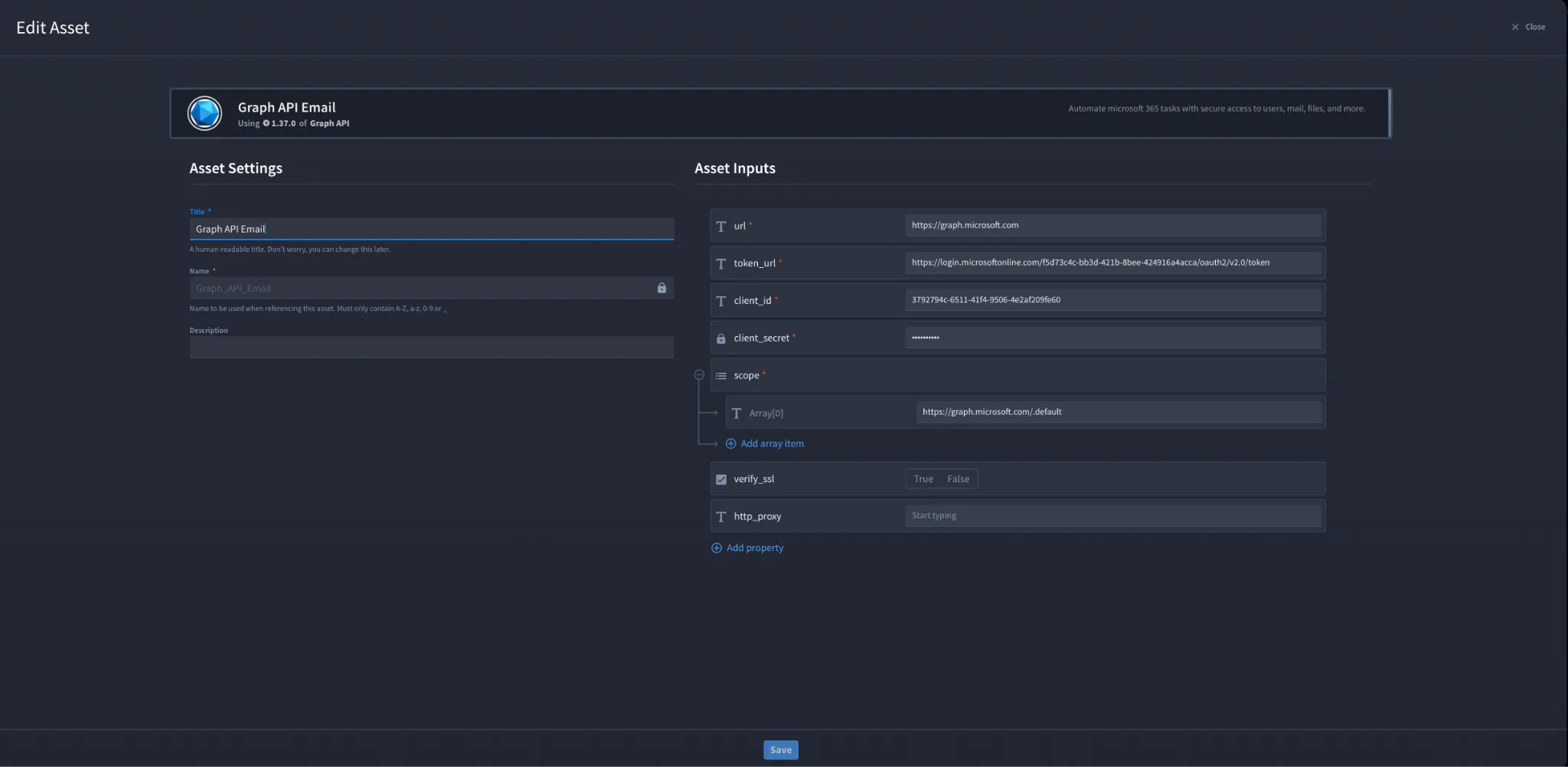
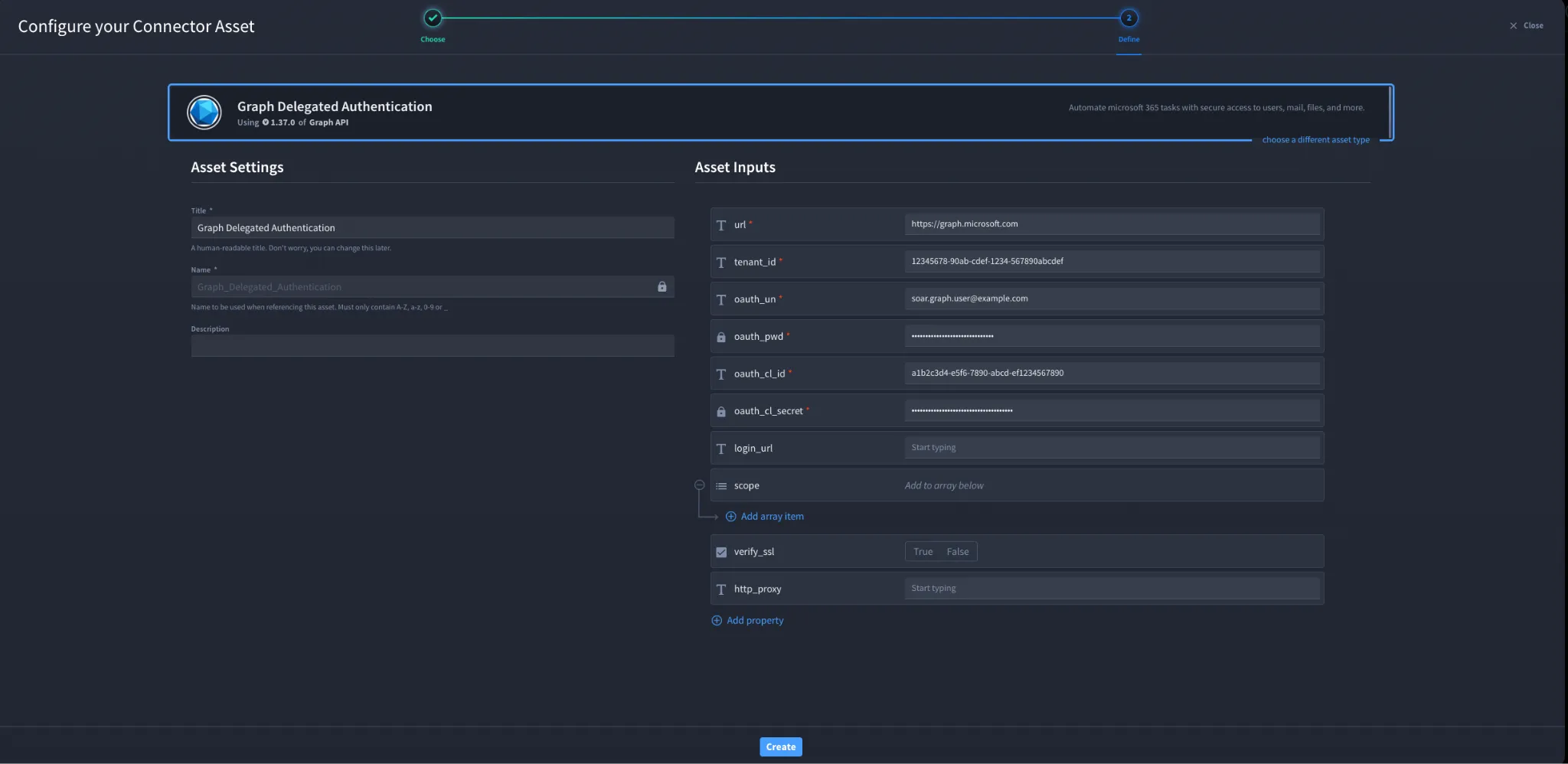
- Fill in the Asset Settings and Asset Input as shown: a) Configuration - Client Credentials
Authenticates using OAuth 2.0 client credentials.
Field | Description | Required |
|---|---|---|
url | Microsoft Graph API endpoint | Required |
client_ID | Client ID from Azure | Required |
client_Secret | Client Secret from Azure | Required |
tenant_id | Tenant ID | Required |
token_url | https://login.microsoftonline.com/{tenant_id}/oauth2/v2.0/token | Required |
scope | Permission scopes | Required |
verify_ssl | Enable/Disable SSL verification | Optional |
http_proxy | Proxy details | Optional |
Fields with * marks are required.
b) Configuration - Password Grant (Delegated Authentication)
Authenticates on behalf of a user.
Field | Description | Required |
|---|---|---|
url | Microsoft Graph API endpoint | Required |
login_url | Default: https://login.microsoftonline.com | Optional |
tenant_id | Tenant ID | Required |
oauth_un | Username | Required |
oauth_pwd | Password | Required |
oauth_cl_id | Client ID | Required |
oauth_cl_secret | Client Secret | Required |
scope | Delegated scopes | Optional |
verify_ssl | SSL verification | Optional |
http_proxy | Proxy | Optional |
Fields with * marks are required.
c) Configuration - Refresh Token Grant (Delegated + MFA) Authenticates using a previously generated Refresh Token.
Field | Description | Required |
|---|---|---|
url | Microsoft Graph API endpoint | Required |
cl_id | Client ID | Required |
cl_secret | Client Secret | Required |
refresh_token | Refresh Token | Required |
scope | Permission scopes | Required |
verify_ssl | SSL verification | Required |
http_proxy | Proxy | Required |
Fields with * marks are required.
6. Click Create.
Troubleshooting
403 Forbidden
Occurs when:
- Missing Graph API permissions
- Missing admin consent
- Incorrect tenant or token URL
- Using Application permissions where Delegated is required
Fix:
- Re-grant admin consent
- Verify permissions
- Ensure token URL includes the correct tenant ID
You have successfully authenticated the Microsoft Graph API Connector using one of the supported OAuth flows.