Microsoft Azure Service Bus
Introduction
This guide explains how to authenticate the Microsoft Azure Service Bus connector in Swimlane using a Service Bus Connection String. You will collect the required connection details from Azure and configure the connector asset in Swimlane Turbine.
Prerequisites
Azure Access Requirements
You must have Azure permissions to:
- Access the Azure Portal
- View or manage Azure Service Bus namespaces
- Access Shared Access Policies
- Retrieve connection strings
Required Credentials
During setup you will collect:
- Azure Service Bus Namespace
- Shared Access Policy Name
- Primary Connection String
Authentication Method Overview
The Microsoft Azure Service Bus connector authenticates using a Service Bus Connection String. This connection string contains the endpoint URL, Shared Access Signature (SAS) key name, and SAS key used to authorize API operations.
Azure Setup
Take the following steps to obtain the Azure Service Bus connection string:
- Log in to the Azure Portal at https://portal.azure.com.
- Navigate to All Resources or Service Bus in the Azure Portal.
- Select the Service Bus namespace used for your messaging queues.
- In the left navigation panel, locate and click Shared Access Policies.
- Select an existing policy such as RootManageSharedAccessKey, or create a new policy with the required permissions.
- Open the selected policy.
- Locate the Primary Connection String field.
- Copy the connection string value.
- Store this value securely as it will be used in the Swimlane connector configuration.
Connector Configuration in Swimlane
Take the following steps to configure the Microsoft Azure Service Bus connector asset in Swimlane.
- Log in to Turbine.
- From the left-hand navigation pane click ORCHESTRATION and then Assets.
- The Asset homepage opens.
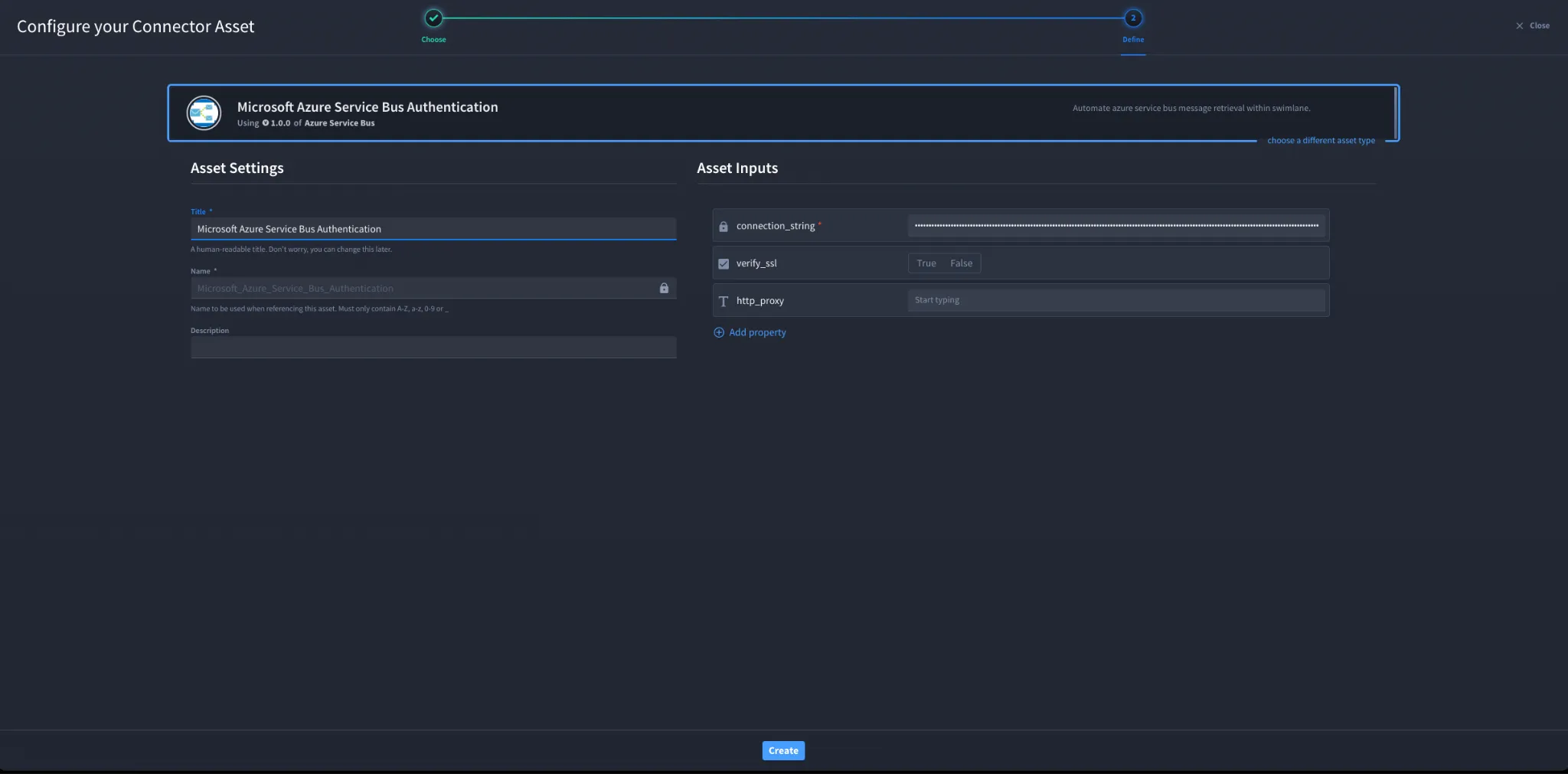
- Click the Plus Icon (+) to open the Configure your Connector Asset window.
- Select Microsoft Azure Service Bus from the Asset Type list.
- Fill in the Asset Settings and Asset Input fields as shown below.
Configuration Parameters
Field | Description | Required |
|---|---|---|
connection_string | Azure Service Bus connection string obtained from the Shared Access Policy | Required |
verify_ssl | Enable or disable SSL certificate verification | Optional |
http_proxy | Proxy configuration if requests must pass through a proxy | Optional |
Troubleshooting
If authentication fails: • Ensure the connection string was copied correctly from Azure. • Verify that the Shared Access Policy has sufficient permissions (Manage, Send, or Listen). • Confirm the Service Bus namespace is accessible from the Swimlane environment. • Check SSL verification settings if SSL inspection is enabled in your environment. • Verify proxy configuration if outbound traffic must pass through a proxy.
Sources
• Microsoft Azure Service Bus Documentation: https://learn.microsoft.com/en-us/azure/service-bus-messaging/
• Azure Service Bus Connection String Documentation: https://learn.microsoft.com/en-us/azure/service-bus-messaging/service-bus-sas
Result
You have successfully authenticated the Microsoft Azure Service Bus connector in Swimlane.