Installation
Install a remote agent on a Docker or Podman host by copying the install script from Turbine and running it on the target machine.
Choose Your Path
I want to… | Start here |
|---|---|
Install with Docker or standard Podman | |
Install with Podman Quadlet (systemd lifecycle) | |
Pull connector images from my own registry | |
Review install fields and flags |
Install a Remote Agent
- Open Admin Panel > Settings > Tenant > Nodes.
- Click View Agents to see your agents and pools.
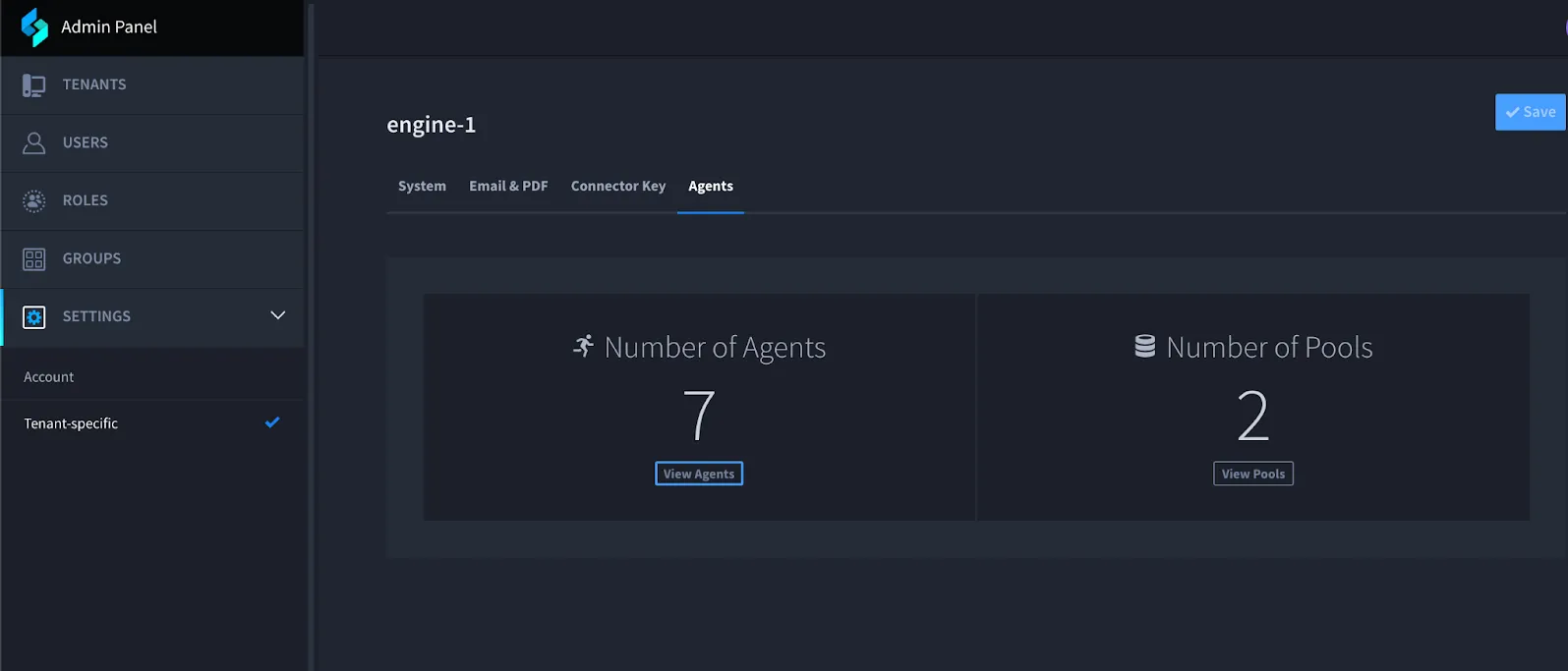
- Open the Install an agent dialog.
- Fill in the required fields. See Configuration Options.
- Click Copy Install Script.
- Paste the script into a terminal on the target host and run it as a user that can start containers (and systemd, if you use Quadlet).
- Complete any prompts. The script can ask for Turbine credentials; credentials are not saved.
Do not click outside the install dialog before you copy the script. Closing the dialog resets the generated command.
Sample install command pattern:
curl -k https://<your-turbine-instance>/agent/install.sh | bash -s -- -n 'my_agent' -S '0 */4 * * *'Configuration Options
UI field or flag | Description |
|---|---|
AGENT_NAME (-n) | Required. Letters, numbers, hyphen, or underscore only. Do not use spaces. |
CA_CERT_PATH (-c) | Folder of CA certificates for self-signed or internal TLS validation. |
AGENT_INITIAL_POOLS (-o) | Comma-delimited pools to join at install time. You can add more than one. |
AGENT_CONTAINER_NETWORK_SUBNET (-N) | Container network subnet in CIDR format. Default: 10.55.55.0/24. |
HTTP_PROXY / HTTPS_PROXY / NO_PROXY | Proxy settings for outbound agent traffic. Wildcards are not supported in NO_PROXY. |
CRON_SCHEDULE (-S) | Cron expression for automatic agent image updates. |
Ignore Insecure Certificates | Instructs the agent and its connectors to ignore insecure certificates when connecting to HTTPS sources. |
Allow Insecure Certificates for Gateway Communication | Allows an insecure certificate when connecting to the Turbine agent gateway. |
Use Podman Quadlet (-Q) | See Use Podman Quadlet. Podman only. Available in Turbine 26.3.0. |
-B / -C | Override registries for Swimlane and custom connector images. Script-only. See Pull Connector Images from an Override Registry. Available in Turbine 26.3.0. |
Additional options may be available only on the command line. Run the install script with help for the full usage list.
Use Podman Quadlet
Starting in Turbine 26.3.0, the Install an agent dialog includes Use Podman Quadlet. When enabled, the generated install command adds the -Q flag so the agent runs as a systemd Quadlet for OS-integrated lifecycle management.
Requirement | Detail |
|---|---|
Container runtime | Podman only. The install script validates that Podman is present when -Q is set. |
Podman version | Podman 4.4 or later. Recommended platforms: RHEL 9 or Rocky Linux 9. |
UI toggle | Use Podman Quadlet — hint text in the product matches this requirement. |
Script flag | -Q — Use Podman Quadlets for managing agent containers. |
Enable Quadlet from the UI
- Open the Install an agent dialog.
- Complete required fields such as AGENT_NAME.
- Turn on Use Podman Quadlet.
- Click Copy Install Script.
- Run the script on a Podman 4.4+ host.
Enable Quadlet from the Script
Add -Q when you install or reinstall with Podman:
# Example fragment — include your full -t, -n, and other required flags
bash -s -- -t '<turbine-url>' -n 'my_agent' -Q -S '0 */4 * * *'
For Docker-based hosts, leave Use Podman Quadlet off. Quadlet is a Podman and systemd integration.
Quadlet unit files live under /etc/containers/quadlets/ for root and under {HOME}/.config/containers/systemd for non-root. After you change Quadlet files manually, run systemctl daemon-reload.
Pull Connector Images from an Override Registry
Starting in Turbine 26.3.0, remote agents can pull connector images from an override registry or namespace instead of only through the agent gateway. This supports environments that must run self-hosted or pre-scanned images.
Use these install script flags (add them to the install command manually; they are not toggles on the Install an agent dialog):
Flag | Description |
|---|---|
-B | Override registry and namespace for Swimlane connector images. The agent pulls those images directly from the override location instead of through the agent gateway. |
-C | Override registry and namespace for custom connector images. Same direct-pull behavior for non-Swimlane connector images. |
Example pattern:
bash -s -- -t '<turbine-url>' -n 'my_agent' \
  -B 'registry.example.com/swimlane-connectors/' \
  -C 'registry.example.com/custom-connectors/'
The install script sets agent environment variables such as CONTAINER_IMAGE_PATH_SWIMLANE and CONTAINER_IMAGE_PATH_CUSTOM from -B and -C.
Preflight Checks
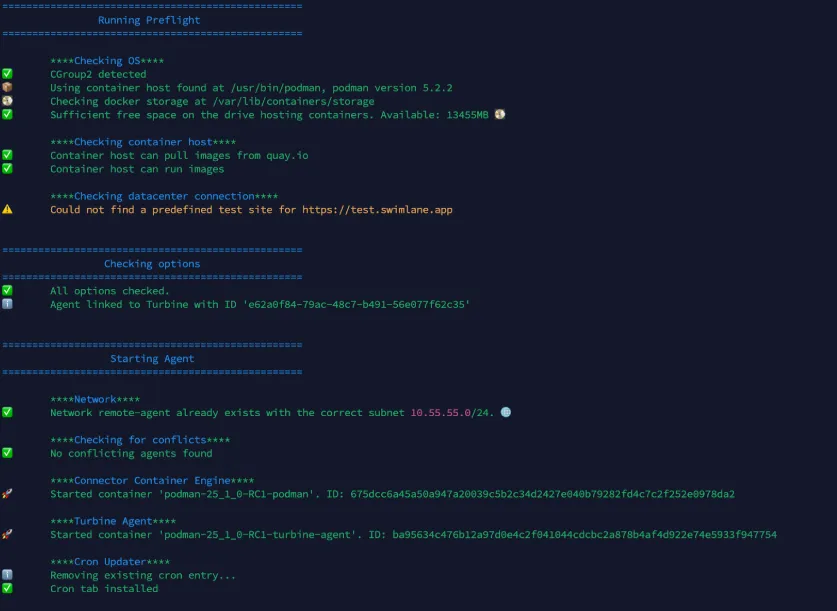
During installation, the script runs several checks. Watch for warnings or errors. Warnings or errors may not block installation, but they can affect stability or performance.
Checks performed:
- Primary Swimlane Turbine system connection
- Login credentials
- Image access from Quay.io (or other image repositories you provide)
- CGroup v2 enablement
- Container host version, function, and storage size
- Ability of the container host to run an image
- Quality of connection to the Turbine environment (including latency)
- Virtual container network settings
- Conflicting containers or networks on the container host