Remote Agents
Swimlane Remote Agents run automation actions on networks outside your primary Swimlane environment. Agents use outbound Secure Websockets (TLS/443) to Turbine. Connectors and action data travel over that connection; a VPN to the customer network is not required.
Remote agents require a container host (Docker or Podman). You install an agent with the install script from Admin Panel > Settings > Tenant > Nodes. For the full procedure, see Installation.
Choose Your Path
I want to… | Start here |
|---|---|
Understand how remote agents work | |
Install an agent (including Quadlet or override registries) | |
View agents and pools | |
Assign pools to playbook actions | |
Uninstall an agent |
Architecture
Remote agents use containers to isolate workloads. Connectors run as containers inside an internal Podman engine, next to a Turbine agent container. The agent opens an outbound Secure Websocket to Turbine. All traffic to the primary instance uses TLS/443. During install and upgrade, base images pull from quay.io unless you override image locations.
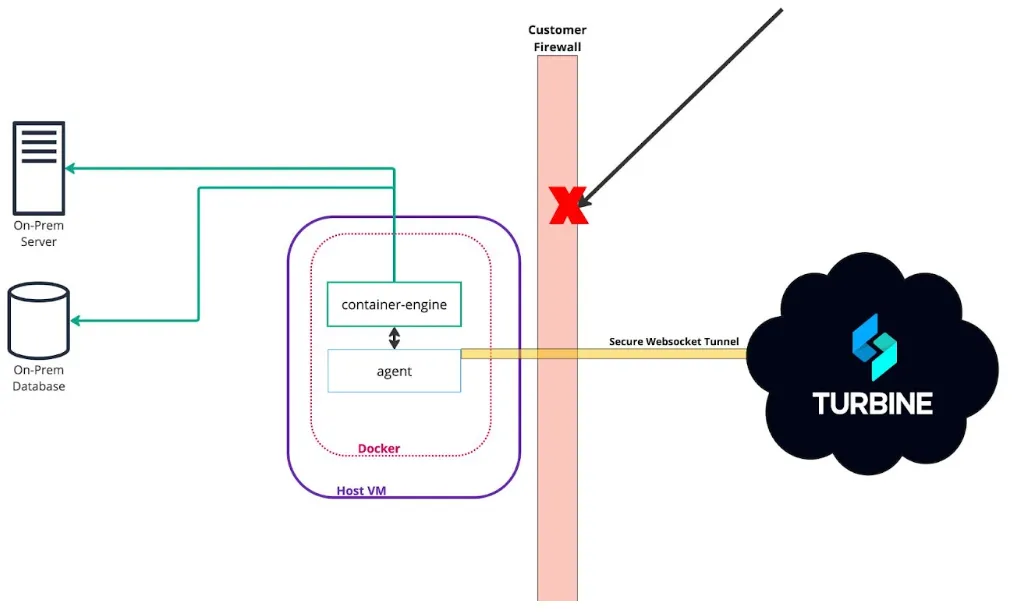
Agents schedule automatic updates with a cron job created at install time. Older agents can still connect after a platform upgrade; the update job replaces them on the next cron run.
Starting in Turbine 26.3.0, you can install with Podman Quadlet (-Q) and pull connector images from override registries (-B / -C). See Installation.