Configure Threat Intelligence Enrichment Integration
Configure Threat Intelligence Enrichment Integration
Threat Intelligence Enrichment gathers reputation information from observables, such as IP addresses, domains, URLs, hashes, email addresses, and so on from one or more enrichment providers using enrichment components. Results are aggregated in Threat Intelligence records, and displayed in Case and Incident Management records as well. Every observable type has a Primary Integlligence Provider (PIP) which is the canonical source of truth for reputation verdict, permalinks, and so on for that observable type.
Prerequisites
Before configuring Threat Intelligence Enrichment:
- Ensure you have access to the SOC Solutions Bundle playbooks
- Have enrichment provider credentials and assets configured
- Understand which observables you want to enrich (IPs, domains, URLs, hashes, etc.)
Configuration Steps
Step 1: Navigate to Components
- Navigate to Orchestration in the Swimlane platform.
- Click on Components.
- Locate and open the SOC - Enrich Observables component (or SOC - Enrich Observable depending on your version).
Step 2: Configure Enrichment Sources
The component uses a Parallel node to run multiple enrichment sources simultaneously. You need to configure which enrichment sources to use:
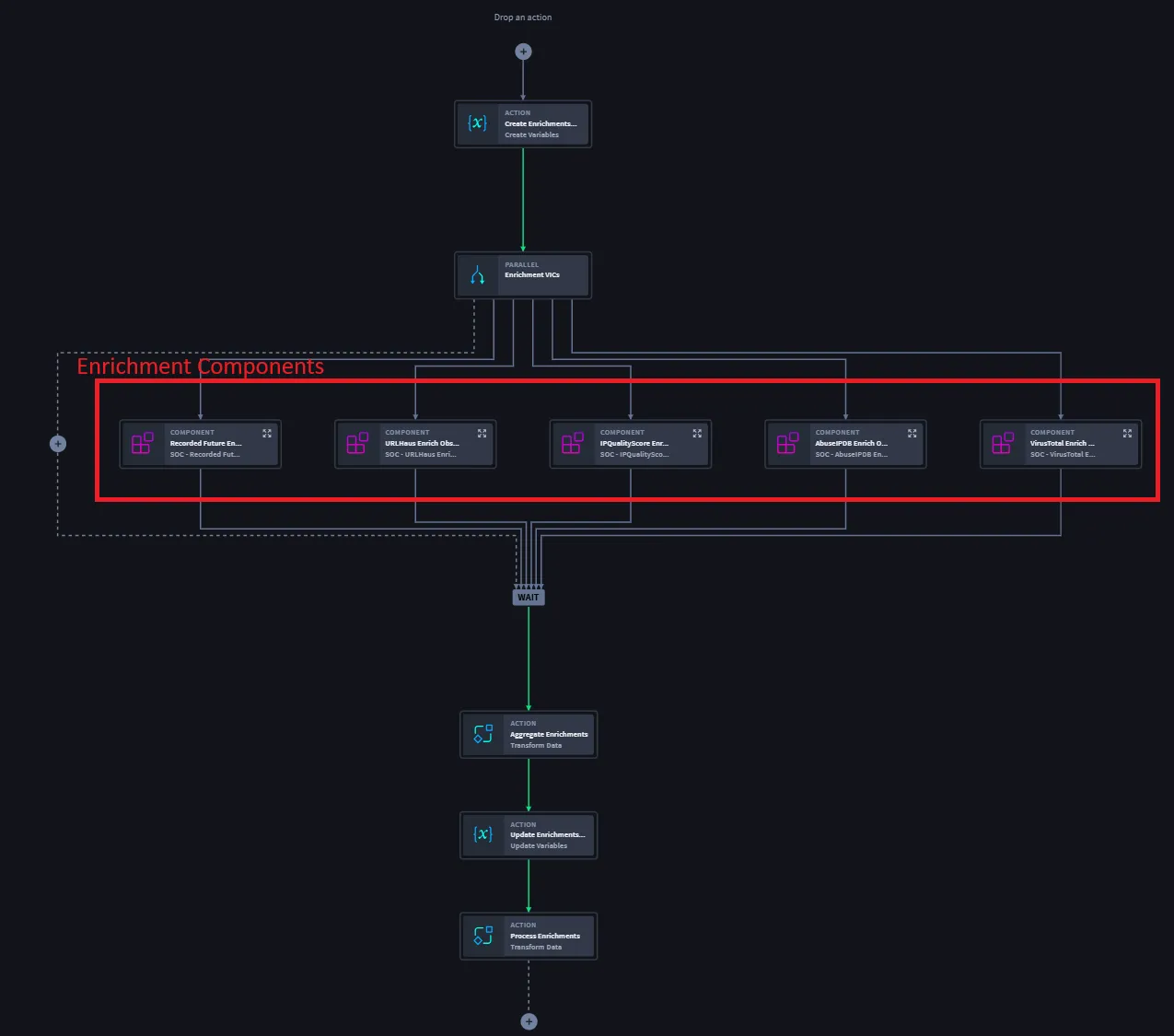
2.1: Remove Unused Enrichment Sources
- Open the SOC - Enrich Observables component.
- Navigate to the Parallel node in the component workflow.
- Review the existing enrichment sources listed under the Parallel node.
- Remove any enrichment sources you are not using:
- Click on the enrichment source component
- Delete or remove it from the Parallel node
- This helps reduce unnecessary API calls and improves performance
2.2: Add New Enrichment Sources
- Click Edit on the Parallel node (or add a new component to the Parallel node).
- From the Components menu, select the enrichment source component you want to add (e.g., VirusTotal, Recorded Future, URLHaus, etc.).
- For each new enrichment source component you add:
- Click Edit on the enrichment source component
- Navigate to the Inputs configuration
- Map inputs.observable as a playbook property:
- In the input mapping, select "Playbook Property"
- Navigate to or search for inputs.observable
- This ensures the observable data flows from the playbook into the enrichment component
- Configure any other required inputs (API keys, authentication, etc.) using the component's asset configuration
Note: The inputs.observable property contains the observable object that needs to be enriched. It typically includes:
- observable_type: The type of observable (e.g., "ip", "domain", "url", "hash")
- observable_value: The actual value to enrich (e.g., "192.168.1.1", "example.com")
- observable_metadata: Any additional metadata about the observable
Step 3: Configure Aggregate Enrichments Action
After removing or adding new enrichment sources, you must update the Aggregate Enrichments action to reflect your changes:
- Locate the Aggregate Enrichments action in the component workflow (typically after the Parallel node).
- Click Edit on the Aggregate Enrichments action.
- Review the existing append actions:
- Each enrichment source component should have its Enrichments property mapped to an append action
- The append actions combine enrichment results from all sources into a single aggregated result
- For each enrichment source you added:
- Add a new append action
- Map the enrichment source component's Enrichments output property to the append action
- Ensure the target is the aggregated enrichments object (not $DELETED)
- For each enrichment source you removed:
- Remove any append actions whose target is $DELETED
- Remove append actions that reference deleted enrichment sources
- Important: Any append action whose target is $DELETED must be removed to prevent errors
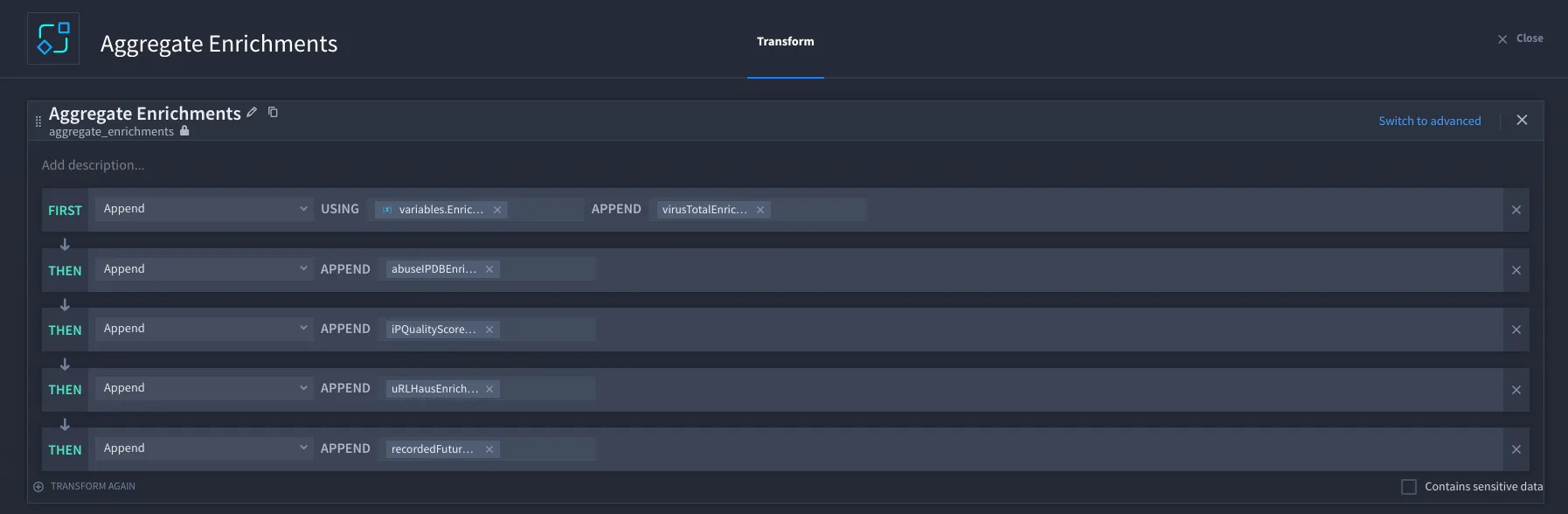
Example Aggregate Enrichments Configuration:
If you have three enrichment sources (VirusTotal, Recorded Future, URLHaus), your Aggregate Enrichments action should have three append actions:
- Append VirusTotal enrichments → aggregated enrichments
- Append Recorded Future enrichments → aggregated enrichments
- Append URLHaus enrichments → aggregated enrichments
Step 4: Configure Enrichment Assets
Ensure that your enrichment provider assets are properly configured:
- Navigate to Orchestration → Assets.
- For each enrichment provider you're using:
- Locate or create the asset for that provider
- Configure authentication credentials (API keys, tokens, etc.)
- Set up any required connection parameters
- Test the asset connection to ensure it's working correctly
- Verify that the asset names match what's configured in your enrichment source components
Common Enrichment Providers:
- VirusTotal
- Recorded Future
- URLHaus
- AbuseIPDB
- Shodan
- And others based on your subscription
Verification
After configuration, verify your setup:
- Test the Component:
- Run a test playbook execution with a sample observable
- Verify that enrichments are being retrieved from all configured sources
- Check that the Aggregate Enrichments action is combining results correctly
- Check Output:
- Verify that enrichment results appear in Threat Intelligence records
- Confirm that enrichments are displayed in Case and Incident Management records
- Ensure the Primary Intelligence Provider (PIP) is correctly identified
- Monitor Performance:
- Check execution times to ensure parallel enrichment is working efficiently
- Monitor API rate limits if applicable
- Review error logs for any failed enrichment requests
Troubleshooting
Issue: Enrichments Not Appearing
Possible Causes:
- Enrichment assets are not properly configured
- API credentials are invalid or expired
- Enrichment source components are not receiving observable input
Solutions:
- Verify asset configuration and test connections
- Check API credentials and renew if necessary
- Verify that inputs.observable is correctly mapped in enrichment source components
Issue: Aggregate Enrichments Errors
Possible Causes:
- Append actions reference deleted enrichment sources
- Append actions have $DELETED as target
- Missing append actions for new enrichment sources
Solutions:
- Remove any append actions with $DELETED targets
- Add append actions for all active enrichment sources
- Verify that each enrichment source's Enrichments output is mapped correctly
Issue: Performance Issues
Possible Causes:
- Too many enrichment sources running in parallel
- API rate limiting from enrichment providers
- Network latency issues
Solutions:
- Consider reducing the number of enrichment sources
- Implement rate limiting or caching
- Check network connectivity to enrichment providers
Best Practices
- Selective Enrichment: Only use enrichment sources that provide value for your specific observable types
- Asset Management: Keep enrichment provider assets up to date with valid credentials
- Error Handling: Configure proper error handling for failed enrichment requests
- Performance: Monitor and optimize the number of parallel enrichment sources
- Cost Management: Be aware of API usage limits and costs for enrichment providers