Custom LLM
Starting Turbine 26.1.2 release you can use the Custom LLM tab under Account Settings to route Hero AI through a provider you manage instead of default platform routing.
The Custom LLM tab appears only when the Custom LLM feature flag is enabled for your account and you have account administrator or super administrator access. To enable Custom LLM, contact Swimlane support.
Changing Custom LLM settings while Hero AI work is in progress (plan generation, playbook builder prompts, companion chat, and similar) applies the new routing to subsequent LLM requests in that operation. Wait for long-running jobs to finish before switching providers if you need a single model throughout one task.
Hero AI Native Action and Provider Changes
When you turn Use Custom LLM Provider on or off, or switch between default Swimlane routing and LiteLLM (or Custom Bedrock on Turbine Platform), existing Hero AI Native ActionHero AI Native Action steps may still store a modelId from the previous configuration.
Starting in 26.2.0:
- At run time, if the saved model is not in the current available models list, the action uses the Small model (the default for Hero AI Native Action — Claude Haiku 4.5 on Swimlane-managed routing) so playbook runs are not blocked.
- In the action dialog, Model Selection shows Previously Selected Model is not available in red until you pick a valid model or use Use Default Model.
Review playbooks after changing Custom LLM settings. See Hero AI Native ActionWhen the Saved Model Is Unavailable in Hero AI Native ActionHero AI Native Action.
Tooltip on Use Custom LLM Provider
Starting in 26.2.0, hover the info icon next to Use Custom LLM Provider on Admin Panel > SETTINGS > Account > Custom LLM for guidance similar to:
Exact tooltip text may vary slightly in the product UI.
Section | Use when |
|---|---|
You use hosted Turbine Cloud and configure LiteLLM | |
You use on-premises Turbine Platform with a LiteLLM proxy | |
You use on-premises Turbine Platform with your own Amazon Bedrock API key |
Turbine Cloud
The Custom LLM tab on Turbine Cloud connects Hero AI to your LiteLLM proxy. You enter a URL and API key, fetch the model catalog from your proxy, then choose models from dropdown lists. Turbine Cloud does not show Select Your Provider; LiteLLM is the only option.
Prerequisites
- Admin Panel > SETTINGS > Account > Custom LLM is visible.
- LiteLLM base URL, API key, and a running LiteLLM-compatible endpoint that exposes a models list.
Configure LiteLLM
- Open Admin Panel > SETTINGS > Account > Custom LLM.
- Turn Use Custom LLM Provider on.
- Enter LiteLLM URL (HTTPS base URL for your LiteLLM-compatible API).
- Enter API Key (credential Turbine sends to LiteLLM).
- Click Fetch Models. Turbine loads the models your proxy exposes and fills the model dropdowns below.
- Select Medium Model, Medium Model Fallback (optional), Small Model, and Small Model Fallback (optional).
- Click Save.
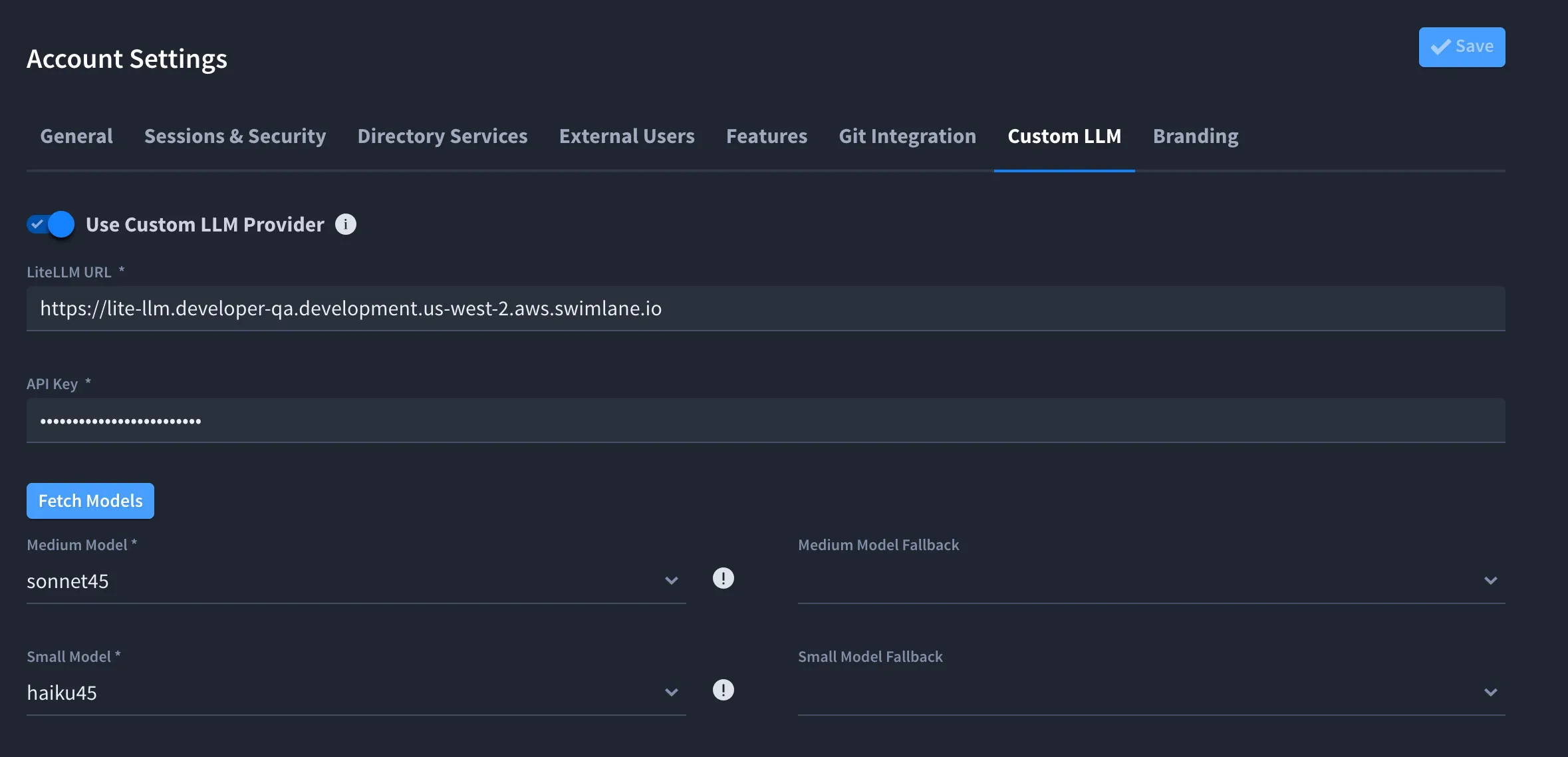
Field | Role |
|---|---|
Fetch Models | Retrieves the model list from your LiteLLM proxy after LiteLLM URL and API Key are set |
Medium Model | Primary model for medium-tier Hero AI workloads (companion, agents) |
Medium Model Fallback | Optional fallback for the medium tier |
Small Model | Primary model for Hero AI Native Action (Claude Haiku 4.5 when Swimlane-managed) |
Small Model Fallback | Optional fallback for the small tier |
Fetch Models is disabled until LiteLLM URL and API Key are entered. When you reopen saved settings, the UI fetches models automatically. After you change the URL or API key, click Fetch Models again before you save. If the request fails, Turbine shows Failed to fetch models and the dropdowns stay empty until you correct the connection and fetch again.
Tip: Choose Sonnet-class models for Medium Model and Haiku-class models for Small Model when your LiteLLM catalog includes them (for example sonnet45 and haiku45 aliases).
Turbine Platform
The Custom LLM tab on Turbine Platform supports two providers: LiteLLM or Custom Bedrock. Use Select Your Provider to choose which form the tab shows.
LLM routing can also be defined in the Turbine Platform Installer (for example LLM_MODEL_ID_MEDIUM). Confirm with your Swimlane contact whether installer values or account settings take precedence in your cluster.
Configure LiteLLM
Prerequisites
- Admin Panel > SETTINGS > Account > Custom LLM is visible.
- LiteLLM base URL, API key, and a running LiteLLM-compatible endpoint that exposes a models list.
Steps
- Open Admin Panel > SETTINGS > Account > Custom LLM.
- Turn Use Custom LLM Provider on.
- Set Select Your Provider to LiteLLM.
- Enter LiteLLM URL.
- Enter API Key.
- Click Fetch Models.
- Select Medium Model, Medium Model Fallback (optional), Small Model, and Small Model Fallback (optional).
- Click Save.
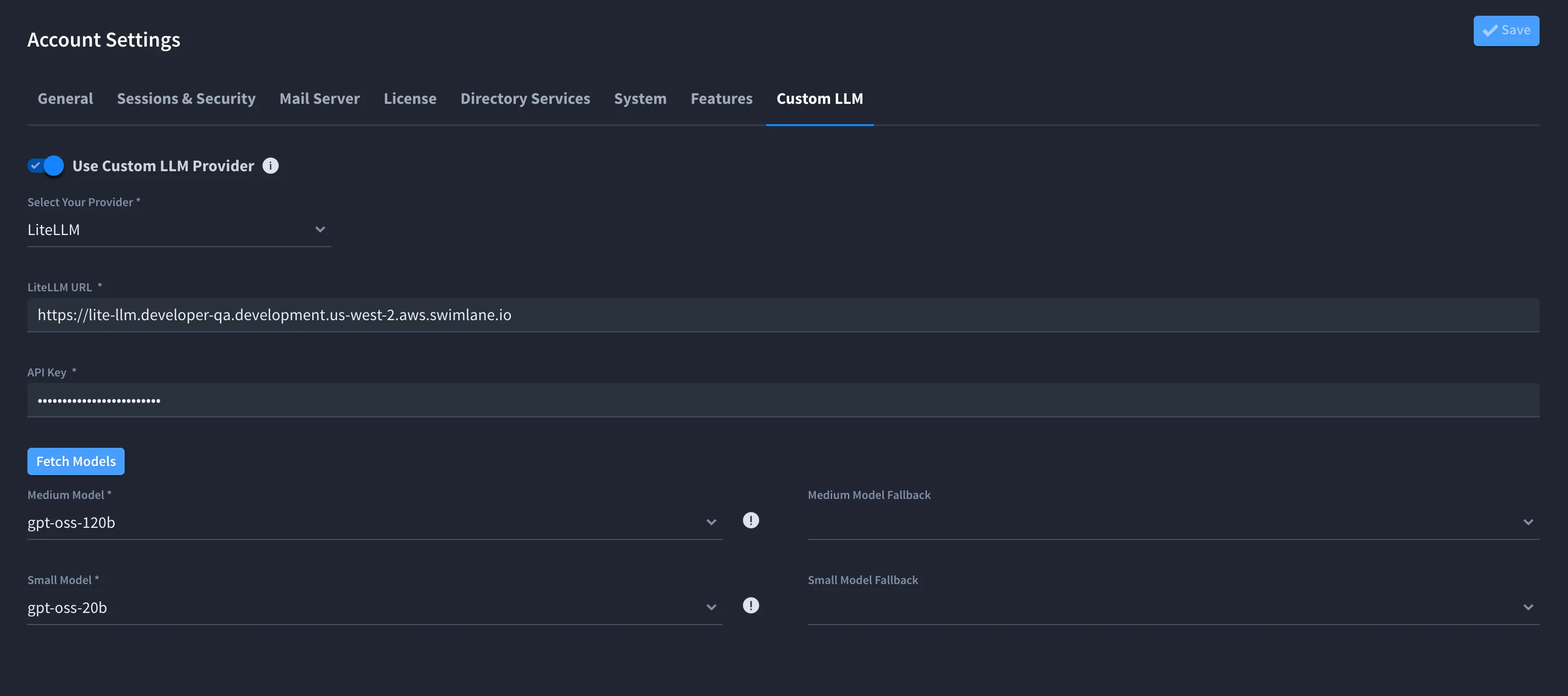
Field | Role |
|---|---|
Fetch Models | Loads models from LiteLLM into the dropdowns below |
Medium Model | Used for the Hero AI Companion and AI SOC plan generation. |
Medium Model Fallback | Optional fallback for the medium tier |
Small Model | Used for the Hero AI Native Action and some AI SOC features. |
Small Model Fallback | Optional fallback for the small tier |
LiteLLM URL, API Key, Medium Model, and Small Model are required when custom LLM is enabled.
Tip: Use Sonnet-class models for medium tiers and Haiku-class models for small tiers when your LiteLLM catalog supports them.
Configure Custom Bedrock
Custom Bedrock supports two configuration paths on Turbine Platform:
Path | Use Bedrock API Key | Model entry |
|---|---|---|
IAM / deployment credentials | Off | Click Fetch Models, then select models from dropdowns (same pattern as LiteLLM) |
Bedrock API key (bearer token) | On | Enter Bedrock URL, Bedrock API Key, and inference profile IDs manually in text fields (Fetch Models is not shown) |
Custom Bedrock With IAM or Deployment Credentials
Prerequisites
- Admin Panel > SETTINGS > Account > Custom LLM is visible.
- Bedrock access configured at deployment (IAM or cluster settings per your Swimlane contact).
Steps
- Open Admin Panel > SETTINGS > Account > Custom LLM.
- Turn Use Custom LLM Provider on.
- Set Select Your Provider to Custom Bedrock.
- Leave Use Bedrock API Key off.
- Click Fetch Models.
- Select Medium Model, Medium Model Fallback (optional), Small Model, and Small Model Fallback (optional).
- Click Save.
Custom Bedrock With Bedrock API Key
Prerequisites
- Admin Panel > SETTINGS > Account > Custom LLM is visible.
- Bedrock runtime URL, Bedrock API key, and cross-region inference profile IDs for each tier.
Steps
- Open Admin Panel > SETTINGS > Account > Custom LLM.
- Turn Use Custom LLM Provider on.
- Set Select Your Provider to Custom Bedrock.
- Turn Use Bedrock API Key on.
- Enter Bedrock URL (runtime endpoint for your region, for example https://bedrock-runtime.us-west-2.amazonaws.com).
- Enter Bedrock API Key (masked after save; leave blank to keep the stored key, or enter a new value to replace it).
- Enter inference profile IDs in each Medium Model, Small Model, and optional fallback field (see below).
- Click Save.

Long-term Amazon Bedrock API keys can be configured to last longer than 12 hours. Swimlane recommends long-term keys only for exploratory use to reduce security risk in production.
For Custom Bedrock without a Bedrock API key (for example IAM credentials configured at deployment), follow guidance from your Swimlane contact.
Inference Profile IDs
The UI prompts you to enter an Inference Profile ARN for each model. Use a cross-region inference profile ID, not a plain foundation model ID. Example: global.anthropic.claude-3-5-sonnet-20241022-v2:0.
Field | Role |
|---|---|
Medium Model | Used for the Hero AI Companion and AI SOC plan generation. |
Medium Model Fallback | Optional fallback for the medium tier |
Small Model | Used for the Hero AI Native Action and some AI SOC features. |
Small Model Fallback | Optional fallback for the small tier |
The inference profile prefix (us., eu., jp., or so on.) must match the region group of your Bedrock URL endpoint. Bedrock API keys are valid for the Bedrock runtime only; mapping from a foundation model ID to an inference profile requires IAM control-plane access and does not run on the API key path.
When Use Bedrock API Key is on, Medium Model, Small Model, and the connection fields for your selected provider must be valid before save succeeds.
Validation and Errors
Turbine Cloud
- Model and URL fields cannot contain characters blocked for injection safety: angle brackets, double quotation marks, apostrophe, ampersand, parentheses, curly braces, or semicolons.
- LiteLLM URL must be a valid URL pattern.
- When Use Custom LLM Provider is on, LiteLLM URL, API Key, Medium Model, and Small Model must be valid before save succeeds.
- If Fetch Models fails, correct LiteLLM URL and API Key, fetch again, then save.
Turbine Platform
- The same character and URL rules apply to LiteLLM and Custom Bedrock fields.
- For LiteLLM and for Custom Bedrock without Use Bedrock API Key, select models from the lists populated by Fetch Models.
- When Use Custom LLM Provider is on, all required connection and model fields for your selected provider must be valid before save succeeds.
Both deployments
- If save fails, read the notification and correct the indicated fields.