Convert Classic Playbooks to Canvas Playbooks
Overview
The Playbook Conversion Tool helps you migrate your existing Classic Playbooks to Canvas Playbooks with minimal manual effort. The conversion process creates Canvas-compatible assets based on your existing Classic Playbooks, allowing you to begin using the new Canvas experience while preserving your existing automation logic.
The conversion process is designed to support a gradual transition from Classic Playbooks to Canvas Playbooks. Your existing Classic Playbooks remain available during the migration process, giving you time to validate and test the converted assets before making them part of your production workflows.
Before You Begin
Recommended Migration Approach
Before converting production playbooks, it is strongly recommended that you perform the migration in a development or test environment first.
Migrating in a non-production environment allows you to:
- Validate the converted Canvas Playbooks and Components.
- Verify trigger behavior and workflow execution.
- Identify any migration-specific changes that require updates.
- Become familiar with the Canvas experience before migrating production workloads.
- Reduce the risk of unexpected interruptions in production environments.
After you have successfully validated the converted assets in a development or test environment, repeat the migration process in production.
Prerequisites
To use the Playbook Conversion Tool, contact your administrator and ensure the following feature flags are enabled:
Feature Flag | Purpose |
|---|---|
Playbook Classic Migration | Enables Classic Playbook to Canvas Playbook migration. |
User Notifications | Displays migration status notifications. |
Important Requirements
Before attempting a migration:
- The Classic Playbook must be enabled.
- Only one migration can run at a time.
- While a migration is running, additional migrations cannot be started.
- A Classic Playbook cannot be edited while it is being migrated.
Convert All Classic Playbooks
Use this option when you want to migrate all eligible Classic Playbooks in bulk. Follow the steps to execute bulk migrations:
Step 1: Open the Classic Playbooks Page
Navigate to:
Orchestration > Playbook Classics
When the required feature flags are enabled, the Convert Playbooks button appears at the top of the page.
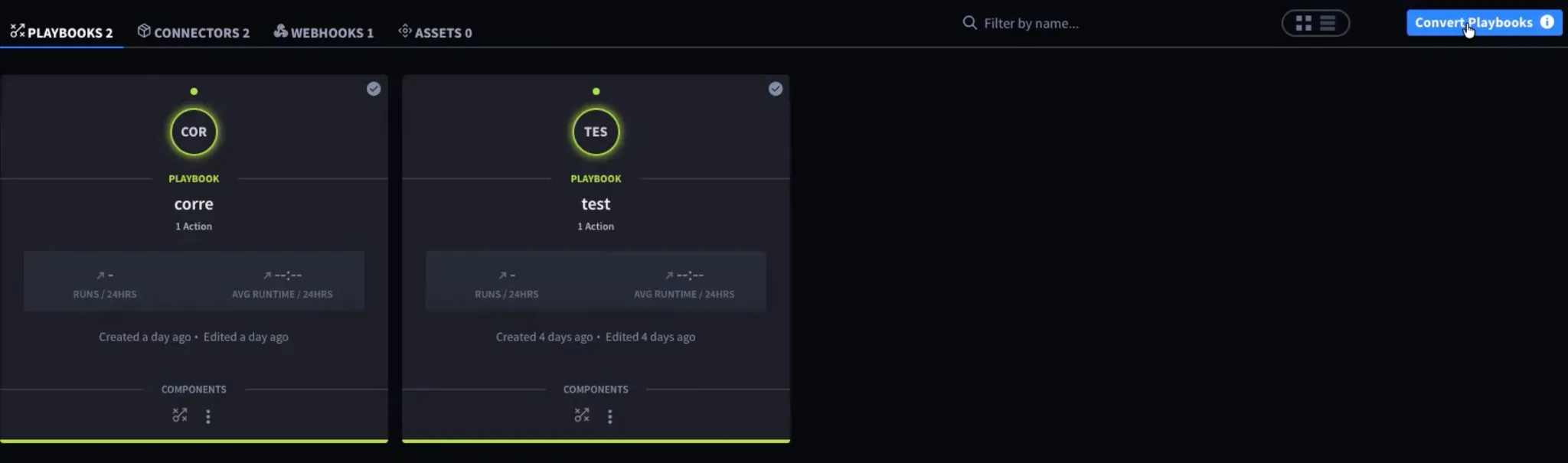
Step 2: Start the Bulk Conversion
Select Convert Playbooks.
A migration information window appears.
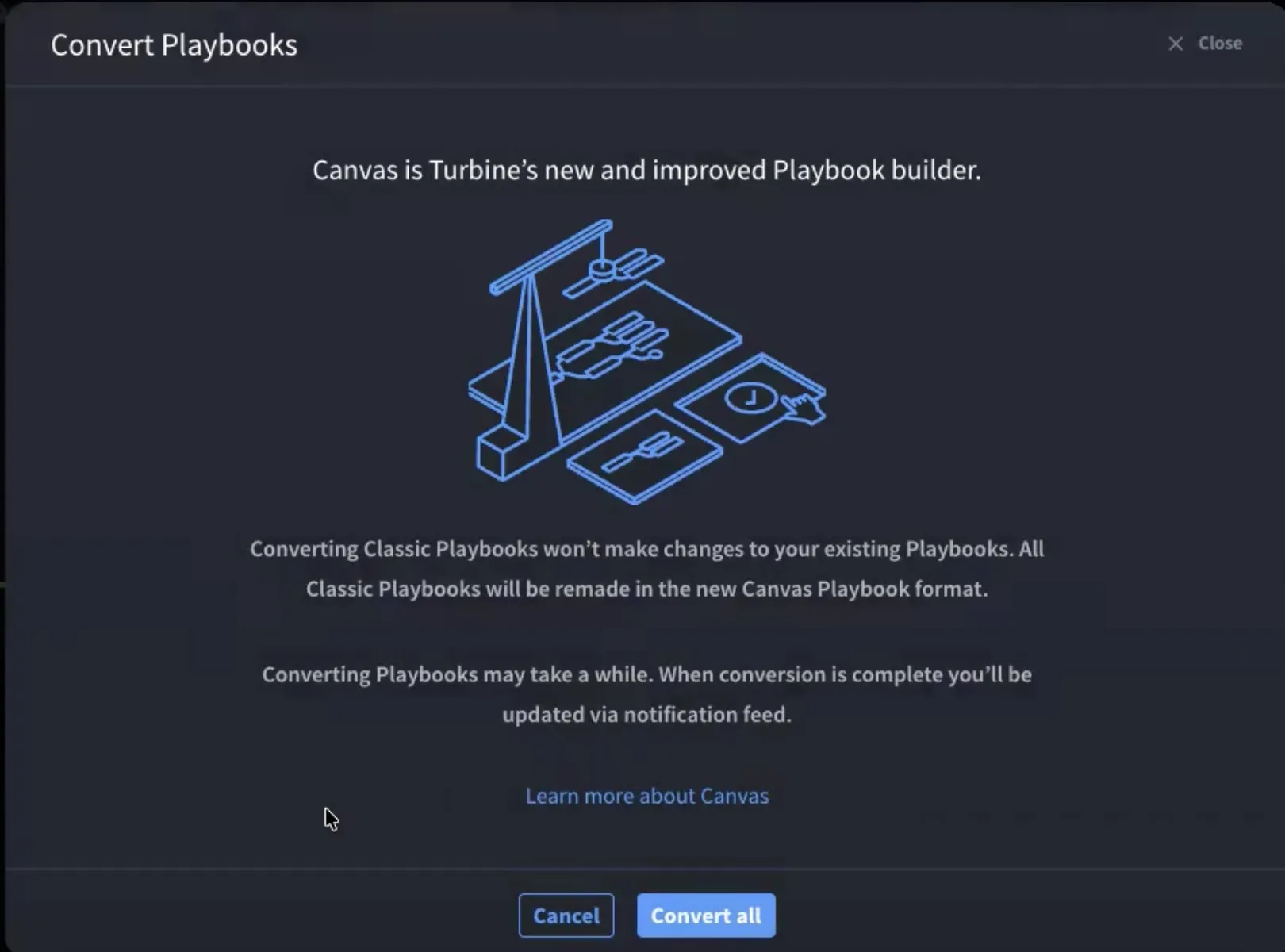
The dialog provides information about Canvas and explains that:
- Existing Classic Playbooks are not modified.
- New Canvas assets are created during migration.
- Migration may take some time.
- Status updates are delivered through notifications.
Select:
- Cancel to exit without starting migration.
- Convert All to begin migrating all eligible Classic Playbooks.
Step 3: Wait for Migration Completion
During migration:
- You cannot edit the playbook while migration is in progress.
- Additional conversion requests cannot be started until the current migration finishes.
Step 4: Review Migration Results
Select the Notifications icon in the application header.
A successful migration displays:
Classic playbook migration completed
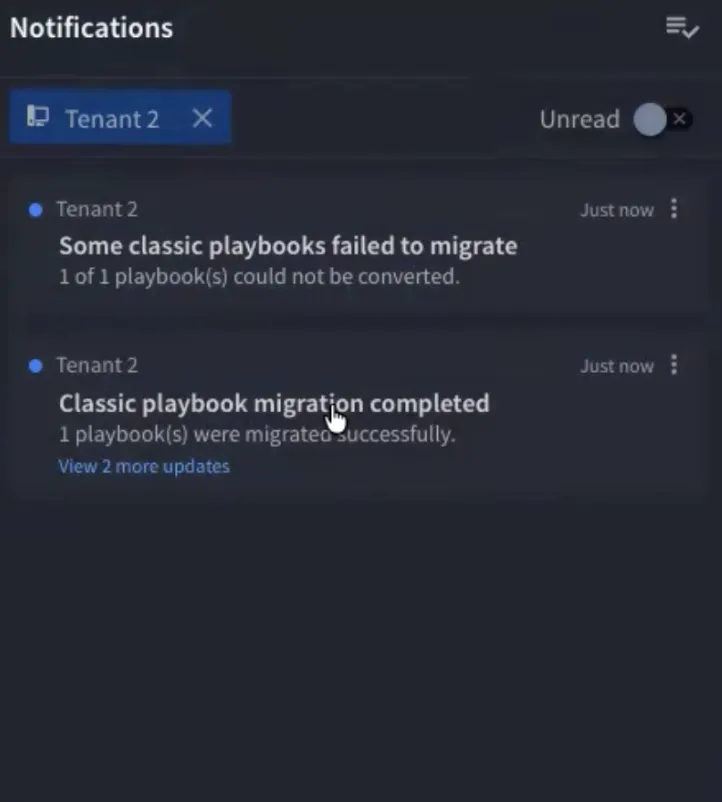
Select the notification to open the converted assets.
Convert a Single Classic Playbook
Use this option when you want to migrate one Classic Playbook at a time.
Step 1: Locate the Playbook
Navigate to:
Orchestration > Playbook Classics
Step 2: Start the Conversion
Open the playbook's More Actions menu (three dots).
Select Convert Playbook.
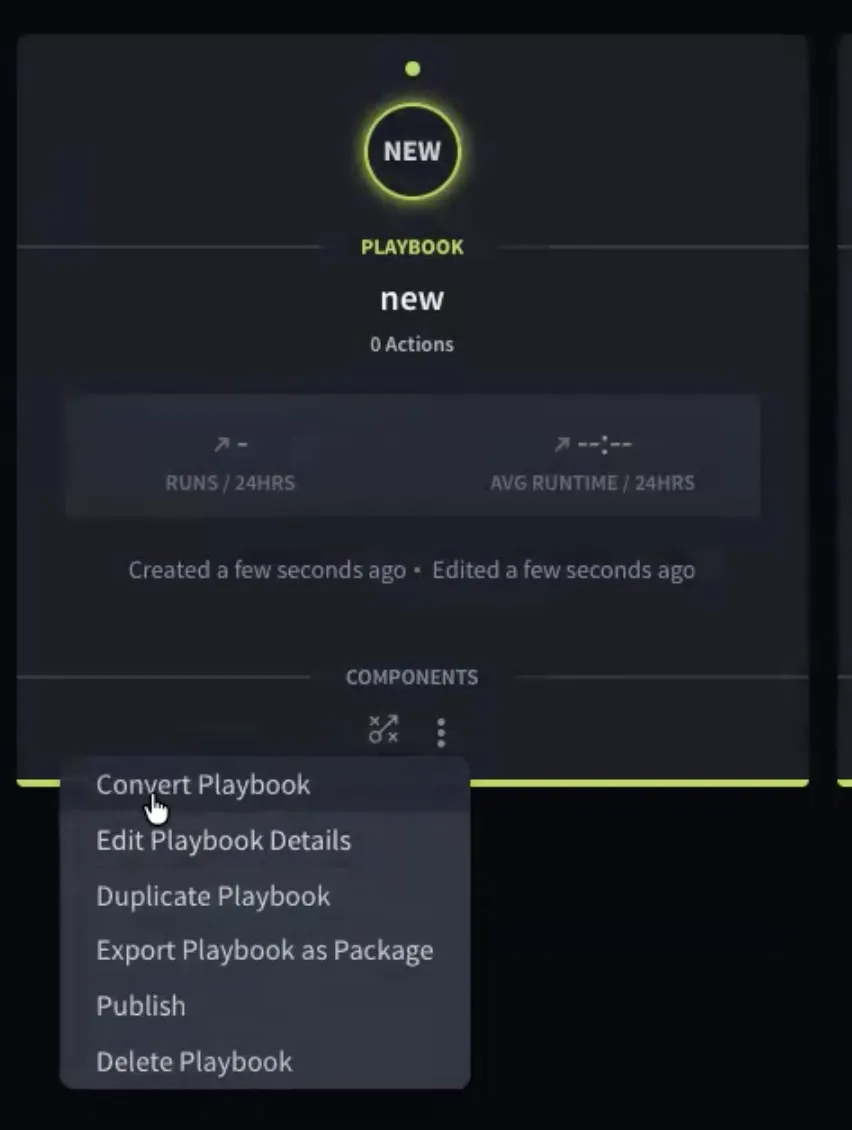
The migration starts immediately.
Step 3: Wait for Completion
While migration is running:
- The user interface prevents modifications to the playbook.
- Additional conversion requests cannot be started until the current migration finishes.
Step 4: Review the Result
Open the notification feed after migration completes.
Successful migrations display:
Classic playbook migration completed
Selecting the notification redirects you to the migrated Canvas Playbook
Access Converted Assets
When migration succeeds, the converted asset name is created using the following naming convention:
<OriginalName>_migrated
For example:
ThreatEnrichment_migrated
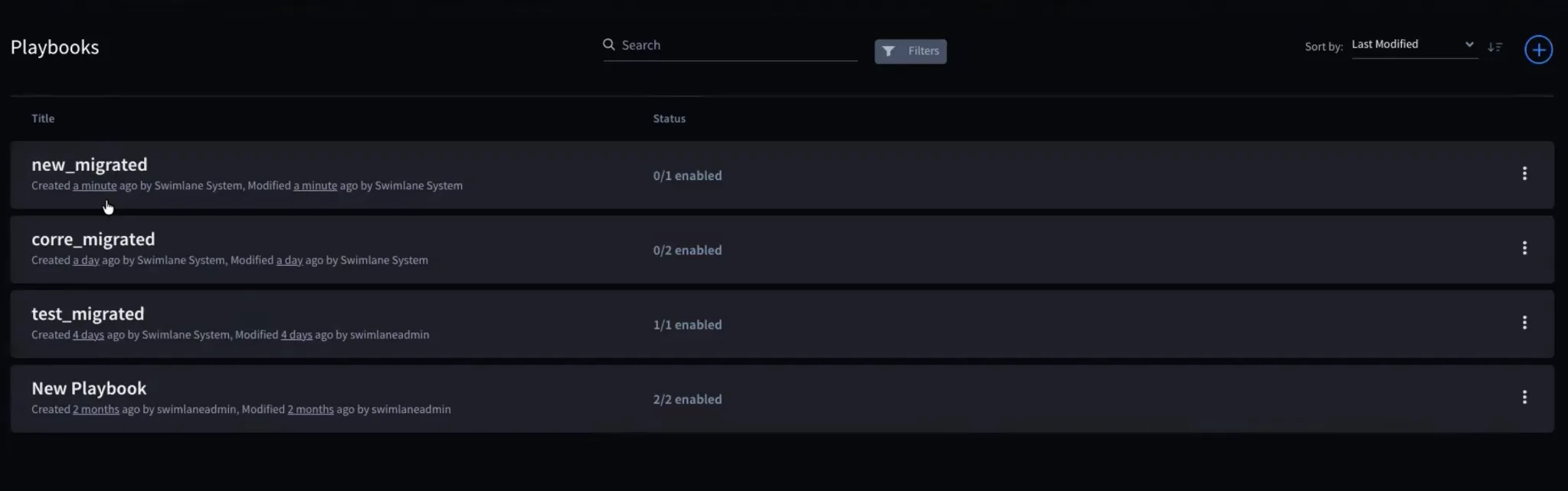
Depending on the structure of the Classic Playbook, migration may produce:
- A Canvas Playbook
- One or more Components
- A combination of Playbooks and Components
Enable the Converted Canvas Playbook
Converted Canvas Playbooks are disabled by default. After validating the converted asset, enable it before using it in production workflows.
Understanding Migration Outcomes
The conversion result depends on the structure of the original Classic Playbook.
Playbook Without a Trigger
If the Classic Playbook does not contain a trigger, it is converted into a Component.
After migration:
- No Canvas Playbook is created.
- A Component is created instead.
- The Component name includes the _migrated suffix.
Locate the converted asset on the Components page.
Playbook With Multiple Triggers
If the Classic Playbook contains multiple triggers:
- The original workflow logic becomes a Component.
- A Canvas Playbook is created.
- Separate flows are generated for each trigger.
- All generated flows reference the same Component.
For example:
A Classic Playbook with two triggers produces:
- One Component
- One Canvas Playbook
- Two flows within the Canvas Playbook
Playbook With Promoted Outputs
Canvas does not support promoted outputs in the same way as Classic Playbooks.
If a Classic Playbook contains a promoted output:
- The playbook flow that contains the promoted output is converted into a Component.
- A Canvas Playbook is created to invoke the generated Component.
- The generated Component is used to expose the output behavior in Canvas.
Migration Status Indicators
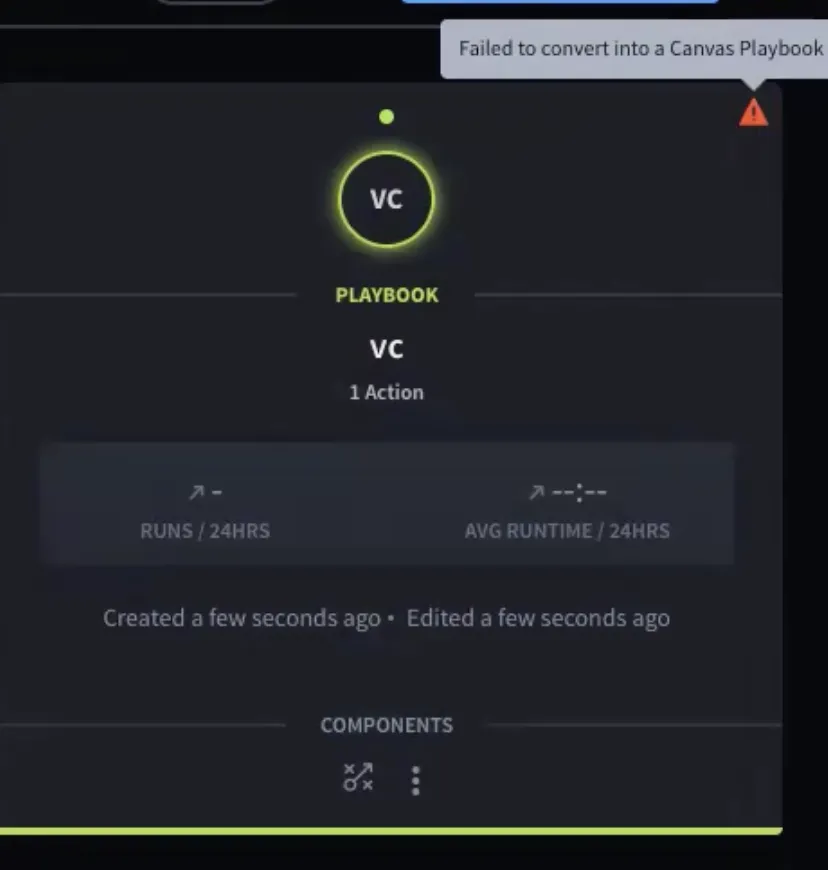
Each Classic Playbook displays a status icon indicating migration status.
Status | Meaning |
|---|---|
Checkmark | Migration completed successfully |
Warning Icon | Migration failed |
Re-Convert a Previously Migrated Playbook
After a Classic Playbook has been converted, the menu option changes from:
Convert Playbook
to
Convert Playbook Again
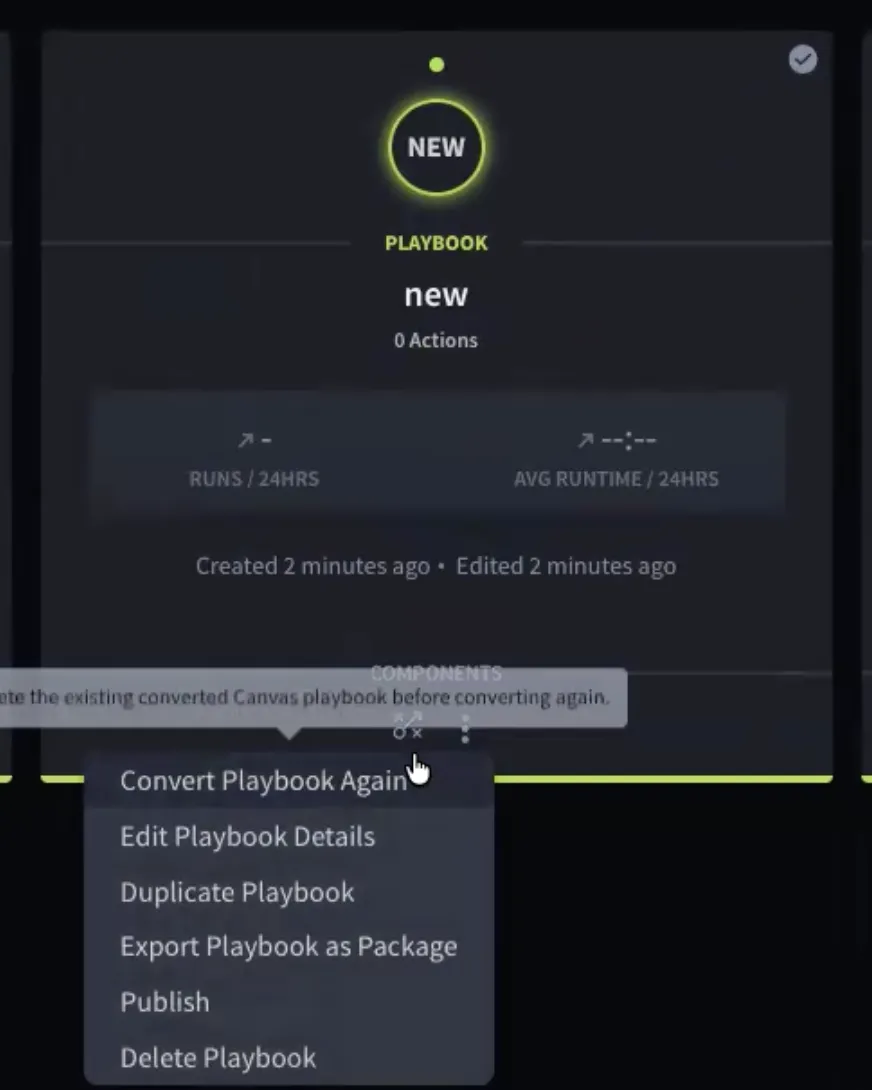
When you select Convert Playbook Again, a tooltip displays the following warning:
Delete the existing converted Canvas Playbook before converting again.
To perform another migration:
- Delete any existing converted Canvas Playbooks or Components associated with the Classic Playbook.
- Return to the Classic Playbook.
- Start the migration again.
Troubleshooting Failed Migrations
If migration fails, a notification appears:
Some classic playbooks failed to migrate
- Select the notification to view the failed playbooks list.
- The dialog displays all playbooks that failed during migration.
- To download detailed error information:
- Select Download as .TXT.
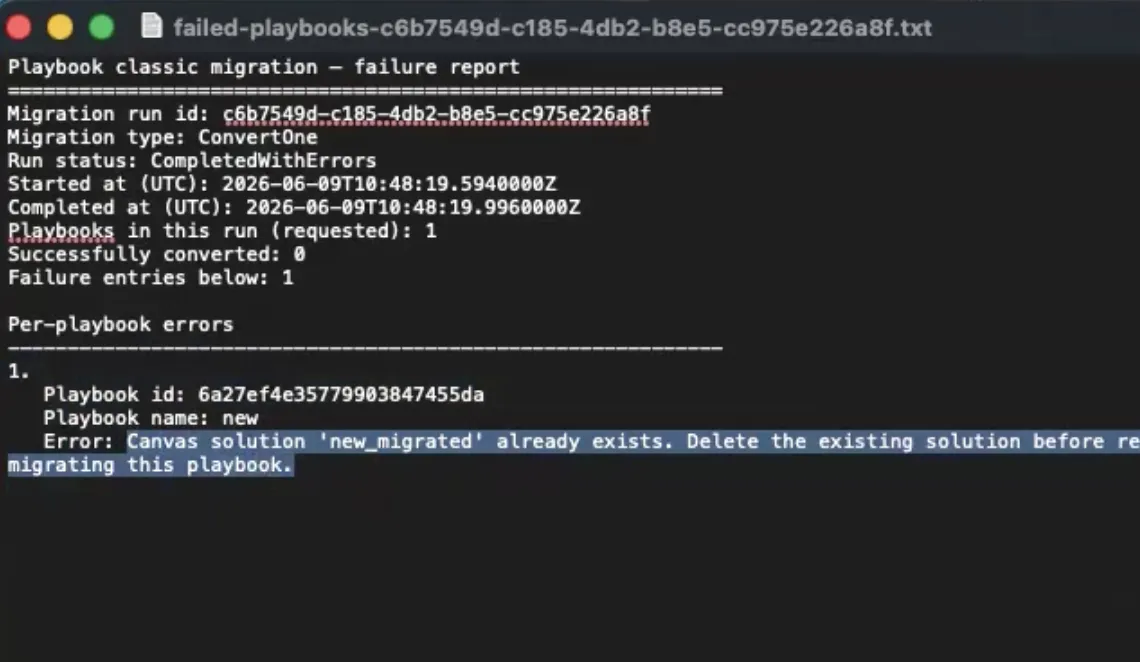
- Open the downloaded file. The report includes:
- Migration run details
- Failed playbook information
- Error messages
- Failure reasons
Example Failure
If a migrated Canvas Playbook already exists, the report may contain:
Canvas solution 'PlaybookName_migrated' already exists. Delete the existing solution before re-migrating this playbook.
Resolution
- Delete the existing migrated Canvas Playbook.
- Return to the Classic Playbook.
- Run the migration again.
Important Migration Behaviors
Disabled Classic Playbooks
Only enabled Classic Playbooks can be migrated.
If a Classic Playbook is disabled:
- It is excluded from bulk migrations.
- It cannot be converted using the Convert Playbook option.
- You must enable the Classic Playbook before attempting migration.
Webhook Triggers
If your Classic Playbook uses a webhook trigger:
- The webhook URL changes after migration.
- Existing integrations continue referencing the original webhook URL unless updated.
After migration:
- Open the converted Canvas Playbook.
- Retrieve the new webhook URL.
- Update any external systems that call the webhook.
Failure to update external integrations may prevent the Canvas Playbook from receiving events.
Playbook Buttons and Correlations
A Playbook Button or Correlation can be associated with only one playbook at a time.
If a Classic Playbook is currently linked to:
- A Playbook Button
- A Correlation
Then during migration:
- The association is removed from the Classic Playbook.
- The association is transferred to the converted Canvas Playbook.
Review these associations after migration to confirm they behave as expected.
Best Practices
- Perform migrations in a development or test environment before production.
- Validate all converted playbooks and components before enabling them.
- Review webhook configurations after migration.
- Verify Playbook Button and Correlation associations.
- Enable converted Canvas Playbooks only after successful testing.
- Resolve all migration warnings before deleting the original Classic Playbook.