Zendesk Ticket Management
Introduction
This guide tells you how to authenticate the Zendesk Ticket Management connector in Swimlane using one of the supported authentication methods. You will configure Zendesk access, collect the required credentials, and configure the connector in Swimlane.
Prerequisites
Zendesk Access Requirements
You must have access to an active Zendesk account with permissions to enable API access, generate API tokens, or create OAuth clients depending on the authentication method used.
Required Credentials
During setup, you will collect one of the following sets of credentials depending on the authentication method:
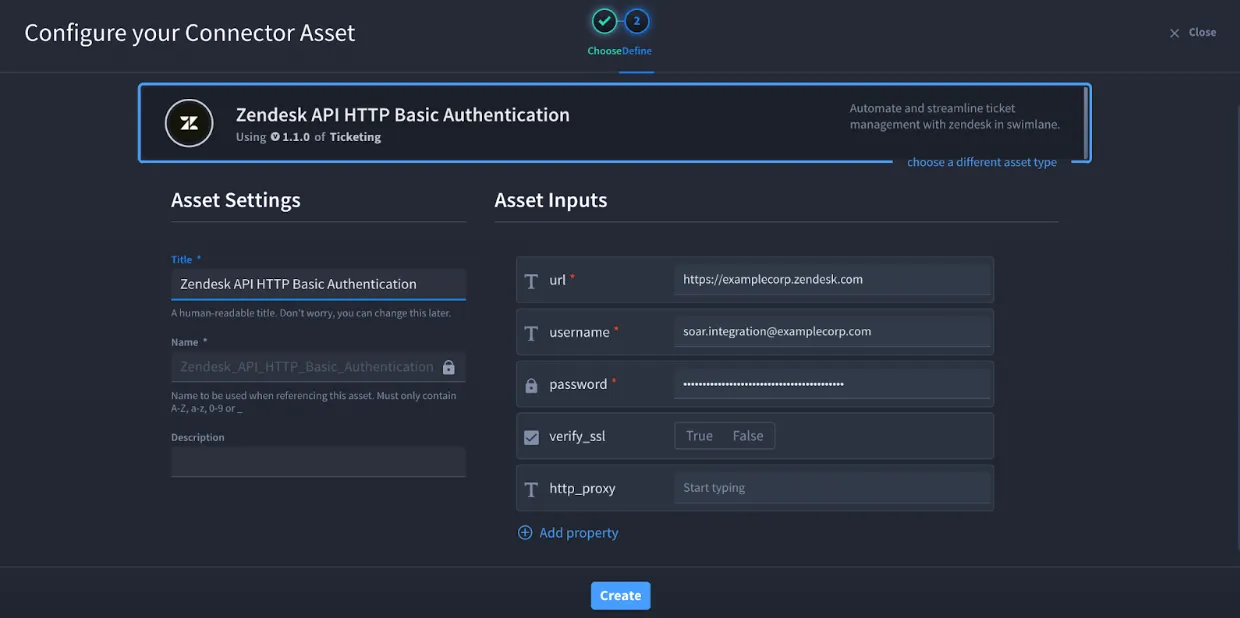
- Email ID and Password (HTTP Basic Authentication)
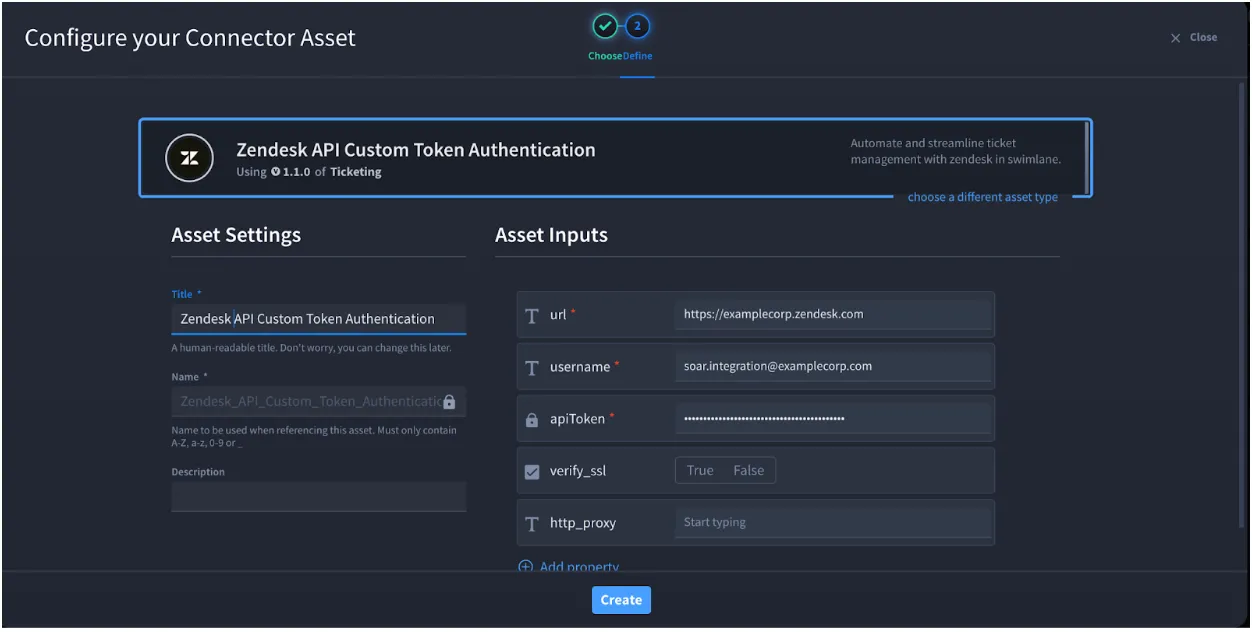
- Email ID and API Token (Custom Token Authentication)
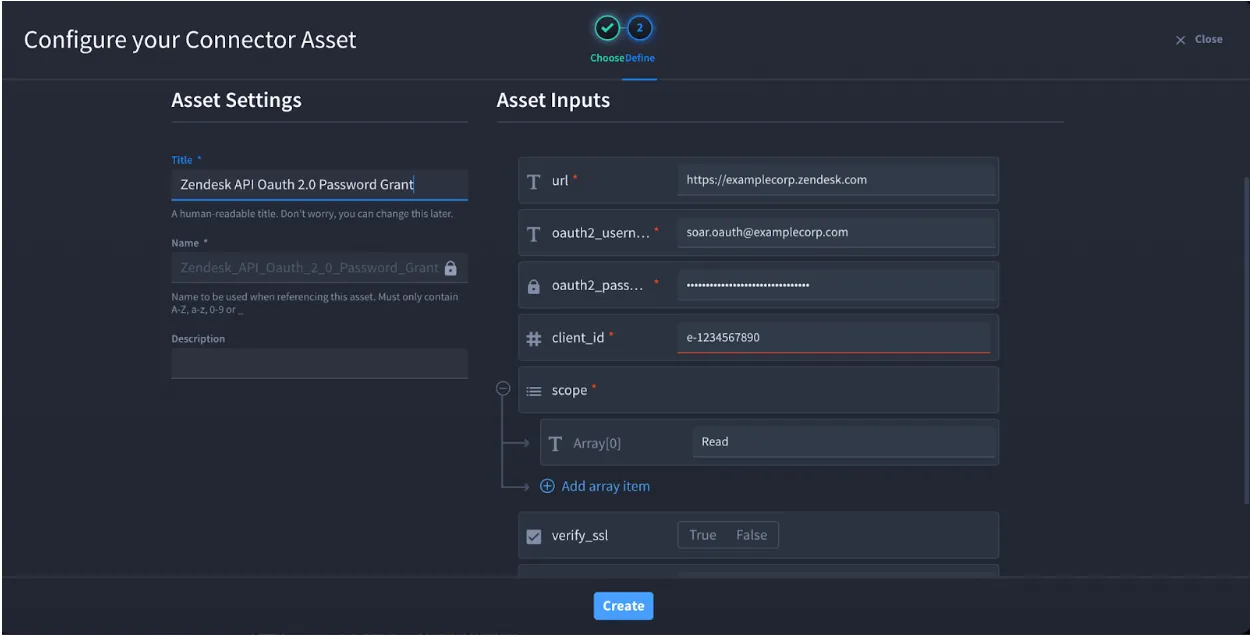
- OAuth Client ID, Email ID, Password, and Scopes (OAuth 2.0 Password Grant)
Authentication Methods Overview
The Zendesk Ticket Management connector supports the following authentication methods:
- HTTP Basic Authentication
- Custom Token Authentication
- OAuth 2.0 Password Grant
OAuth 2.0 Password Grant – Scopes
When using OAuth 2.0 Password Grant authentication, Zendesk requires explicit scopes to be assigned to the OAuth client. Scopes must be provided as an array of strings in the Swimlane connector configuration.
Recommended Scopes
These scopes cover all ticket-related actions supported by the Swimlane Zendesk Ticket Management connector:
- tickets:read
- tickets:write
Additional Scopes (Optional – Based on Usage)
Add these scopes only if your workflows require them:
Scope | When it is needed? |
|---|---|
users:read | Listing ticket comments with include=users, resolving requester/assignee details |
users:write | Create or update requester or assignee user details when managing tickets programmatically. |
ticket_comments:read | Retrieve ticket comments to understand investigation context and response history. |
organizations:read | Listing tickets by organization |
organizations:write | Update organization details to reflect ownership, severity, or incident impact. |
groups:read | Fetch group information to route tickets to the correct support or security teams. |
attachments:read | Accessing and inspecting ticket attachments |
attachments:write | Uploading files or modifying malware access on attachments |
tags:read | Read ticket tags to drive automated triage, categorization, and workflow decisions. |
Example Scope String (Recommended for Most Use Cases):
tickets:read tickets:write users:read organizations:read attachments:read attachments:write
- Missing scopes may result in 403 Forbidden errors.
- Scopes must be configured on the Zendesk OAuth client, not only in Swimlane.
- Changes to scopes require regenerating the OAuth token.
Read more:
- Zendesk OAuth Scopes Documentation https://developer.zendesk.com/documentation/api-basics/authentication/oauth/#scopes
- Zendesk Tickets API https://developer.zendesk.com/api-reference/ticketing/tickets/tickets/
- Zendesk Users API https://developer.zendesk.com/api-reference/ticketing/users/users/
- Zendesk Organizations API https://developer.zendesk.com/api-reference/ticketing/organizations/organizations/
Zendesk API Setup
Take the following steps to enable API access in Zendesk:
- Log in to the Zendesk Admin Center.
- Navigate to Apps and integrations, then select APIs.
- Open the Zendesk API settings page.
- Enable Password access for HTTP Basic Authentication.
- Enable Token access and generate an API token.
- Create OAuth clients if using OAuth authentication.
Connector Configuration in Swimlane
Take the following steps to configure the Zendesk Ticket Management connector asset in Swimlane:
- Log in to Turbine.
- From the left-hand navigation pane, click ORCHESTRATION and click Assets Asset homepage opens.
- Click the plus icon to open the Configure your Connector Asset window.
- Select Microsoft Azure Sentinel from the Asset type list.
- Fill in the Asset Settings and Asset Input as shown:
Configuration Parameters
Parameter | Description | Type | |
|---|---|---|---|
url | Zendesk API endpoint URL | string | Required |
username | Zendesk account email ID | string | Required |
password | Zendesk account password | string | Required for Basic/OAuth |
apiToken | Zendesk API token | string | Required for Custom Auth |
client_id | OAuth client ID | number | Required for OAuth |
scope | OAuth scopes | array | Required for OAuth |
verify_ssl | Verify SSL certificate | boolean | Optional |
http_proxy | Proxy configuration | string | Optional |
Custom Token Authentication
Basic Authentication
Oauth 2.0 Authentication
Troubleshooting
If authentication fails:
- Ensure API access is enabled in Zendesk.
- Verify credentials and authentication type.
- Confirm OAuth client configuration and scopes.
- Check SSL and proxy settings.
You have successfully authenticated the Zendesk Ticket Management connector in Swimlane.