Rapid7 InsightIDR
Introduction
This guide tells you how to authenticate the Rapid7 InsightIDR connector in Swimlane using API Key Authentication.
You will generate an API key in Rapid7 InsightIDR, collect the required identifiers, and configure the connector in Swimlane.
Prerequisites
Rapid7 Access Requirements
You must have Rapid7 permissions to:
- Access the InsightIDR platform
- Generate API keys
- Access Insight Platform APIs
- View your data region
Required Credentials
During setup, you will collect:
- API Base URL
- API Key
- Region (data center identifier)
Authentication Methods Overview
The Rapid7 InsightIDR connector supports:
- API Key Authentication
Rapid7 Setup
Take the following steps to generate an API Key:
- Log in to the Rapid7 Insight Platform.
- Navigate to User Settings / API Keys.
- Click Create API Key.
- Enter a name or description for the key.
- Assign required permissions (if applicable).
- Click Generate.
- Copy and securely store the API key.
Take the following steps to identify your Region:
- Log in to InsightIDR.
- Observe the URL in your browser.
- Example: https://us.idr.insight.rapid7.com
- Extract the region value (e.g., us, eu).
- Use this region to construct your API endpoint.
API Endpoint Format
https://[region].api.insight.rapid7.com
Example:
https://us.api.insight.rapid7.com
Connector configuration in Swimlane
- Log in to Turbine.
- From the left-hand navigation pane, click ORCHESTRATION and click Assets.
- Asset homepage opens.
- Click the plus icon to open the Configure your Connector Asset window.
- Select Rapid7 InsightIDR from the Asset type list.
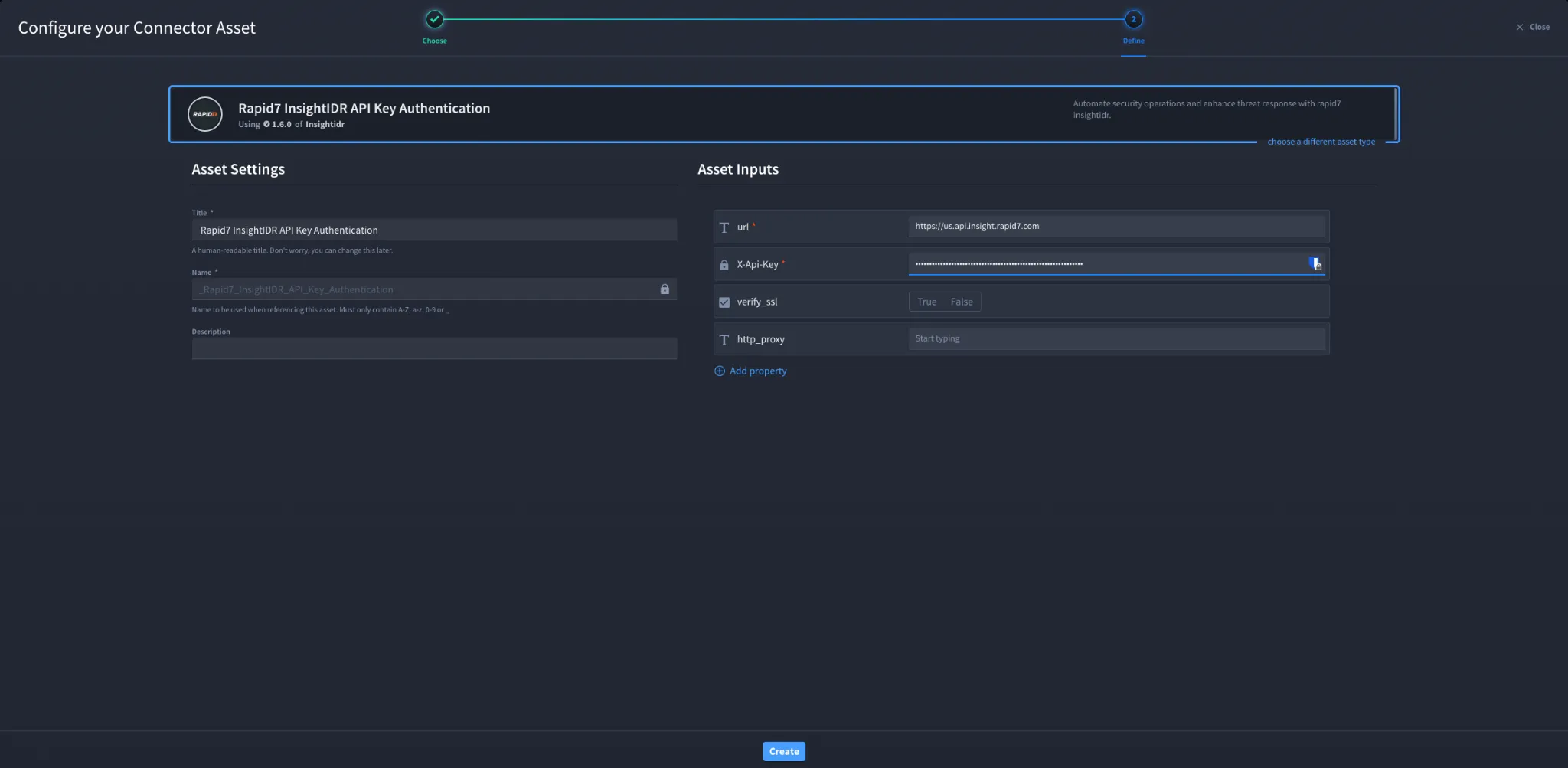
- Fill in the Asset Settings and Asset Input as shown:
Configuration – API Key Authentication
Field | Description | Required |
|---|---|---|
url | Rapid7 InsightIDR API base URL | Yes |
X-Api-Key | API key for authentication | Yes |
verify_ssl | Enable or disable SSL verification | No |
http_proxy | Proxy configuration | No |
Troubleshooting
Authentication failures may occur due to:
- Invalid or expired API key
- Incorrect API base URL or region
- Insufficient permissions
- SSL or proxy configuration issues
Fix:
- Regenerate API key if needed
- Verify correct region in URL
- Ensure proper API permissions
- Check SSL and proxy settings
You have successfully authenticated the Rapid7 InsightIDR connector in Swimlane.
Sources
- Rapid7 InsightIDR API Documentation: https://docs.rapid7.com/insightidr/
- Rapid7 Insight Platform API Reference: https://docs.rapid7.com/insight/platform-api/