Oasis STIX/TAXII2
Introduction
This guide tells you how to authenticate the OASIS TAXII2 connector in Swimlane. The connector supports HTTP Basic Authentication and Client Certificate Authentication. You will configure authentication details for your TAXII server, collect the required credentials, and configure the connector asset in Swimlane Turbine.
Prerequisites
TAXII Server Access Requirements
You must have access to a TAXII 2.0 or TAXII 2.1 server with permissions to:
- Access TAXII collections
- Retrieve and submit STIX objects
- Use API authentication (HTTP Basic or Client Certificate)
Required Credentials
Depending on the authentication method used, collect the following information:
- TAXII Server Root URL
- Username and Password (for HTTP Basic Authentication)
- Client Side Certificate (base64 encoded)
- Client Side Key (base64 encoded)
- TAXII version indicator (TAXII 2.1 enabled or disabled)
Authentication Methods Overview
The OASIS TAXII2 connector supports the following authentication methods:
- HTTP Basic Authentication
- Client Certificate Authentication
TAXII Server Setup
Authentication configuration depends on the TAXII server implementation. Take the following general steps to prepare authentication access.
- Log in to your TAXII server administration console.
- Create or identify a user account with access to TAXII collections.
- Enable HTTP Basic Authentication for the account if required.
- If certificate authentication is used, generate a client certificate and key.
- Export the client certificate and key as base64 encoded strings.
- Confirm whether your server supports TAXII 2.0 or TAXII 2.1.
- Copy the TAXII server root URL.
Connector Configuration in Swimlane
Take the following steps to configure the OASIS TAXII2 connector asset in Swimlane.
- Log in to Turbine.
- From the left-hand navigation pane, click ORCHESTRATION and click Assets.
- The Asset homepage opens.
- Click the plus icon to open the Configure your Connector Asset window.
- Select OASIS TAXII2 from the Asset type list.
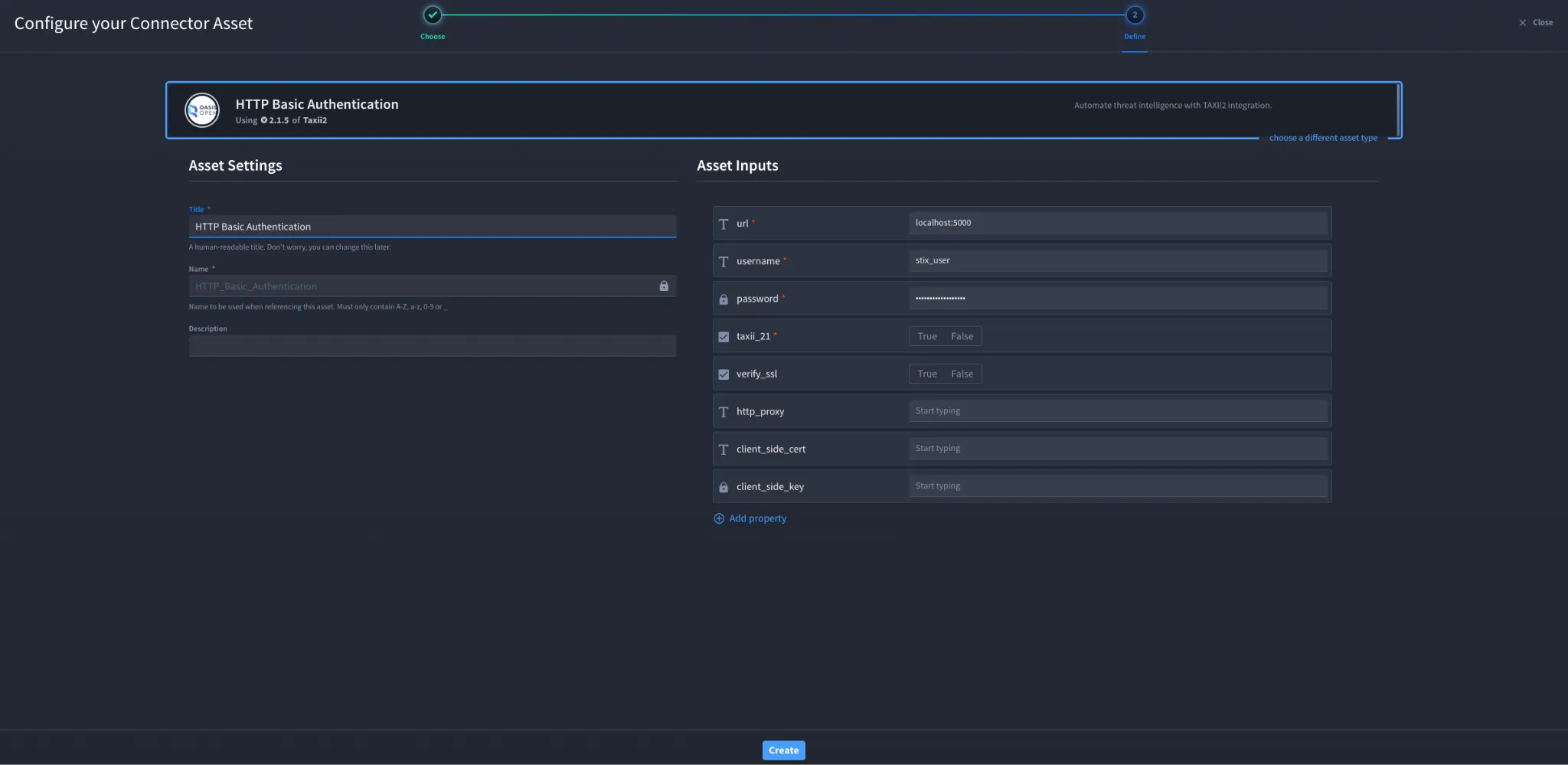
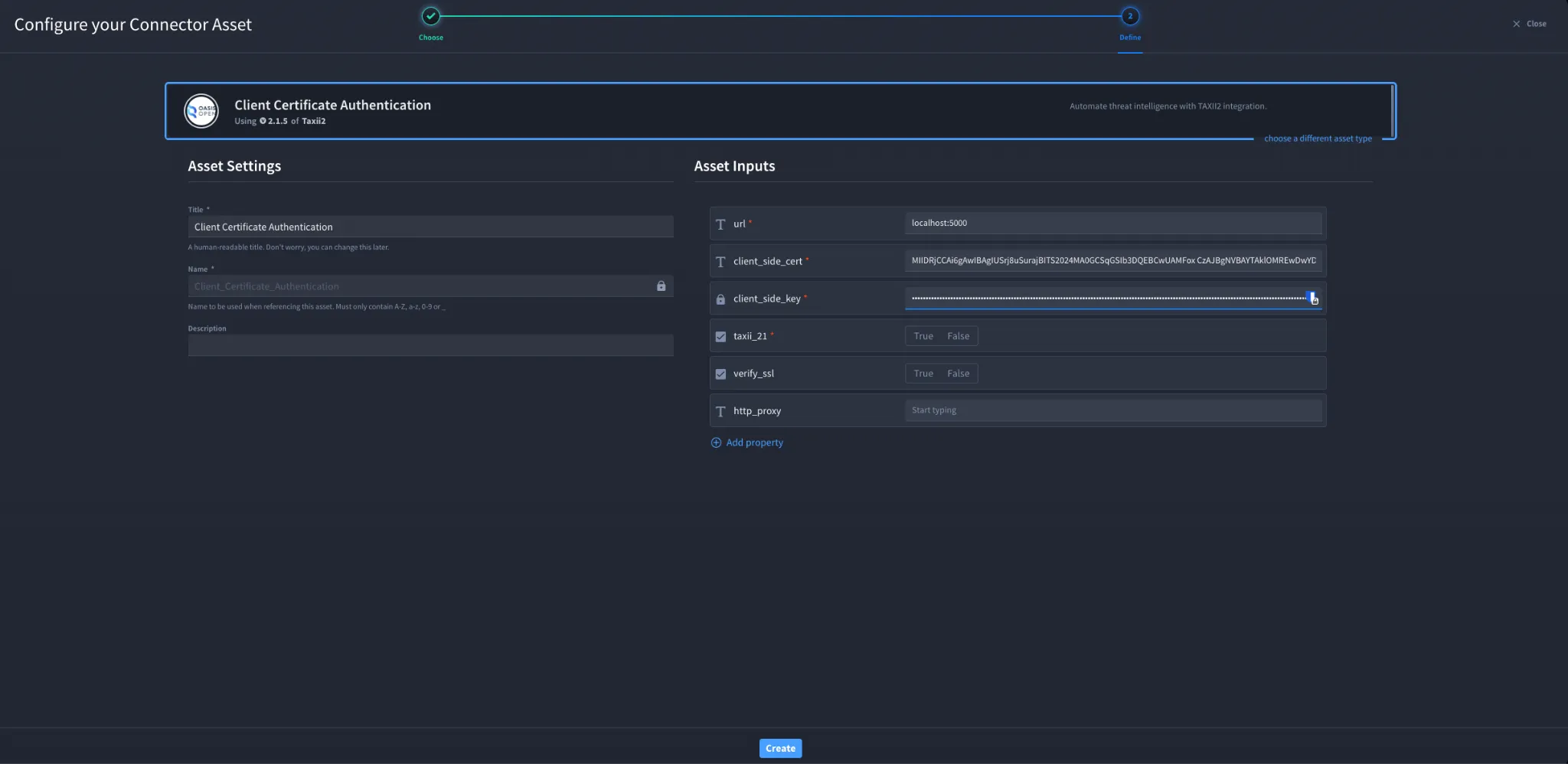
- Fill in the Asset Settings and Asset Input as shown below.
- Click Create.
Configuration – HTTP Basic Authentication
Field | Description | Required |
|---|---|---|
url | Root URL for TAXII2 server | Required |
username | TAXII server username | Required |
password | TAXII server password | Required |
client_side_cert | Base64 encoded client certificate (optional) | Optional |
client_side_key | Base64 encoded client key (optional) | Optional |
taxii_21 | True if connecting to a TAXII 2.1 server | Required |
verify_ssl | Enable or disable SSL certificate verification | Optional |
http_proxy | Proxy configuration | Optional |
Configuration – Client Certificate Authentication
Field | Description | Required |
|---|---|---|
url | Root URL for TAXII2 server | Required |
client_side_cert | Base64 encoded client certificate | Required |
client_side_key | Base64 encoded client key | Required |
taxii_21 | True if connecting to a TAXII 2.1 server | Required |
verify_ssl | Enable or disable SSL certificate verification | Optional |
http_proxy | Proxy configuration | Optional |
Troubleshooting
If authentication fails:
- Ensure the TAXII server URL is correct.
- Confirm the username and password are valid.
- Verify the client certificate and key are correctly base64 encoded.
- Ensure the TAXII version setting matches the server version.
- Check SSL verification and proxy settings if applicable.
Sources
- OASIS TAXII 2.0 Documentation: https://docs.oasis-open.org/cti/taxii/v2.0/
- OASIS TAXII 2.1 Documentation: https://docs.oasis-open.org/cti/taxii/v2.1/
Result
You have successfully authenticated the OASIS TAXII2 connector in Swimlane.