OpenAI ChatGPT
Introduction
This guide tells you how to authenticate the OpenAI ChatGPT connector in Swimlane using API Key Authentication. You will generate an OpenAI API key and configure the connector asset in Swimlane.
Prerequisites
OpenAI Access Requirements
You must have OpenAI permissions to:
- Access the OpenAI dashboard
- Generate API keys
Required Credentials
During setup, you will collect:
- API Key
- Base URL (optional)
OpenAI Setup
Take the following steps to generate an API Key:
- Log in to the OpenAI platform.
- Navigate to API keys.
- Click Create new secret key.
- Copy and securely store the generated API key.
Connector Configuration in Swimlane
Take the following steps to configure the connector:
- Log in to Turbine.
- From the left-hand navigation pane, click ORCHESTRATION and click Assets.
- Click the plus icon to create a new asset.
- Select OpenAI ChatGPT from the Asset Type list.
- Fill in the Asset Settings and Asset Input as shown:
Configuration - API Key Authentication
Field | Description | Type | Required |
|---|---|---|---|
apiKey | OpenAI API key | string | Required |
base_url | Base URL for OpenAI API endpoint | string | Optional |
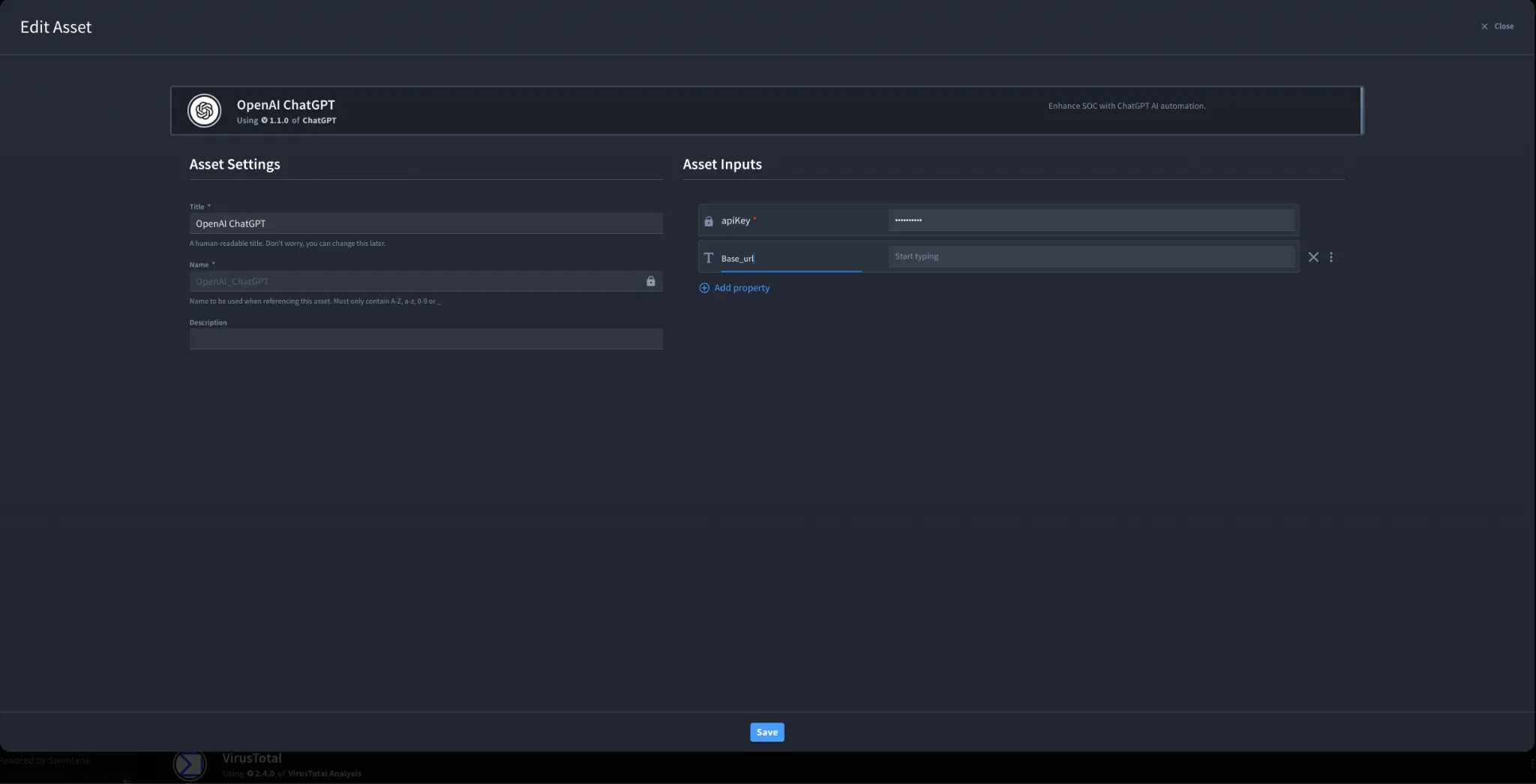
- Click Create.
You have successfully authenticated the OpenAI ChatGPT Connector in Swimlane.