NIST National Vulnerabilities Database (NVD)
Introduction
This guide tells you how to authenticate the NIST National Vulnerabilities Database (NVD) connector in Swimlane using an API Key.
The connector allows you to retrieve Common Vulnerabilities and Exposures (CVEs) and Common Platform Enumeration (CPE) information directly from the National Vulnerability Database. An API key is optional but strongly recommended because it increases the API rate limit from 5 requests per 30 seconds to 50 requests per 30 seconds.
Prerequisites
NIST Access Requirements
You must have:
- Access to the National Vulnerability Database (NVD).
- A valid email address to request an API key.
- Internet access to the NVD REST APIs.
Required Credentials
During setup, you will collect:
- NIST API Key
NIST Setup
Take the following steps to generate an API Key:
- Navigate to the NIST API Key Request page.
- Enter your:
- First Name
- Last Name
- Email Address
- Read and accept the Terms of Use.
- Click Submit.
- Check your email inbox for a message from [email protected].
- Open the activation link contained in the email.
- Copy and securely save your API Key.
Important:
- The activation link is valid for 7 days.
- Each email address can have only one active API key.
- Requesting and activating a new key invalidates the previous key associated with that email address.
Connector Configuration in Swimlane
- Log in to Turbine.
- From the left-hand navigation pane, click ORCHESTRATION and click Assets.
- Asset homepage opens.
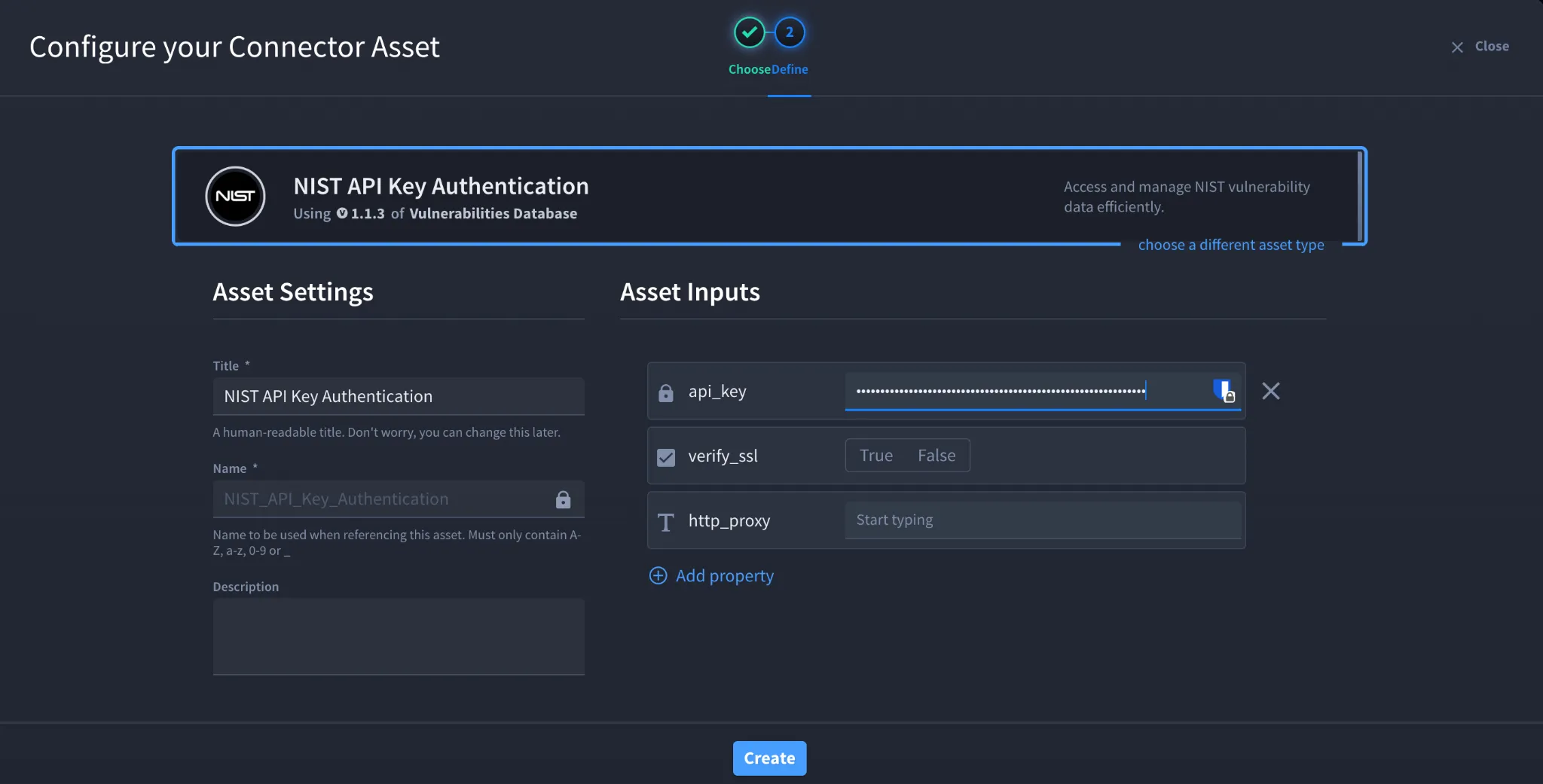
- Click the plus icon to open the Configure your Connector Asset window.
- Select NIST National Vulnerabilities Database from the Asset type list.
- Fill in the Asset Settings and Asset Input as shown:
Field | Description | Required/Optional |
|---|---|---|
api_key | NIST API Key | Optional (Recommended) |
verify_ssl | Enable/Disable SSL Verification | Optional |
http_proxy | Optional proxy configuration | Optional |
Fields with * marks are required.
- Click Create.
Troubleshooting
API Rate Limit Reached
If you receive rate limit errors:
- Verify that your API key has been entered correctly.
- Use an API key to increase your request limit.
- Reduce the frequency of API requests if necessary.
Authentication Failed
Verify that:
- The API key has been activated.
- The API key has been copied correctly.
- The API key has not been regenerated or revoked.
Unable to Connect
Verify that:
- Your internet connection allows outbound HTTPS traffic.
- Proxy settings are configured correctly if your environment uses a proxy.
SSL Errors
If SSL verification fails:
- Verify that your system trusts the NIST SSL certificate.
- Disable verify_ssl only for testing if permitted by your organization's security policy.
Result
You have successfully authenticated the NIST National Vulnerabilities Database connector in Swimlane.
Sources
- NIST National Vulnerability Database API Key Requests https://nvd.nist.gov/developers/request-an-api-key
- NIST National Vulnerability Database API Documentation https://nvd.nist.gov/developers/start-here