Microsoft Graph API SharePoint
Introduction
This guide explains how to authenticate the Microsoft Graph API SharePoint connector in Swimlane using OAuth 2.0 Client Credentials.
The connector uses an Azure AD (Microsoft Entra ID) application to securely authenticate with Microsoft Graph and perform SharePoint operations such as managing sites, lists, folders, files, and document libraries.
Prerequisites
Before configuring the connector, ensure that you have:
- A Microsoft 365 tenant
- Administrator access to Microsoft Entra ID (Azure AD)
- Permission to register applications
- A SharePoint Online site
- Permission to grant Microsoft Graph API application permissions
Required Credentials
Collect the following information during setup:
Credential | Description |
|---|---|
URL | Microsoft Graph API endpoint |
Token URL | OAuth token endpoint |
Client ID | Azure application (client) ID |
Client Secret | Azure application client secret |
Scope | Microsoft Graph permission scope |
Register an Application in Microsoft Entra ID
Take the following steps to create an Azure application.
- Sign in to the Microsoft Azure Portal.
- Navigate to Microsoft Entra ID > App registrations.
- Click New registration.
- Enter a name for the application.
- Select Accounts in this organizational directory only.
- Click Register.
Configure Microsoft Graph Permissions
- Open the newly created application.
- Select API permissions.
- Click Add a permission.
- Select Microsoft Graph.
- Select Application permissions.
- Add the permissions required for your SharePoint operations.
Typical permissions include:
- Sites.ReadWrite.All
- Files.ReadWrite.All
Depending on your workflows, you may also require:
- User.ReadWrite.All
- Directory.ReadWrite.All
- Directory.AccessAsUser.All
- Mail.ReadWrite
- Mail.Send
- SecurityEvents.Read.All
- SecurityEvents.ReadWrite.All
Sites.ReadWrite.All is required for SharePoint actions.
- Click Add permissions.
- Click Grant admin consent for your organization.
Create a Client Secret
- Select Certificates & secrets.
- Click New client secret.
- Enter a description.
- Select an expiration period.
- Click Add.
- Copy the Value of the client secret immediately.
The client secret value is displayed only once. Store it securely.
Obtain the Required Values
From the application's Overview page, copy:
- Application (Client) ID
- Directory (Tenant) ID
Construct the following URLs.
Microsoft Graph API URL
https://graph.microsoft.com
Token URL
Replace <Tenant_ID> with your Azure tenant ID.
https://login.microsoftonline.com/<Tenant_ID>/oauth2/v2.0/token
Scope
https://graph.microsoft.com/.default
Configure the Connector in Swimlane
- Log in to Turbine.
- Navigate to ORCHESTRATION > Assets.
- Click the plus (+) icon.
- Select Microsoft Graph API SharePoint.
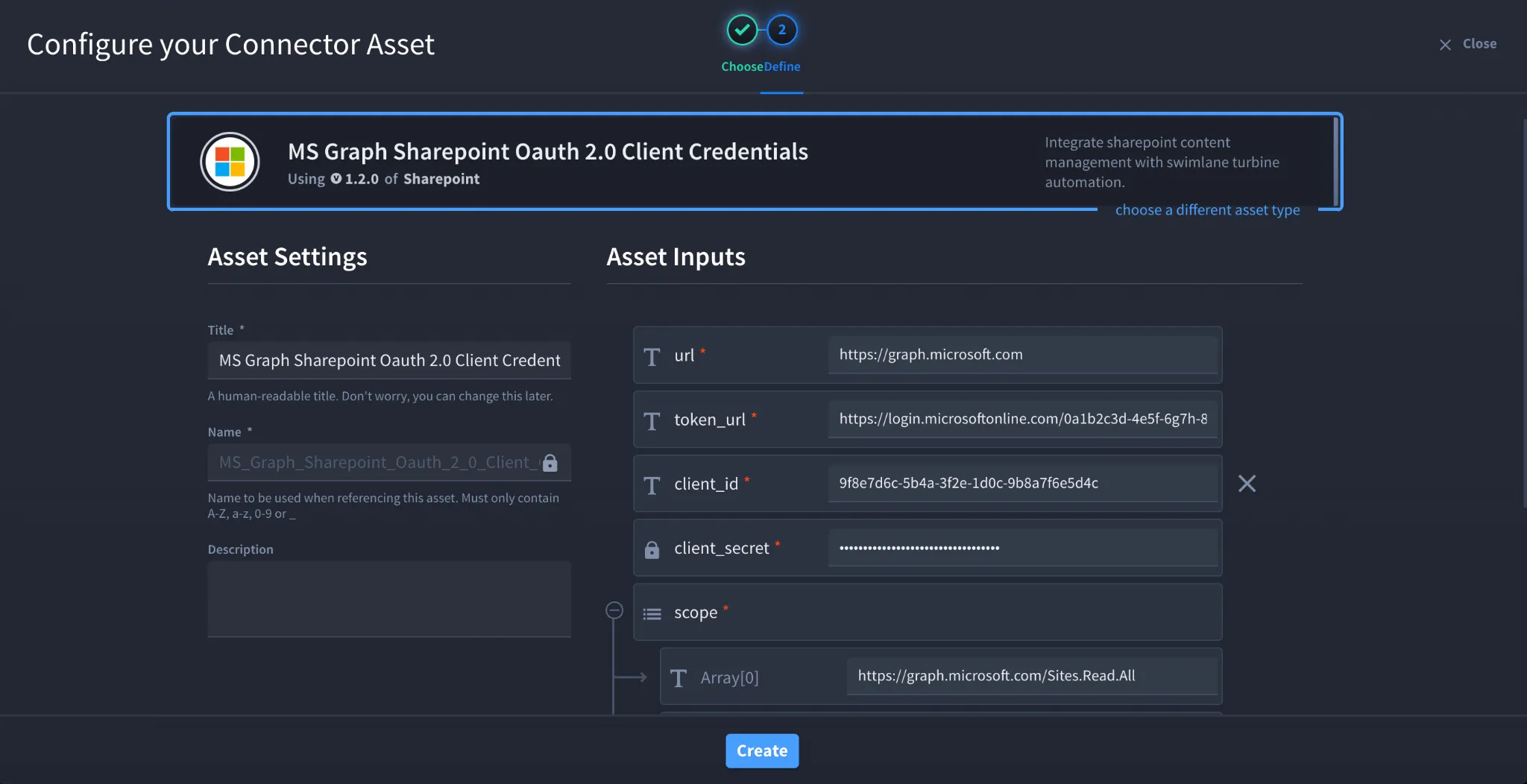
- Choose MS Graph SharePoint OAuth 2.0 Client Credentials as the configuration type.
- Configure the asset using the following values.
Field | Value |
|---|---|
url | https://graph.microsoft.com |
token_url | https://login.microsoftonline.com/<Tenant_ID>/oauth2/v2.0/token |
client_id | Azure Application (Client) ID |
client_secret | Azure Client Secret |
scope | https://graph.microsoft.com/.default |
verify_ssl | Optional |
http_proxy | Optional |
- Click Create.
Delegated Authentication (Optional)
The connector also supports OAuth 2.0 Password Grant (Delegated Authentication), which authenticates on behalf of a Microsoft Entra user. This method requires the following additional credentials:
- Tenant ID
- Username
- Password
- Client ID
- Client Secret
Use delegated authentication only when user-context access is required. Microsoft recommends using Client Credentials whenever possible for service-to-service integrations.
Troubleshooting
Authentication Failed
Verify that:
- The Client ID and Client Secret are correct.
- The client secret has not expired.
- The Token URL includes the correct Tenant ID.
Insufficient Privileges
Verify that:
- Required Microsoft Graph permissions have been granted.
- Admin consent has been granted for the application.
- The application has the SharePoint permissions required for the actions being performed.
Unable to Access SharePoint Sites
Verify that:
- The SharePoint site exists.
- The application has Sites.ReadWrite.All permission.
- The correct Site ID is being used for SharePoint actions. You can retrieve the Site ID using the connector's Get Site action.
SSL or Proxy Issues
If SSL verification fails:
- Verify that the Microsoft Graph endpoint presents a trusted certificate.
- Confirm that any corporate proxy is configured correctly.
- Disable verify_ssl only for testing if permitted by your organization's security policy.
Result
You have successfully authenticated the Microsoft Graph API SharePoint connector in Swimlane using OAuth 2.0 Client Credentials.
Sources
- Microsoft Graph API documentation: https://learn.microsoft.com/graph/api/overview
- Microsoft Entra ID – Register an application: https://learn.microsoft.com/entra/identity-platform/quickstart-register-app
- Microsoft Graph permissions reference: https://learn.microsoft.com/graph/permissions-reference
- Microsoft identity platform OAuth 2.0 client credentials flow: https://learn.microsoft.com/entra/identity-platform/v2-oauth2-client-creds-grant-flow
- Microsoft Graph SharePoint API documentation: https://learn.microsoft.com/graph/api/resources/sharepoint
- Microsoft Graph Sites API: https://learn.microsoft.com/graph/api/resources/site
- Microsoft Graph Lists API: https://learn.microsoft.com/graph/api/resources/list
- Microsoft Graph Drive API: https://learn.microsoft.com/graph/api/resources/driveitem