Malware Information Sharing Platform
Introduction
This guide tells you how to authenticate the MISP (Malware Information Sharing Platform) connector in Swimlane using API Key Authentication.
You will generate a MISP authentication key, collect the required connection details, and configure the connector in Swimlane. The connector authenticates using an API Key passed in the Authorization header. The connector details referenced below are from the uploaded Swimlane connector documentation.
Prerequisites
MISP Access Requirements
You must have permissions to:
- Log in to your MISP instance.
- Create or manage authentication keys.
- Access the MISP REST API.
- View or manage events and attributes, depending on the connector actions you plan to use.
Required Credentials
During setup, you will collect:
- MISP Server URL
- MISP API Key
MISP Setup
Take the following steps to generate an API Key:
- Log in to your MISP instance.
- From the left navigation menu, click Administration.
- Select List Auth Keys.
- Click + Add authentication key.
- Enter a descriptive comment for the key.
- (Optional) Restrict the key to specific IP addresses.
- (Optional) Set an expiration date.
- Click Submit.
- Copy the generated authentication key.
- Store the key securely, as it will be required when configuring the Swimlane connector.
Take the following steps to obtain the MISP URL:
- Open your MISP instance in a web browser.
- Copy the base URL.
Example:
https://misp.company.com
Do not include any API endpoints such as /attributes or /events.
Connector Configuration in Swimlane
- Log in to Turbine.
- From the left-hand navigation pane, click ORCHESTRATION and click Assets.
- Asset homepage opens.
- Click the plus icon to open the Configure your Connector Asset window.
- Select MISP from the Asset type list.
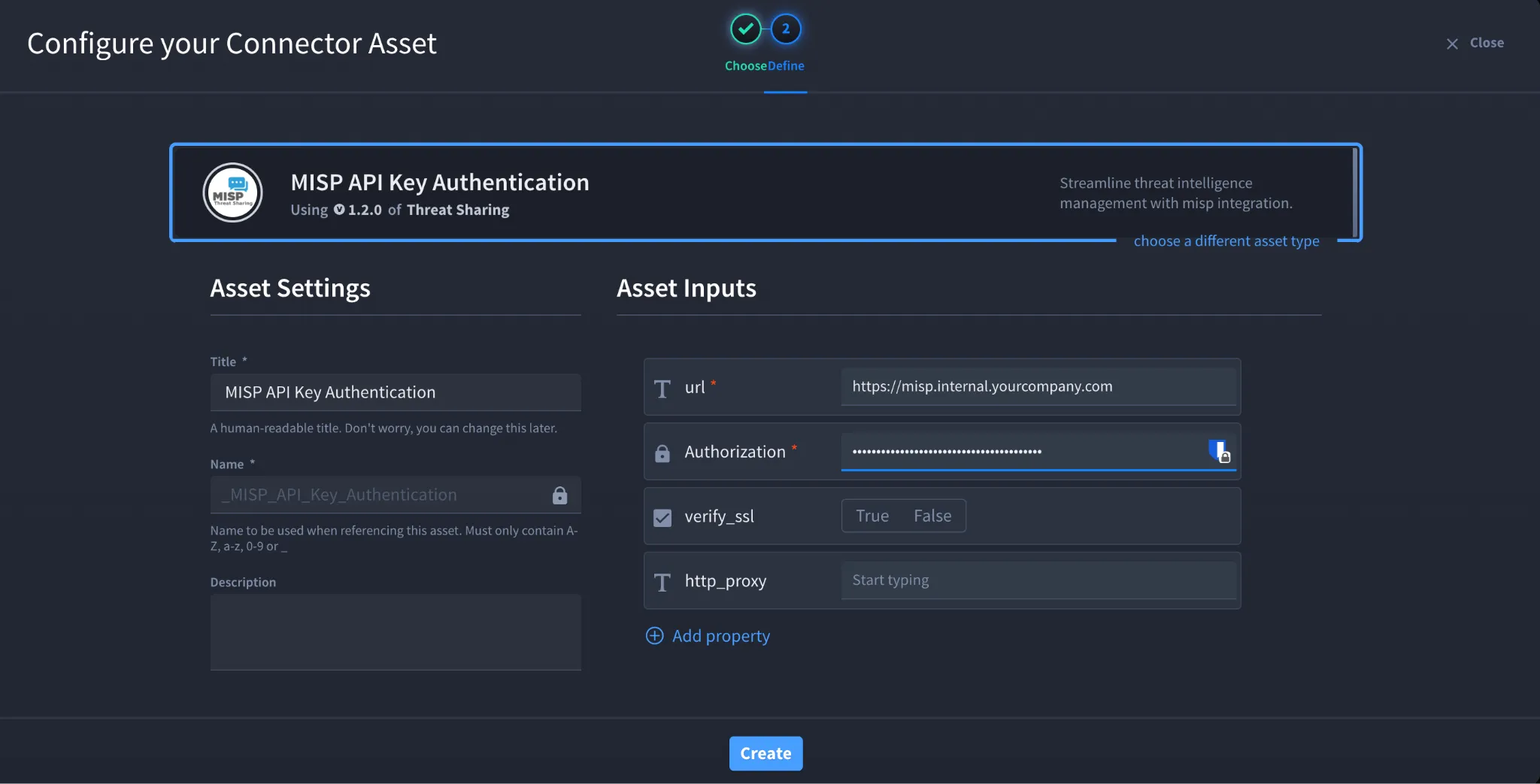
- Fill in the Asset Settings and Asset Input as shown:
Field | Description | Required/Optional |
|---|---|---|
url | Base URL of your MISP instance (for example, https://misp.company.com) | Required |
Authorization | MISP API Key | Required |
verify_ssl | Enable/Disable SSL Verification | Optional |
http_proxy | Optional proxy configuration | Optional |
Fields with * marks are required.
- Click Create.
Troubleshooting
Authentication Failed (401 Unauthorized)
Verify that:
- The API Key is correct.
- The API Key has not expired.
- The API Key has not been revoked.
Forbidden (403)
Verify that:
- Your MISP user has permission to access the API.
- Your account has permission to perform the connector actions.
- Your API key is allowed to access the requested resources.
Unable to Connect
Verify that:
- The MISP URL is correct.
- The MISP server is reachable from the Swimlane instance.
- Any required firewall rules allow HTTPS traffic.
SSL Certificate Errors
If SSL verification fails:
- Verify that the MISP server is using a trusted certificate.
- Import the CA certificate if your organization uses an internal CA.
- Disable verify_ssl only for testing if permitted by your organization's security policy.
Result
You have successfully authenticated the MISP connector in Swimlane.
Sources
- MISP Automation Documentation https://www.circl.lu/doc/misp/automation/
- MISP OpenAPI Documentation https://www.misp-project.org/openapi/
- MISP Project Documentation https://www.misp-project.org/documentation/