IBM QRADAR
Introduction
This guide explains how to authenticate the IBM QRadar connector in Swimlane using API Key authentication. You will generate a QRadar SEC token, collect the required deployment URL, and configure the connector asset in Swimlane.
Prerequisites
QRadar Access Requirements
You must have QRadar administrator or equivalent permissions to:
- Access the QRadar Admin console
- Create Authorized Services for API access
- Generate SEC tokens
- View system deployment URL and API endpoint
Required Credentials
During setup you will collect:
- QRadar Deployment URL
- SEC Token (API Key)
- Optional API Version
IBM QRadar API Setup
Take the following steps to generate a SEC API Token in QRadar:
- Log in to the IBM QRadar console using administrator credentials.
- From the top navigation bar, click Admin.
- Navigate to User Management → Authorized Services.
- Click Add Authorized Service.
- Enter the following information:
- Service Name (example: Swimlane_API_Access).
- User Role with appropriate permissions for the API.
- Expiry Date if required.
- API Access level appropriate for your environment.
- Click Create to generate the SEC token.
- Copy and securely store the token. It will only be shown once.
Retrieve the QRadar API URL
- Log in to the QRadar console.
- Navigate to Admin.
- Locate system information under System and License Management.
- Identify the QRadar host or IP address.
- Construct the API endpoint using the format: https://<QRadar-IP>/api/
Example API URL: https://192.168.1.100/api/
Optional: Test the QRadar API Token
You can validate the SEC token using a simple cURL command:
curl --location 'https://<QRadar-IP>/api/siem/offenses' --header 'SEC: <your_token>' --header 'Range: items=0-0'
If the request returns offense data, the API token is working correctly.
Connector Configuration in Swimlane
- Log in to Turbine.
- From the left navigation pane click ORCHESTRATION and select Assets.
- Click the Plus (+) icon to create a new asset.
- Select IBM QRadar from the Asset Type list.
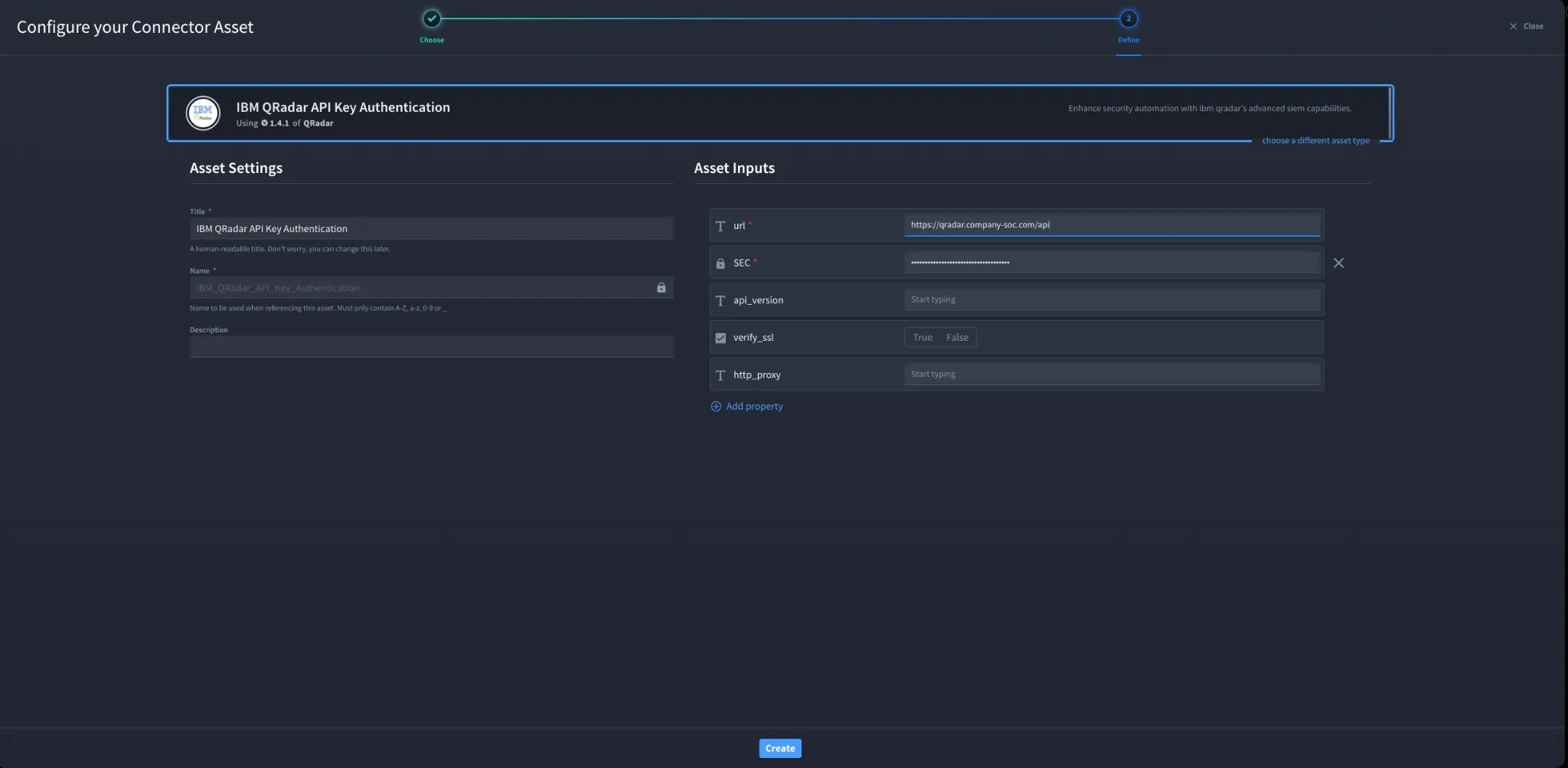
- Fill in the Asset Settings and Asset Input fields as shown below.
Field | Description | Required |
|---|---|---|
url | Base URL of the QRadar API endpoint (example: https://<QRadar-IP>/api/) | Required |
SEC | QRadar SEC token used for API authentication | Required |
api_version | Specify QRadar API version if required. Default uses latest version | Optional |
verify_ssl | Enable or disable SSL certificate verification | Optional |
http_proxy | Proxy configuration if API requests must pass through a proxy | Optional |
Troubleshooting
- Ensure the SEC token was copied correctly when the Authorized Service was created.
- Verify the QRadar API URL uses the correct host or IP address followed by /api/.
- Confirm the user role assigned to the Authorized Service has sufficient permissions.
- If API requests fail with authentication errors, regenerate the SEC token and update the Swimlane asset.
- If SSL errors occur, verify SSL settings or disable SSL verification if appropriate for your environment.
- If QRadar is behind a proxy, configure the http_proxy field in the Swimlane asset.
Result
You have successfully authenticated the IBM QRadar connector in Swimlane.
Sources
- IBM QRadar API Documentation: https://www.ibm.com/docs/en/qradar-common
- IBM QRadar Ariel Query Language Documentation: https://www.ibm.com/docs/en/qradar-common?topic=language-ariel-query
- AirMDR QRadar Integration Guide: https://docs.airmdr.com/Integrations/QRadar