GreyNoise Introduction
This guide tells you how to authenticate the GreyNoise connector in Swimlane using API Key Authentication.
You will obtain an API key from GreyNoise and configure the connector in Swimlane. The connector uses the GreyNoise API to retrieve context and threat intelligence for IP addresses.
Prerequisites
GreyNoise Access Requirements
You must have:
- A GreyNoise account.
- Access to the GreyNoise API.
- A valid GreyNoise API key.
- Appropriate GreyNoise subscription or API access for the actions you want to use.
Required Credentials
During setup, you will collect:
- URL
- API Key
GreyNoise Setup
Take the following steps to obtain your API key:
- Go to the GreyNoise website and log in with your existing account. If you do not have an account, create one.
- Click your profile.
- Select My API Key.
- Click View API Key to display your API key.
- Copy and securely save the API key. You will use this value when configuring the GreyNoise connector in Swimlane.
Keep your API key secure and do not expose it in playbooks, documentation, or other locations accessible to unauthorised users.
Connector Configuration in Swimlane
- Log in to Turbine.
- From the left-hand navigation pane, click ORCHESTRATION and click Assets.
- Asset homepage opens.
- Click the plus icon to open the Configure your Connector Asset window.
- Select GreyNoise from the Asset type list.
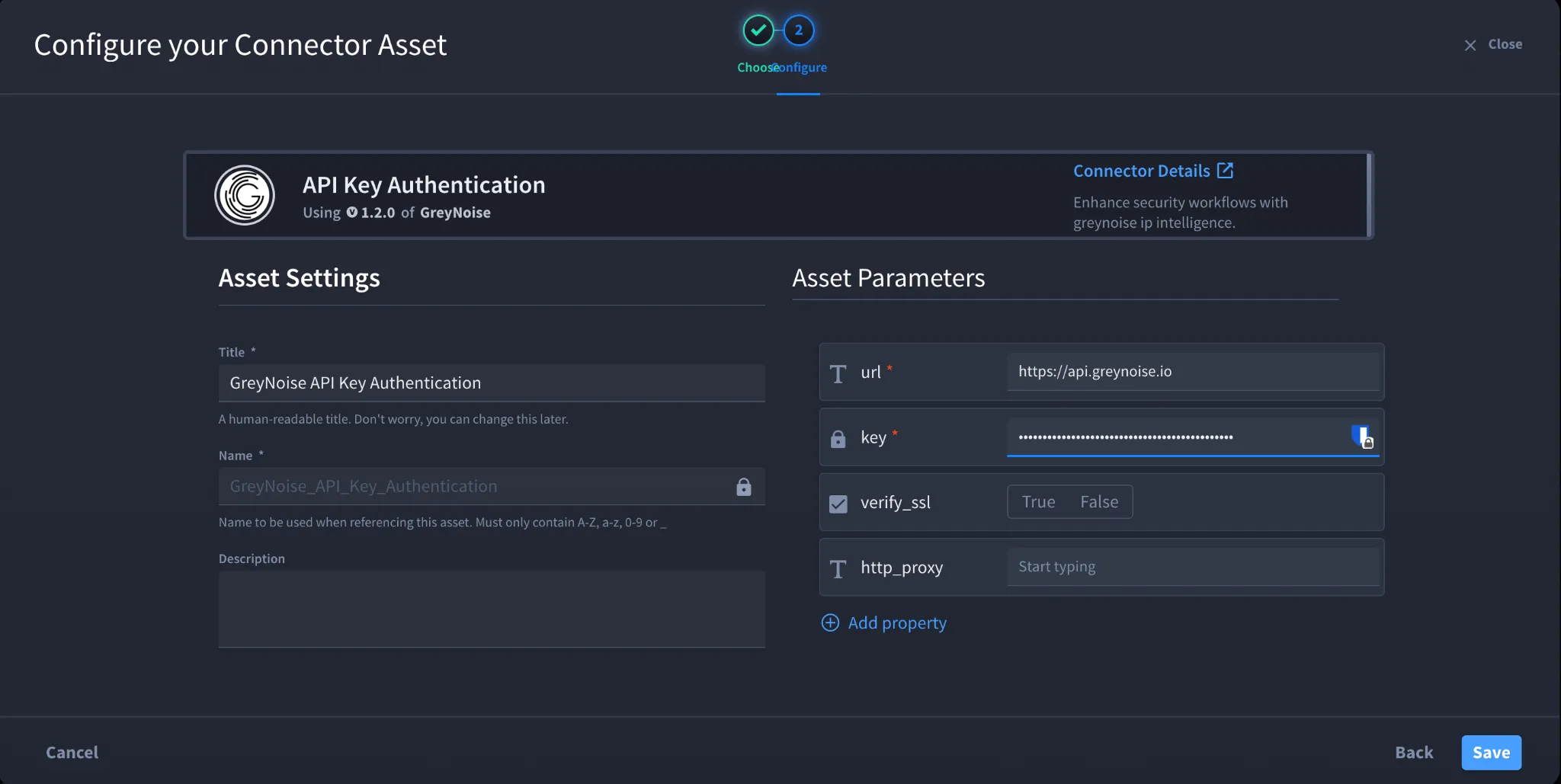
- Fill in the Asset Settings and Asset Input as shown:
Field | Description | Required/Optional |
|---|---|---|
url | URL of the target GreyNoise API host. | Required |
key | GreyNoise API key used to authenticate API requests. | Required |
verify_ssl | Enable or disable SSL certificate verification. | Optional |
http_proxy | Proxy configuration used to route requests, if required. | Optional |
Fields with * marks are required.
- Click Create.
Troubleshooting
- If authentication fails, verify that the API key entered in the key field is correct and active.
- If you receive an authorization error, verify that your GreyNoise account and API key have access to the API endpoint you are trying to use.
- If an action is unavailable or returns a permission-related response, verify that your GreyNoise subscription provides access to that endpoint.
- If you receive an SSL certificate error, verify the verify_ssl configuration.
- If your environment uses a proxy, verify that the http_proxy value is configured correctly.
Result: You have successfully authenticated the GreyNoise connector in Swimlane.
Sources
- GreyNoise API Documentation https://docs.greynoise.io/
- GreyNoise API Reference - Community IP Lookup https://docs.greynoise.io/reference/get_v3-community-ip
- GreyNoise https://www.greynoise.io/
- GreyNoise Authentication Guide https://explained.tines.com/en/articles/8484293-greynoise-authentication-guide