Google Workplace
Introduction
This guide tells you how to authenticate the Google Workspace connector in Swimlane.
You will create a Google Cloud project, enable required APIs, configure a service account, optionally enable domain-wide delegation, and configure the connector in Swimlane.
This connector supports Google authentication using one of the following:
- Service Account JSON credentials (Base64-encoded)
- OAuth 2.0 Client ID, Client Secret, and Refresh Token
Prerequisites
Google Access Requirements
You must have permissions to:
- Create and manage projects in Google Cloud Platform
- Enable APIs in Google Cloud Console
- Create service accounts and download JSON key files
- Manage domain-wide delegation in Google Admin console (recommended)
- Create OAuth 2.0 client credentials (optional)
Required Credentials
During setup, you will collect:
- Service Account JSON key file (Base64-encoded) or OAuth 2.0 Client ID and Client Secret
- Delegate account email address (recommended)
- Customer ID or my_customer alias (optional)
- OAuth scopes for domain-wide delegation (recommended)
- Refresh token (if using OAuth 2.0 client credentials)
GCP Project Creation
Take the following steps to create a Google Cloud project:
- Log in to Google Cloud Console at https://console.cloud.google.com/.
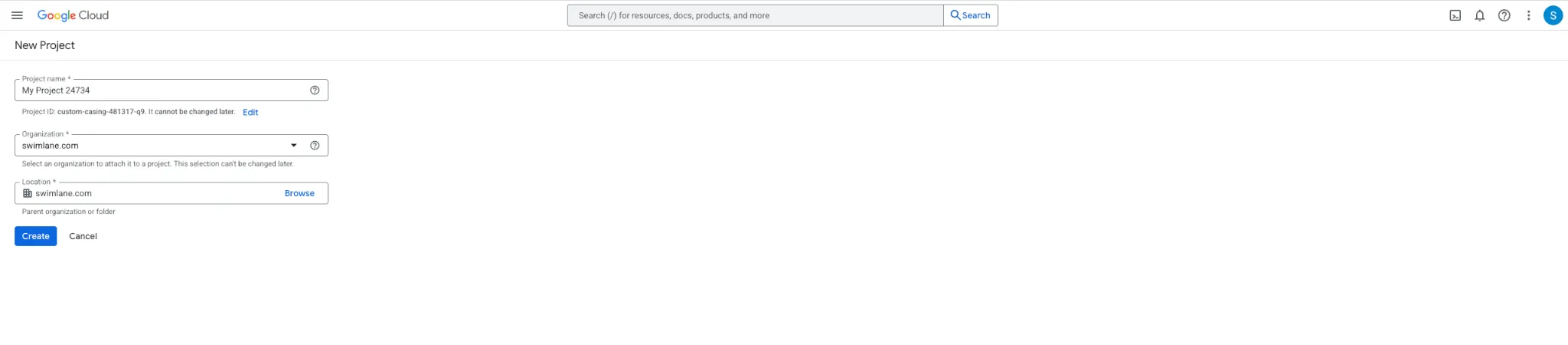
- Navigate to https://console.cloud.google.com/projectcreate .
- Name project and click Create.
- Navigate to Projects and select new project.
Enabling Individual APIs
- After creating project, enable required APIs for the connector.
- Navigate to APIs & Services dashboard and enable following APIs using explicit names if links become deprecated:
API | URL |
|---|---|
Google Drive | |
Gmail | |
Google Workspace Alert Center | |
G Suite Vault | |
Admin SDK API | |
Google Chat API | |
Google Sheets API |
- After enabling APIs, navigate back to APIs & Services dashboard and verify all APIs are listed.
- If any APIs are missing, enable again.
Configuring a Service Account
Google Workspace connector requires a Google service account to authenticate.
Take the following steps to create a service account and download JSON key file:
- Select the appropriate project.
- Click CREATE SERVICE ACCOUNT.
- Assign name and description, then click CREATE AND CONTINUE.
- Select role Owner, then click CONTINUE.
- Skip Grant users access to this service account or add users, then click DONE.
- Click newly created service account email.
- Navigate to KEYS.
- Click ADD KEY and select CREATE NEW KEY.
- Select JSON and click CREATE.
- Download JSON file. This file is required for Swimlane asset creation.
- Navigate to DETAILS and copy Unique ID. This value is required for domain-wide delegation.
Delegating Domain-Wide Authority (Recommended)
- In order to support accessing multiple user's accounts, domain-wide authority must be enabled before creating a service account.
- Choosing not to delegate domain-wide authority will heavily limit the scope of what this connector can do.
- If the connector will only operate against a single account, the Setting API Scopes section can be skipped.
Setting API Scopes
After creating service account, authorize required API scopes using Google Admin console:
- From https://admin.google.com, navigate to Security > API controls.
- Click Manage Domain Wide Delegation.
- Click Add new.
- In Client ID field, enter Unique ID from service account Details menu.
- Enter following CSV value into OAuth Scopes (comma-delimited) input:
https://mail.google.com/,https://www.googleapis.com/auth/admin.directory.device.mobile,https://www.googleapis.com/auth/admin.directory.device.mobile.action,https://www.googleapis.com/auth/admin.directory.group,https://www.googleapis.com/auth/admin.directory.group.member,https://www.googleapis.com/auth/admin.directory.orgunit,https://www.googleapis.com/auth/admin.directory.user,https://www.googleapis.com/auth/admin.directory.user.security,https://www.googleapis.com/auth/admin.directory.user.alias,https://www.googleapis.com/auth/admin.directory.userschema,https://www.googleapis.com/auth/apps.alerts,https://www.googleapis.com/auth/devstorage.read_only,https://www.googleapis.com/auth/drive,https://www.googleapis.com/auth/ediscovery,https://www.googleapis.com/auth/chat.bot,https://www.googleapis.com/auth/spreadsheets
- Click Authorize.
OAuth 2.0 (Optional)
To configure OAuth 2.0 for Google Workspace connector, follow these steps:
- Navigate to Google Cloud Console.
- Select project.
- In left sidebar, select APIs & Services > Credentials.
- Click CREATE CREDENTIALS and select OAuth client ID.
- Select application type as Web application.
- Enter name and click Create.
- Copy client ID and client secret.
- Add necessary scopes under Scopes for Google APIs.
- Click Save.
Retrieve Refresh Token
To retrieve refresh_token, reach out to Swimlane support for requirements.txt and get_refresh_token.py files.
Python3 must be installed on local system.
Run the following commands:
- python3 -m pip install -r requiremments.txt
- python3 get_refresh_token.py
Script will:
- Prompt for client_id and client_secret
- Prompt for additional scopes. By default requested scopes are gmail.send and gmail.modify
- Direct user to Gmail authentication and approval in browser.
- Redirect the user to a blank page at https://localhost.
- Copy full URL for https://localhost address and provide it to script to receive refresh token.
Swimlane Asset Setup
Credentials
Contents of JSON credentials key file downloaded when creating service account must be base64-encoded when creating Swimlane Google Workspace asset. Copy Base64 encoded string and paste into Service Account JSON field.
For Linux and Mac:
$ cat <path_to_credentials.json> | base64
For Windows using Powershell:
[convert]::ToBase64String((Get-Content -path your_file_path -Encoding byte))
Delegate Account
- Delegate account value determines which account to operate as when running actions.
- Delegate account value should be the email address for the target account.
- In most cases an Admin account of Google Workspace should be used.
- Do not use service account email.
Customer ID
- Customer ID is unique ID for customer's Google Workspace account.
- As account administrator, my_customer alias can be used to represent customerId.
- To find Customer ID, navigate to https://admin.google.com and go to Account > Account settings.
Limitations when NOT using a Delegated Account
- Using a service account without delegate_account introduces limitations when interacting with user data.
- Service accounts may not be able to access user emails, contacts, or Google Drive files in the same way a regular user can.
Connector configuration in Swimlane
- Log in to Turbine.
- From the left-hand navigation pane, click ORCHESTRATION and click Assets. Asset homepage opens.
- Click plus icon to open Configure your Connector Asset window.
- Select Google Workspace from Asset type list.
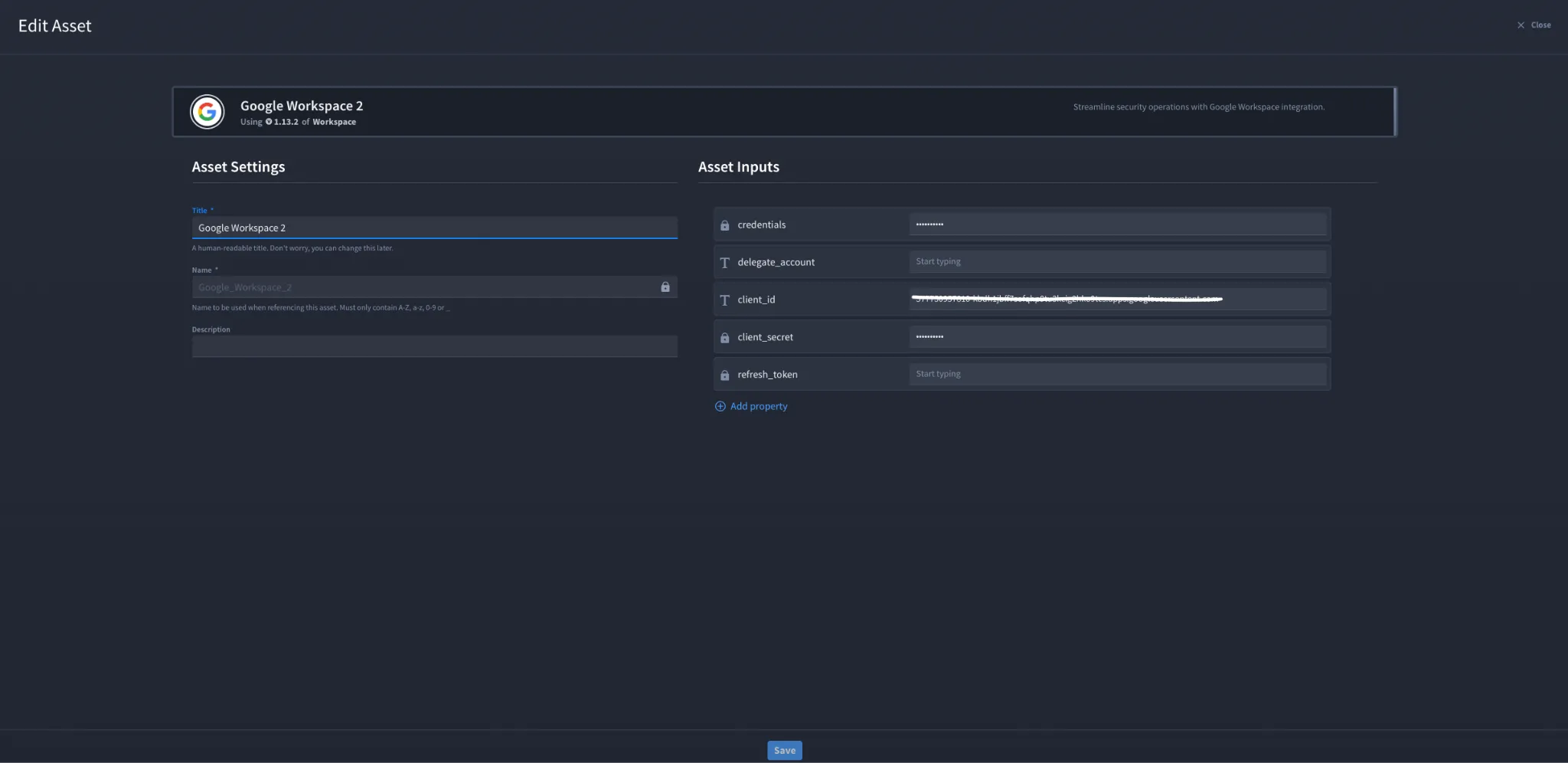
- Fill in Asset Settings and Asset Input as shown:
Field | Description | Required/Optional |
|---|---|---|
credentials | Base64-encoded contents from Service Account JSON credentials file. | Optional |
delegate_account | Account to execute integrations under. If not specified, integration will run as service account. | Optional |
client_id | The client ID for the OAuth 2.0 application. | Optional |
client_secret | The client secret for the OAuth 2.0 application. | Optional |
refresh_token | OAuth 2.0 refresh token used to obtain new access tokens. If using refresh token, provide client_id and client_secret. | Optional |
Fields with * marks are required.
While adding an asset, provide either credentials or Client ID and Client Secret. If both are provided, Client ID takes precedence.
- Click Create.
Troubleshooting
If you encounter an authentication error:
- Verify required APIs are enabled in Google Cloud project.
- Verify service account JSON key is valid and Base64 encoding includes full file contents.
- Verify domain-wide delegation is configured with correct Unique ID and required scopes.
- Verify delegate_account is a valid admin user email address and not a service account email.If using refresh_token flow, verify client_id, client_secret, and refresh_token match the same OAuth client.
You have successfully authenticated the Google Workspace Connector in Swimlane.