Google Chronicle Search
Introduction
This guide tells you how to authenticate the Google Chronicle Search connector in Swimlane using OAuth 2.0 Service Account Authentication.
You will create a Google Cloud service account, assign the required permissions, generate a JSON key file, collect the required identifiers, and configure the connector in Swimlane.
Prerequisites
Google Chronicle Access Requirements
You must have Google Cloud permissions to:
- Access the Google Chronicle platform
- Create and manage Service Accounts
- Generate Service Account JSON keys
- Assign Chronicle API permissions
- Access Google Security Operations APIs
Required Credentials
During setup, you will collect:
- Google Chronicle API Base URL
- Service Account JSON Key File
- OAuth Scopes
Authentication Methods Overview
The Google Chronicle Search connector supports:
- OAuth 2.0 Service Account Authentication
Google Chronicle Setup
Take the following steps to create a Service Account:
- Log in to the Google Cloud Console.
- Navigate to IAM & Admin → Service Accounts.
- Click Create Service Account.
- Enter:
- Service Account Name
- Description
- Click Create and Continue.
- Assign appropriate Chronicle or Security Operations roles.
- Click Done.
Take the following steps to generate a JSON Key File:
- Open the created Service Account.
- Navigate to the Keys tab.
- Click Add Key → Create New Key.
- Select JSON.
- Click Create.
- Download and securely store the JSON key file.
Take the following steps to Base64 encode the JSON Key File:
The Swimlane connector requires the Service Account JSON contents to be Base64 encoded.
Linux / macOS
base64 service-account.json
Windows PowerShell
[Convert]::ToBase64String([IO.File]::ReadAllBytes("service-account.json"))
Copy the generated Base64 string for use in Swimlane.
Regional Endpoints
Region | Endpoint |
|---|---|
United States Multi-Region | |
European Multi-Region | |
London | |
Singapore | |
Sydney | |
Tel Aviv |
Connector configuration in Swimlane
- Log in to Turbine.
- From the left-hand navigation pane, click ORCHESTRATION and click Assets.
- Asset homepage opens.
- Click the plus icon to open the Configure your Connector Asset window.
- Select Google Chronicle Search from the Asset type list.
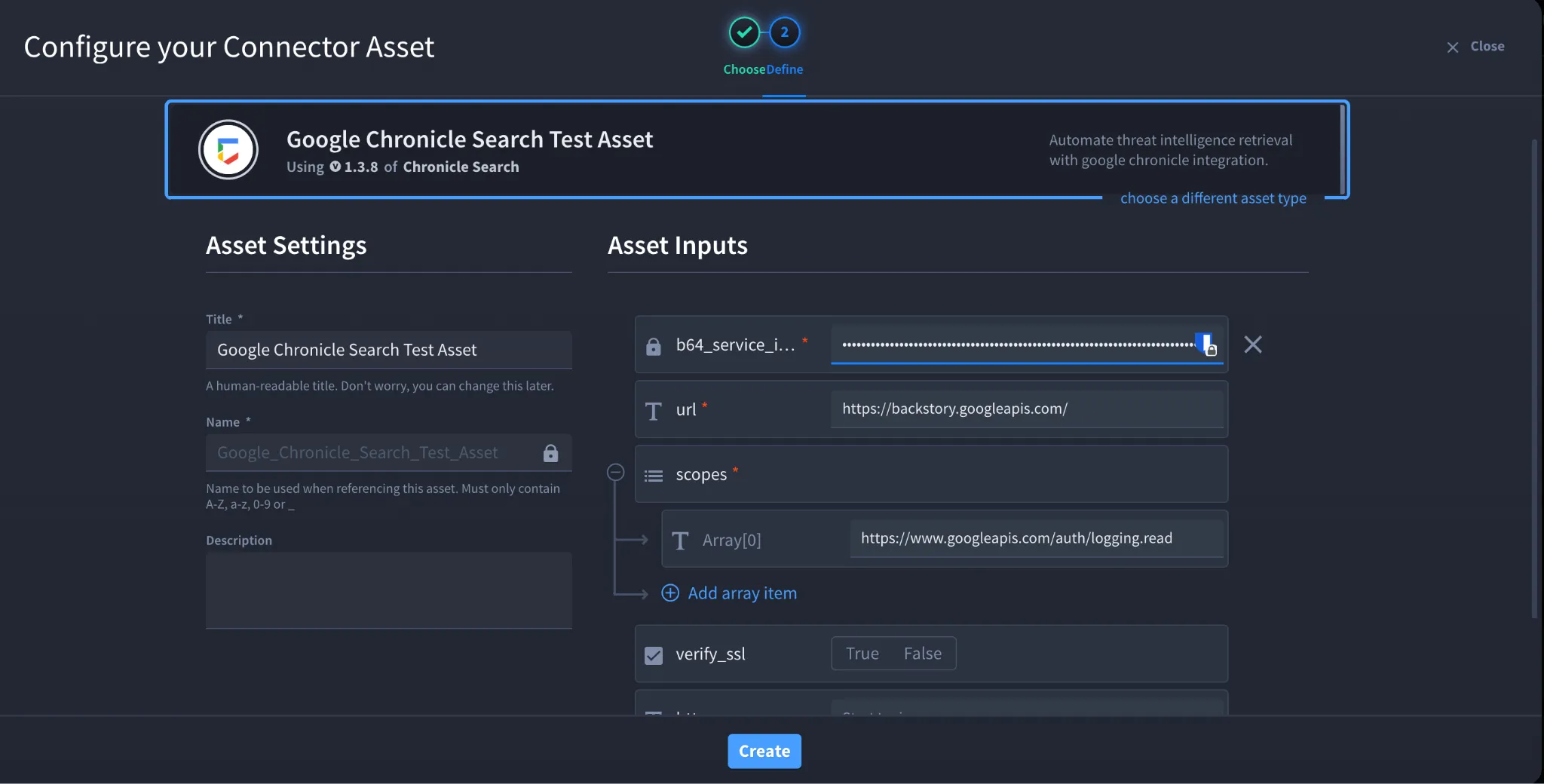
- Fill in the Asset Settings and Asset Input as shown:
Configuration – OAuth 2.0 Service Account Authentication
Field | Description | Required |
|---|---|---|
b64_service_info | Base64-encoded Service Account JSON contents | Yes |
url | Google Chronicle regional API endpoint | Yes |
scopes | OAuth scopes required for Chronicle APIs | Yes |
verify_ssl | Enable or disable SSL verification | No |
http_proxy | Proxy configuration | No |
Recommended OAuth Scopes
Scope | Purpose |
|---|---|
Access Google Cloud APIs | |
Access Chronicle APIs |
Troubleshooting
Authentication failures may occur due to:
- Incorrect Base64 encoding
- Invalid Service Account JSON file
- Missing Chronicle API permissions
- Incorrect regional endpoint
- Invalid OAuth scopes
Fix:
- Ensure the JSON file is correctly Base64 encoded
- Verify Service Account permissions
- Confirm the correct Chronicle regional endpoint
- Verify assigned OAuth scopes
- Regenerate Service Account keys if necessary
You have successfully authenticated the Google Chronicle Search connector in Swimlane.
Sources
- Google Chronicle API Documentation: https://cloud.google.com/chronicle/docs/reference
- Google Chronicle Search API Documentation: https://cloud.google.com/chronicle/docs/reference/search-api
- Google Cloud Service Accounts Documentation: https://cloud.google.com/iam/docs/service-accounts
- Google Cloud Service Account Keys Documentation: https://cloud.google.com/iam/docs/keys-create-delete