Expel Workbench
Introduction
This guide explains how to authenticate the Expel Workbench connector in Swimlane using HTTP Bearer Token authentication. You will obtain an API key from Expel, collect the required endpoint information, and configure the connector inside Swimlane Turbine.
Prerequisites
Expel Access Requirements You must have:
- An active Expel Workbench tenant
- Permission to request API access through your Expel Engagement Manager
Required Credentials
During setup, you will collect:
- API Key
- API Base URL
Expel Workbench Setup
Take the following steps to obtain an API key from Expel:
- Contact your Expel Engagement Manager.
- Request an API key for Expel Workbench API v2 access.
- Confirm the API base URL for your tenant (for example: https://workbench.expel.io).
- Store the API key securely.
Authentication Method Overview
HTTP Bearer Token Authentication This connector authenticates using a static API token provided by Expel. You will need:
- API Key
- API Base URL
Connector Configuration in Swimlane
- Log in to Turbine.
- From the left-hand navigation pane, click ORCHESTRATION and click Assets. Asset homepage opens.
- Click the plus icon to open the Configure your Connector Asset window.
- Select Expel Workbench from the Asset type list.
- Fill in the Asset Settings and Asset Input as shown:
Configuration – API Key Authentication
Field | Description | Required |
|---|---|---|
url | Expel Workbench API base URL | Required |
token | Expel Workbench API Key | Required |
verify_ssl | Enable or disable SSL verification | Optional |
http_proxy | Proxy configuration | Optional |
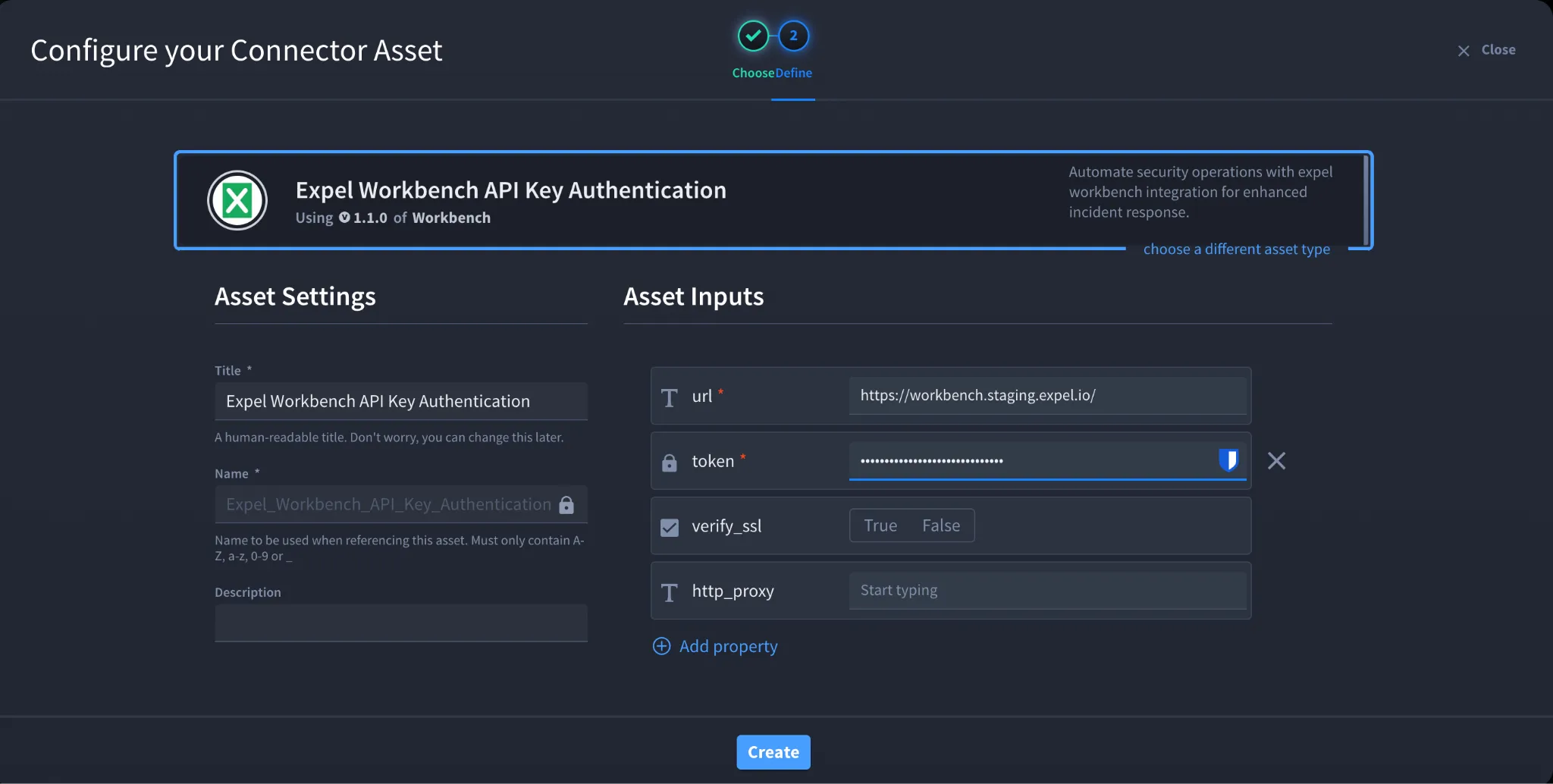
- Click Create.
Troubleshooting
401 Unauthorized Occurs when:
- API key is invalid or expired
- API key copied incorrectly
Fix:
- Request a new API key from Expel
- Verify the token value pasted into Swimlane
403 Forbidden Occurs when:
- API key does not have sufficient permissions
Fix:
- Confirm API scope with Expel Engagement Manager
Connection Errors Occurs when:
- Incorrect API base URL
- Network or proxy misconfiguration
Fix:
- Verify API URL
- Validate proxy and SSL settings
You have successfully authenticated the Expel Workbench connector in Swimlane and can now automate alert and investigation workflows.