DomainTools DomainTools
This guide tells you how to authenticate the DomainTools connector in Swimlane using API Key authentication.
You will obtain your DomainTools API credentials and configure the connector in Swimlane. The DomainTools connector enables Turbine to retrieve domain and DNS-based threat intelligence for domain enrichment and investigation.
Prerequisites
DomainTools Access Requirements
You must have:
- An active DomainTools account with access to the APIs required for the connector actions.
- A valid DomainTools API key.
- Your DomainTools API username, if required by your DomainTools account.
- Network access from Swimlane Turbine to the DomainTools API endpoint.
The Swimlane connector uses API Key authentication.
Required Credentials
During setup, you will collect:
- API URL
- API Key
- API Username, if applicable
DomainTools Setup
Take the following steps to obtain your DomainTools API credentials:
- Log in to your DomainTools account.
- Navigate to your account or API settings.
- Locate your API Username and API Key.
- Copy and securely save the API Key. You will use this value when configuring the connector in Swimlane.
- Note your API Username if your DomainTools account requires it for API authentication.
Access to individual DomainTools APIs depends on your DomainTools subscription and API entitlements. Ensure your account has access to the APIs required for the actions you intend to use.
Connector configuration in Swimlane
- Log in to Turbine.
- From the left-hand navigation pane, click ORCHESTRATION and click Assets.
- Asset homepage opens.
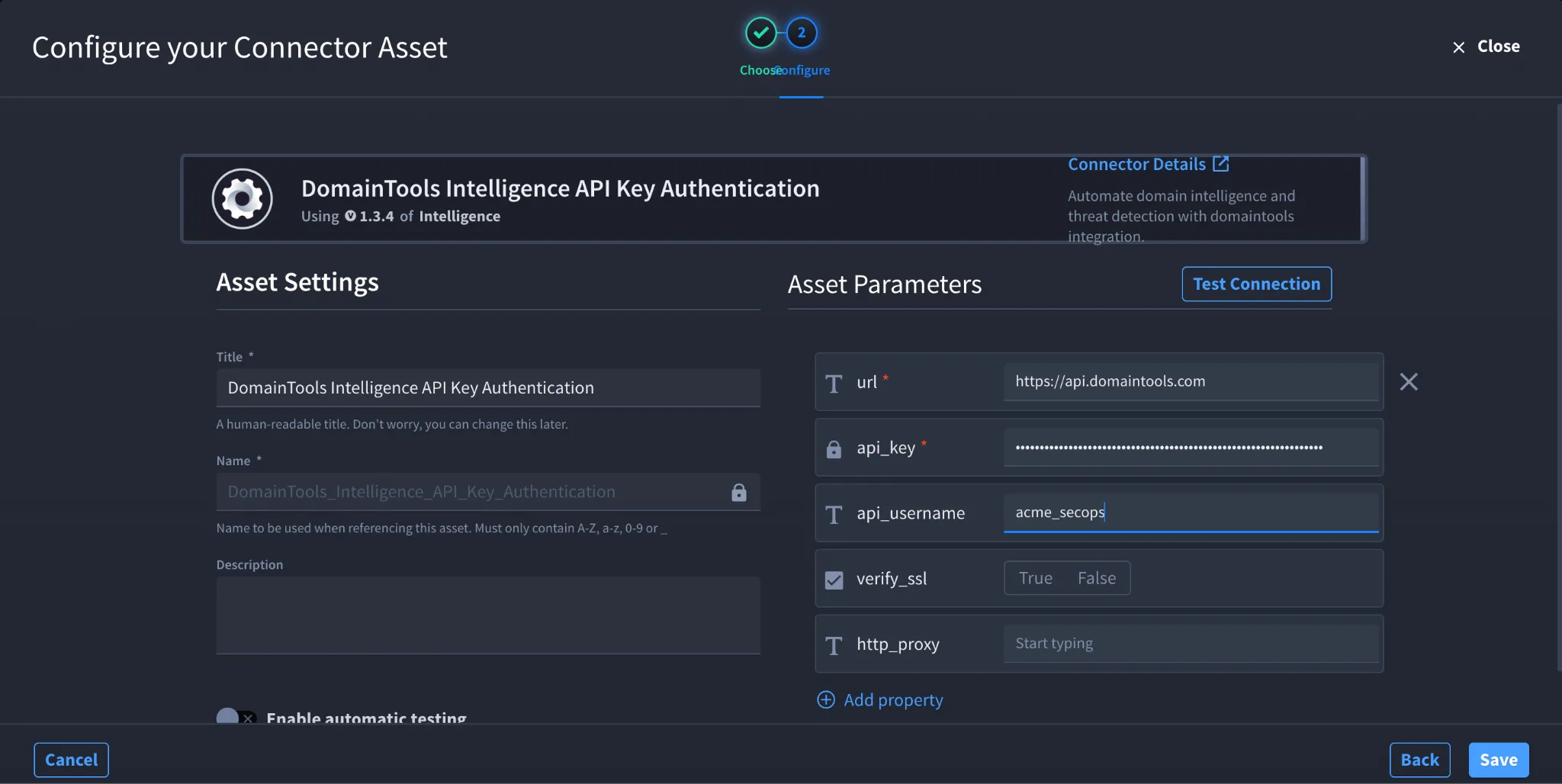
- Click the plus icon to open the Configure your Connector Asset window.
- Select DomainTools from the Asset type list.
- Fill in the Asset Settings and Asset Input as shown:
Field | Description | Required/Optional |
|---|---|---|
url | URL of the DomainTools API host. | Required |
api_username | Username associated with the DomainTools API account. | Optional |
api_key | API key used to authenticate with DomainTools. | Required |
verify_ssl | Enable or disable SSL certificate verification. | Optional |
http_proxy | Proxy used to route requests, if required. | Optional |
The current DomainTools connector configuration requires url and api_key, while api_username, verify_ssl, and http_proxy are optional.
Fields with * marks are required.
- Click Create.
Troubleshooting
- If authentication fails, verify that the API Key was copied correctly and entered correctly in the Swimlane asset.
- If your DomainTools account uses an API username, verify that the correct username is entered in api_username.
- If an action returns an authorization or access error, verify that your DomainTools subscription provides access to the API used by that action.
- Verify that the url field contains the correct DomainTools API host.
- If a previously working connection stops authenticating, verify that the API credentials are still valid and have not been changed or revoked.
- If requests fail because of certificate validation, verify the verify_ssl configuration and the SSL certificate used by the target environment.
- If your environment requires a proxy, verify that the http_proxy field contains the correct proxy configuration.
Result: You have successfully authenticated the DomainTools connector in Swimlane.
Sources
- DomainTools API Documentation