Azure Active Directory
Introduction
This guide tells you how to authenticate the Azure Active Directory connector in Swimlane using OAuth 2.0 Client Credentials.
You will create an Azure application, assign Microsoft Graph API permissions, collect required identifiers, and configure the connector in Swimlane.
Prerequisites
Azure Access Requirements
You must have Azure permissions to:
- Register applications under Azure Active Directory
- Assign Microsoft Graph API permissions
- Grant admin consent
- Create client secrets
- View Azure Tenant information
Required Credentials
During setup, you will collect:
Credential | Description |
|---|---|
Client ID | Azure Application (Client) ID |
Client Secret | Azure Application Secret |
Tenant ID | Azure Directory (Tenant) ID |
Token URL | OAuth token endpoint |
URL | Microsoft Graph API URL |
Scope | Microsoft Graph permission scopes |
Token URL
Action Type | Token URL |
|---|---|
All Actions |
Host URL
Action Type | Host URL |
|---|---|
All Actions | https://graph.microsoft.com |
Azure Setup
Take the following steps to register the application:
- Navigate to: Azure Portal → Azure Active Directory → App Registrations
- Click New Registration.
- Enter an application name.
- Choose: Accounts in this organizational directory only
- Click Register.
Take the following steps to assign API permissions:
- Open the API Permissions tab.
- Click Add a permission.
- Select Microsoft Graph.
- Select Application permissions.
- Add the required permissions.
Recommended Permissions
Permission |
|---|
User.ReadWrite.All |
Directory.ReadWrite.All |
Directory.AccessAsUser.All |
User.ReadBasic.All |
Directory.Read.All |
User.ManageIdentities.All |
User.EnableDisableAccount.All |
- Click Add permissions.
- Click Grant admin consent for your organization.
Take the following steps to generate a Client Secret:
- Navigate to: Certificates & Secrets
- Click New client secret.
- Add description and expiration.
- Click Add.
- Copy and save the secret value.
This saved value is the Client Secret.
Take the following steps to collect required identifiers:
From App Registration → Overview, copy:
- Client ID
- Tenant ID
Record the following values:
Value | Example |
|---|---|
URL | https://graph.microsoft.com |
Token URL |
Connector Configuration in Swimlane
- Log in to Turbine.
- From the left-hand navigation pane, click ORCHESTRATION and click Assets.
- Asset homepage opens.
- Click the plus icon to open the Configure your Connector Asset window.
- Select Azure Active Directory from the Asset type list.
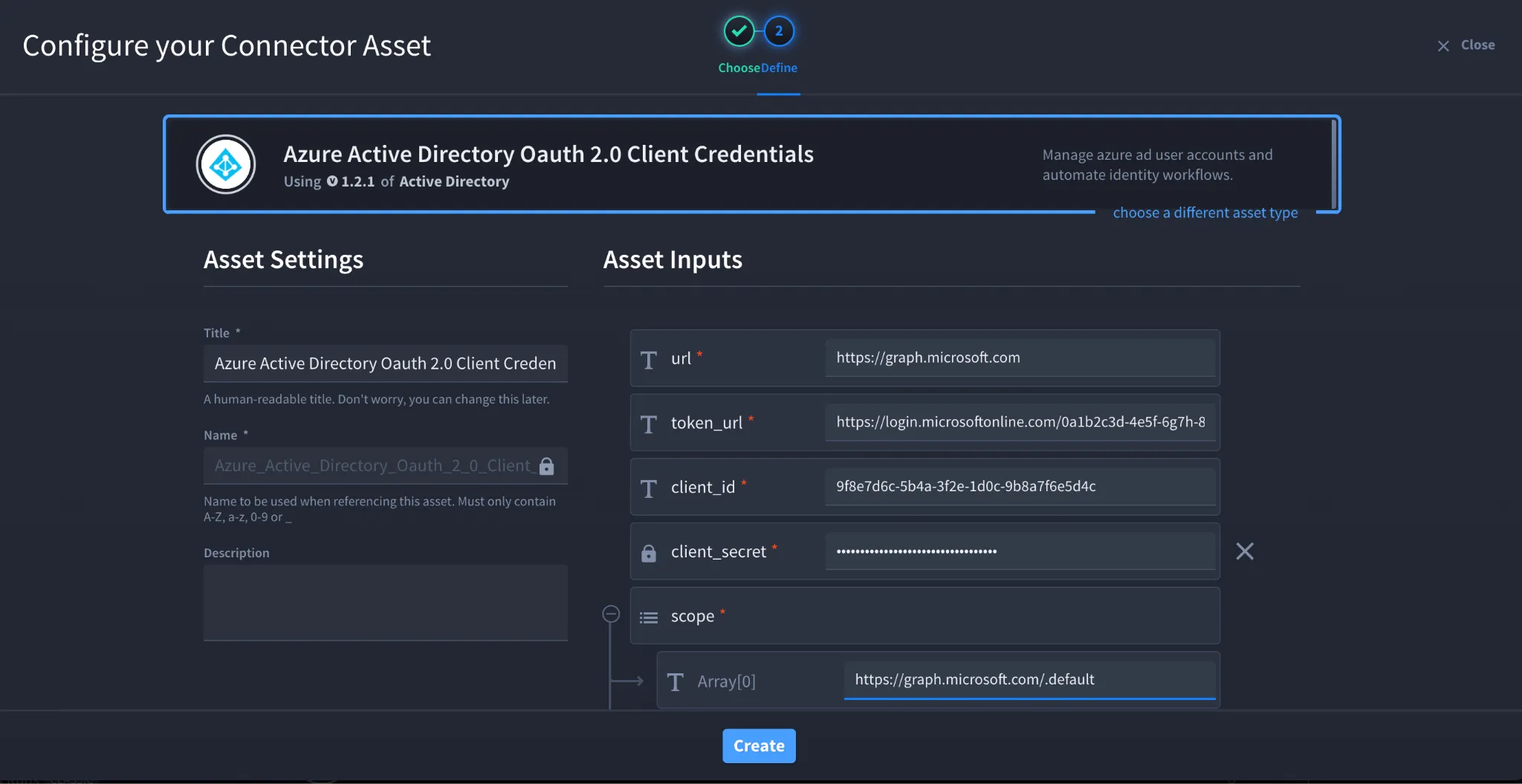
- Fill in the Asset Settings and Asset Input as shown:
Field | Description | Required/Optional |
|---|---|---|
url | Microsoft Graph API URL | Required |
token_url | Azure OAuth Token URL | Required |
client_id | Azure Application Client ID | Required |
client_secret | Azure Application Client Secret | Required |
scope | Microsoft Graph permission scopes | Required |
verify_ssl | Enable/Disable SSL Verification | Optional |
http_proxy | Optional proxy configuration | Optional |
Fields with * marks are required.
Scope Configuration
The connector supports Microsoft Graph scopes.
Example scope:
https://graph.microsoft.com/.default
This scope allows the connector to use all Microsoft Graph API permissions granted to the application.
Troubleshooting
Authentication Failed
Verify:
- Client ID is correct
- Client Secret is correct
- Tenant ID is correct
- Token URL includes the correct Tenant ID
- Admin consent has been granted
Insufficient Privileges Error
Ensure:
- Required Microsoft Graph permissions are assigned
- Admin consent has been granted
- The Azure application has Application permissions, not Delegated permissions
SSL Errors
If SSL verification fails:
- Verify the certificate chain
- Confirm proxy/firewall inspection settings
- Temporarily disable verify_ssl for testing if permitted by your organisation
You have successfully authenticated the Azure Active Directory connector in Swimlane.
Sources
- Microsoft Graph API Documentation: https://learn.microsoft.com/en-us/graph/api/overview
- Microsoft Graph Permissions Reference: https://learn.microsoft.com/en-us/graph/permissions-reference
- Microsoft OAuth 2.0 Client Credentials Flow: https://learn.microsoft.com/en-us/azure/active-directory/develop/v2-oauth2-client-creds-grant-flow