Amazon AWS SQS
Introduction
This guide explains how to authenticate the Amazon AWS SQS connector in Swimlane using AWS credentials. You will generate AWS API credentials, collect the required identifiers, and configure the connector asset in Swimlane Turbine.
Prerequisites
AWS Access Requirements
You must have access to an AWS account with permissions to:
- Create or manage IAM users or roles
- Generate access keys for API authentication
- Access Amazon SQS resources
Required Credentials
During setup you will collect:
- AWS Access Key ID
- AWS Secret Access Key
- AWS Region Name
- Role ARN (optional, if assuming a role)
Authentication Method Overview
The Amazon AWS SQS connector authenticates using AWS access credentials associated with an IAM user or role.
AWS Setup
Take the following steps to generate AWS credentials for API access:
- Log in to the AWS Management Console.
- Navigate to IAM (Identity and Access Management).
- Select Users from the left navigation menu.
- Choose an existing user or click Create user to create a new IAM user.
- Assign the user programmatic access for API usage.
- Attach required permissions such as AmazonSQSFullAccess or a custom policy that includes sqs:SendMessage.
- After creating the user, navigate to the Security Credentials tab.
- Click Create Access Key.
- Copy the Access Key ID and Secret Access Key and store them securely.
Optional: Role Configuration
If using an IAM role instead of direct credentials:
- Navigate to IAM → Roles.
- Create or select a role with SQS permissions.
- Ensure the role trust policy allows your IAM user or service to assume the role.
- Copy the Role ARN.
Connector Configuration in Swimlane
Take the following steps to configure the Amazon AWS SQS connector asset in Swimlane.
- Log in to Turbine.
- From the left navigation pane click ORCHESTRATION and then Assets.
- The Asset homepage opens.
- Click the plus icon to open the Configure your Connector Asset window.
- Select Amazon AWS SQS from the Asset type list.
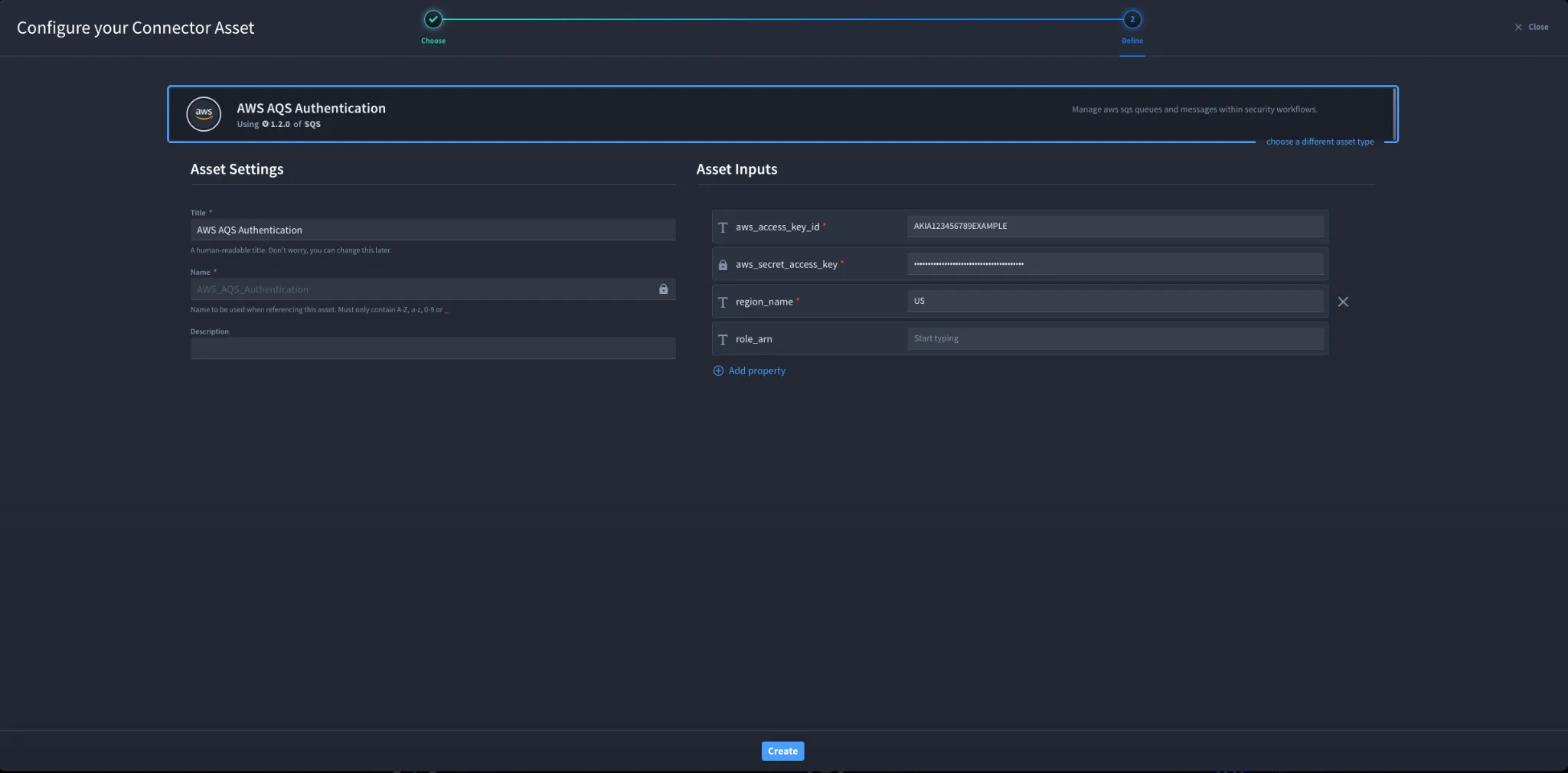
- Fill in the Asset Settings and Asset Input as shown below.
Configuration Parameters
Field | Description | Required |
|---|---|---|
aws_access_key_id | AWS Access Key ID used for authentication | Required |
aws_secret_access_key | AWS Secret Access Key paired with the access key ID | Required |
region_name | AWS region where the SQS resources are located | Required |
role_arn | Role ARN used for role assumption (if applicable) | Optional |
Troubleshooting
If authentication fails:
- Verify the Access Key ID and Secret Access Key are correct.
- Ensure the IAM user or role has permissions for Amazon SQS.
- Confirm the region_name matches the region where your queue exists.
- If using role assumption, ensure the role trust policy allows the user to assume the role.
Sources
- AWS IAM Access Keys Documentation: https://docs.aws.amazon.com/IAM/latest/UserGuide/id_credentials_access-keys.htmlAmazon SQS API Documentation: https://docs.aws.amazon.com/AWSSimpleQueueService/latest/APIReference/Welcome.html
Result
You have successfully authenticated the Amazon AWS SQS connector in Swimlane.