Amazon AWS Lambda
Introduction
This guide tells you how to authenticate the Amazon AWS Lambda connector in Swimlane using AWS access keys and (optionally) an assumable IAM role. You will create or identify an IAM principal, generate credentials, assign the required permissions to invoke Lambda functions, collect required identifiers, and configure the connector asset in Swimlane.
Prerequisites
AWS Access Requirements
You must have AWS permissions to:
- Create or manage IAM users (or another IAM principal) for programmatic access
- Create and manage IAM roles (optional, if you will use role assumption)
- Create and manage IAM policies/permissions for AWS Lambda
- View the AWS region where your Lambda functions are deployed
Required Credentials
During setup, you will collect:
- AWS Access Key ID
- AWS Secret Access Key
- AWS Region (region_name)
- Role ARN (role_arn) – required by this connector
Required Permissions
At minimum, the IAM role used by the connector must be allowed to invoke the target Lambda function(s). If you use role assumption, the calling IAM principal must also be allowed to assume the role.
Minimum IAM permissions typically include:
- lambda:InvokeFunction (on the specific function ARN(s) you will invoke)
- sts:AssumeRole (only if you are using role assumption via role_arn)
AWS Setup
Take the following steps to create (or identify) an IAM user for programmatic access:
- Log in to the AWS Management Console.
- Open the IAM console.
- In the left navigation pane, select Users.
- Select an existing user (recommended) or create a new user for programmatic access.
Take the following steps to generate an access key for the IAM user:
- From IAM, open the selected user.
- Open the Security credentials tab.
- Under Access keys, click Create access key.
- Select the appropriate use case (for example, Command Line Interface (CLI) or Application running outside AWS).
- Click Next, optionally add a description tag, then click Create access key.
Copy and securely store the Access key and Secret access key. You will not be able to view the secret access key again after you close this window.
Take the following steps to create an IAM role for the connector to assume (role_arn):
- In the IAM console, select Roles, then click Create role.
- For Trusted entity type, select AWS account (or the appropriate trusted entity for your environment).
- In the trust policy, allow the IAM principal used by Swimlane (for example, your IAM user or your AWS account) to assume the role using sts:AssumeRole.
- Attach (or create and attach) a permissions policy that allows lambda:InvokeFunction for the required Lambda function ARN(s).
- Name the role and create it.
- Open the newly created role and copy the Role ARN. This value will be used as role_arn in Swimlane.
Connector Configuration in Swimlane
Take the following steps to configure the Amazon AWS Lambda connector asset in Swimlane:
- Log in to Turbine.
- From the left-hand navigation pane, click ORCHESTRATION and click Assets.
- Click the plus icon to open the Configure your Connector Asset window.
- Select Amazon AWS Lambda from the Asset type list.
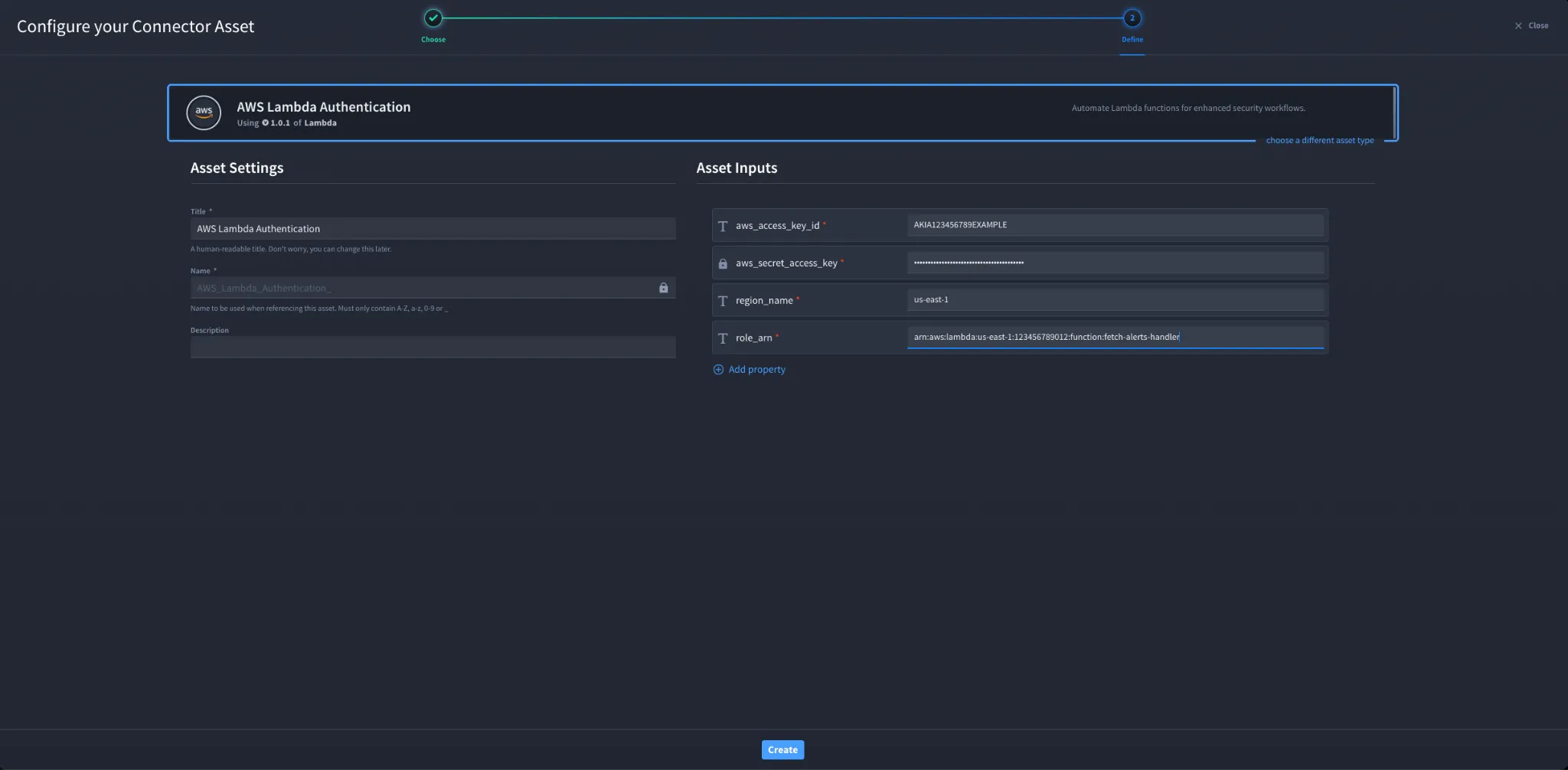
- Fill in the Asset Settings and Asset Input as shown:
Field | Description | Required/Optional |
|---|---|---|
aws_access_key_id | AWS access key ID for the IAM principal used for authentication. | Required |
aws_secret_access_key | AWS secret access key paired with the access key ID. | Required |
region_name | AWS region where the target Lambda function is deployed (for example, us-east-1). | Required |
role_arn | IAM Role ARN that the connector will assume to invoke Lambda functions. | Required |
verify_ssl | Enable/Disable SSL verification. | Optional |
http_proxy | Optional proxy configuration. | Optional |
Fields with * marks are required.
- Click Create.
Troubleshooting
If authentication fails or actions return authorization errors:
- Verify the Access Key ID and Secret Access Key are correct and active for the IAM user.
- Confirm region_name matches the region where the Lambda function exists.
- If using role_arn, confirm the role ARN is correct and the role trust policy allows the calling IAM principal to assume it (sts:AssumeRole).
- Confirm the assumed role has lambda:InvokeFunction permission for the target function ARN(s).
- If you receive AccessDeniedException when invoking a function, check the Lambda function resource policy (if used) and the role policy for the exact function ARN and qualifier (versions/aliases).
- If requests fail behind a corporate proxy, configure http_proxy and confirm proxy allows outbound connectivity to AWS endpoints.
Result: You have successfully authenticated the Amazon AWS Lambda connector in Swimlane.
Sources
- AWS IAM User Guide – Managing access keys for IAM users: https://docs.aws.amazon.com/IAM/latest/UserGuide/id_credentials_access-keys.html
- AWS IAM User Guide – Security credentials: https://docs.aws.amazon.com/IAM/latest/UserGuide/security-creds.html
- AWS STS API Reference – AssumeRole: https://docs.aws.amazon.com/STS/latest/APIReference/API_AssumeRole.html
- AWS Lambda Service Authorization Reference (IAM actions such as lambda:InvokeFunction): https://docs.aws.amazon.com/service-authorization/latest/reference/list_awslambda.html
- AWS Lambda Developer Guide: https://docs.aws.amazon.com/lambda/latest/dg/welcome.html