Swimlane 10.16.3 Upgrade Instructions
Use these upgrade instructions to upgrade your instance of Swimlane 10.x. The instructions are organized by subsections of this document that will help you upgrade by specific installation type, whether you have an embedded, or existing cluster installation.
Upgrade Swimlane on Embedded Cluster Installations
Use the following instructions to upgrade this version of Swimlane on an embedded cluster installation.
Prerequisites:
· Swimlane version 10.14+
If you are not on a version that is >= 10.13, contact your Swimlane support representative.
· MongoDB 5.0.24
Important! Swimlane recommends that you perform a MongoDB backup before starting this update. For more information, see Backup and Restore on an Embedded Cluster with Snapshots.
Upgrade Instructions:
- SSH into any node in your deployment and execute the following command to begin the Swimlane Platform Installer component upgrade:
NOTE: If you have configured SELinux, add this to the end of the command above:
- For a multi-node (HA) cluster, the script prompts you to drain node one (1) and apply the upgrade. Once the upgrade on node one (1) is complete, the process continues running. It then asks for confirmation to drain node two (2) as well as a command to run in that node. See this example:
- Run the upgrade command on the node that was drained. Use kubectl get nodes -o wide to find the IP of the node that was drained.
The primary script that ran in node (1) will detect that node (2) has been upgraded, and will now ask to drain and upgrade node (3). Follow the same steps for node (2) to complete the kubernetes portion of the upgrade.
- Once the additional nodes are complete, press Enter in the terminal window of the first node in which you ran the install command to complete the installation.
- Log in to the Swimlane Platform Installer dashboard (https://<SwimlaneDNS>:8800).
- Go to the Version History tab and look for the new published version
If this version doesn’t show up initially, click Check For Updates.
- A pop-up window appears, click Go to updated version.
- Click Deploy on the new 10.16.3 version with the highest sequence number at the top of the versions list (currently 10.16.3_XXX).
- Once the Application tab shows ‘Ready’ your upgrade is complete.
See Update the Swimlane Python Driver Python Package if you want to update the driver at this time.
Upgrade Swimlane on Existing Cluster Installations
Prerequisites:
· Swimlane version 10.6 or greater If you are not on a version that is > 10.6, contact your Swimlane support representative.
· MongoDB 5.0.24
· Kubernetes 1.25-1.28
· KOTS kubectl plugin 1.107.x
· Velero 1.12.x
Important! Swimlane recommends that you perform a MongoDB backup prior to starting this update. For more information, see Backup and Restore on an Existing Cluster with Snapshots.
Upgrade Kotsadm to v1.107.3:
Download the latest SPI kubectl add-on for the OS version where you run kubectl commands from:
The KOTS kubectl plugin version should match what is listed in the prerequisites above.
Upgrading past velero 1.11.x:
Velero 1.11 includes a change that replaces the restic daemonset with the node-agent daemonset. Depending on what version you are upgrading from, there are different steps for patching the container images. See the Velero Documentation for details. upgrade to 1.11
- Download Velero 1.11.x for your OS version:
Untar the file and then change directory (cd) into the uncompressed directory:
- Update Velero custom resource definitions:
- Confirm that both the client and server versions are on the same 1.12.0 release:
Upgrade the Swimlane KOTS application:
- Next, upgrade the Swimlane Platform Installer (SPI):
- Log in to the Swimlane Platform Installer dashboard (https://<SwimlaneDNS>:8800).
- Go to the Version History tab and look for the new published version
If this version doesn’t show up initially, click Check For Updates.
- A pop-up window appears, click Go to updated version or visit the Version History tab.
- Click Deploy on the new 10.16.3 version with the highest sequence number at the top of the versions list.
- Once the Application tab shows ‘Ready’ your upgrade is complete.
See Update the Swimlane Python Driver Python Package if you want to update the driver at this time.
Upgrade Swimlane on Embedded Airgap Cluster Installations
Prerequisites:
- Swimlane version 10.14+
If you are not on a version that is >= 10.13, contact your Swimlane support representative.
- MongoDB 5.0.24
- Links to the Offline Installer Package and Offline Airgap Bundle If you do not have these linked, contact your Swimlane support representative.
Important! Swimlane recommends that you perform a MongoDB backup prior to starting this update. For more information, see Backup and Restore on an Embedded Cluster with Snapshots.
Upgrade Instructions:
- Copy the latest offline installer package to each airgapped server. Untar the offline installer package on each server. $ tar -xzvf swimlane-platform-10.16.3_XXX.tar.gz
- Copy kubernetes-1.27.10.tar.gz on each server. The file could be downloaded in the jump server using the following command. curl -LO https://kurl.sh/bundle/version/v2024.02.05-0/swimlane-platform-rgarcia/packages/kubernetes-1.27.10.tar.gz
- Run the Swimlane Platform Installer update on any node in your deployment: $ cat install.sh | sudo bash -s airgap ha Provide the absolute of path for kubernetes-1.27.10.tar.gz , downloaded as part of step 2, when prompted during installation.
- Once the install is complete, if you have a multi-node (HA) cluster, the script prompts you to run an additional command on every node:
- Run cat ./tasks.sh | sudo bash -s load-images on nodes (2) and node (3) before proceeding to run the command on node (1).
- This command can be run simultaneously on nodes (2) and (3).
Once the load-images script completes on nodes (2) and (3), enter Y in the node (1) terminal session twice.
- The install script now runs on node 1 for a few minutes. Once it completes, follow the prompts to run the upgrade script on nodes 2 and 3, similar to this example (the IP address will depend on your deployment):
- When both upgrade scripts are complete, press Enter on node 1 and then upload the airgap bundle to the SPI dashboard.
- Log in to the Swimlane Platform Installer dashboard (https://<SwimlaneDNS>:8800).
- Go to the Version History tab and click Upload a new version, then browse to the swimlane-platform-10.16.3_XXX.airgap file and click Upload.
- The sequence number “_XXX” of the airgap file may be higher than shown if a new sequence has been published.
- Once the upload of the airgap completes, refresh the page or switch tabs to see the status of the file extraction.
- Go back to the Version History tab and click Deploy on the new 10.16.3 version at the top of the versions list.
- Once the Application tab shows ‘Ready’ your upgrade is complete.
See Update the Swimlane Python Driver Python Package if you want to update the driver at this time.
Upgrade Swimlane on Existing Airgap Cluster Installations
Prerequisites
- Swimlane version 10.6+ If you are not on a version that is > 10.6, contact your Swimlane support representative.
- MongoDB 5.0.24
- Kubernetes 1.25-1.28
- KOTS kubectl plugin 1.107.3
- Velero 1.12.x
Important! Swimlane recommends that you perform a MongoDB backup prior to starting this update. For more information, see Backup and Restore on an Existing Cluster with Snapshots.
Upgrade Kotsadm to v1.107.3:
- Download the latest SPI Kubectl Add-on
- Download the latest SPI offline package: https://get.swimlane.io/existing-cluster/install/offline-package
- Copy the latest SPI Kubectl Add-on and SPI offline packages to your jumpbox:
- Untar the SPI Kubectl Add-on:
- Rename or remove the original kubectl-kots file:
- Rename and move the latest SPI Kubectl Add-on file to /usr/local/bin/kubectl-kots
- Verify version
Upgrade past Velero 1.11.x:
Velero 1.11 includes a change that replaces the restic daemonset with the node-agent daemonset. Depending on what version you are upgrading from, there are different steps for patching the container images. See the Velero Documentation for details upgrade to 1.11
- Download Velero 1.11 to the jumpbox for the jumpbox's OS version:
- Untar the file and then change directory into the uncompressed directory:
- Update Velero custom resource definitions:
- Download the new Velero images and push them to your private registry from your jumpbox.
- Upgrade container images as instructed in the Velero upgrade to 1.12 article
- Confirm both client and server version are on the same 1.12.0 release:
Upgrade the Swimlane KOTS application:
- Push the SPI (kotsadm) images to your registry:
- Next, upgrade the Swimlane Platform Installer (SPI):
When the SPI upgrade is complete, upload the Swimlane airgap bundle to the SPI dashboard.
- Log in to the Swimlane Platform Installer dashboard (https://<SwimlaneDNS>:8800).
- Go to the Version History tab and click Upload a new version, then browse to the swimlane-platform-10.16.3_XXX.airgap file and click Upload.
- The sequence number “_XXX” of the airgap file may be higher than shown if a new sequence has been published
- Once the upload of the airgap completes, refresh the page or switch tabs to see the status of the file extraction.
- Go to the Version History tab - you will see a version for 10.16.3_XXX.
- Click Deploy on the new 10.16.3_XXX version with the highest sequence number at the top of the versions list.
- Once the Application tab shows ‘Ready’ your upgrade is complete.
See Update the Swimlane Python Driver Python Package if you want to update the driver at this time.
Update the Swimlane Python Driver Python Package
Beginning with Swimlane version 10.2.0, the Python Driver swimlane Python package must be manually updated after an upgrade.
- Delete the old swimlane Python package.
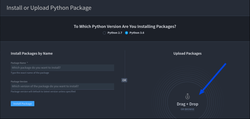
- Update the swimlane Python package in the Swimlane UI to version 10.9.1 If this is an embedded airgapped upgrade, please download the swimlane Python wheel (.whl) package from here and update it in the Swimlane UI.
- Restart the Swimlane API and tasks pods with this command:
Download and Push New Velero Images
Use these commands to download and push new Velero images.
Troubleshooting
Upgrading will sometimes leave the Hangfire notifications in a corrupted state. The swimlane-api and swimlane-tasks pods will be crashlooping with logs of this form
Dropping the Hangfire notifcations collection in Mongo will remedy this.