A support bundle should be requested by a support engineer for initial triage. This bundle contains logs from all relevant pods, as well as other useful information from your deployment.
Using the Command Line (Online & Airgap)
- Download and unarchive the latest release
curl -L https://github.com/replicatedhq/troubleshoot/releases/latest/download/support-bundle_linux_amd64.tar.gz | tar xzvf -
For airgap (offline) environments, run the above command from a host that is connected to the internet to download the plugin, then do the following:
- Copy the downloaded file to your offline Swimlane server
scp support-bundle_linux_amd64.tar.gz user@<swimlaneDNS>:/path/to/file
- Unarchive the downloaded file from the step above as follows:
tar -xzvf support-bundle_linux_amd64.tar.gz
- Move the plugin to your $PATH
sudo mv ./support-bundle /usr/local/bin/kubectl-support_bundle
- NOTE: If you choose not to put the plugin into your $PATH, then replace all instances of kubectl support-bundle in the remainder of this document with ./support-bundle or with the absolute path to the binary where it was unzipped.
- Gather the support bundle
NOTE: Replace <namespace> with the applicable namespace (default for embedded cluster)
kubectl support-bundle --interactive=false secret/<namespace>/kotsadm-swimlane-platform-supportbundle
- Alternatively, if you have an online installation, you can also generate a support bundle directly from the Swimlane Admin Console under Application > Troubleshoot.
Host Collector Support Bundle
A host collector support bundle should be needed by a support engineer in the following situations:
- The application is not installed
- The admin console is not working
- To debug a host-specific performance and configuration problems even when the cluster is running
This bundle contains information gathered directly from the host, such as CPU, memory, available block devices, and more.
NOTE: Install / unarchive the latest support-bundle release before proceeding
To gather a host collector support bundle, execute the following command on each node in the cluster with elevated privileges / as root:
kubectl support-bundle --interactive=false https://raw.githubusercontent.com/replicatedhq/troubleshoot-specs/main/host/default.yaml
The resulting host collector support bundle will be available in the current working directory as support-bundle-YYYY-MM-DDTHH_mm_ss.tar.gz.
NOTE: For an air-gapped Swimlane deployment, on a server with internet access, download https://raw.githubusercontent.com/replicatedhq/troubleshoot-specs/main/host/default.yaml in your browser and copy default.yaml to your Swimlane server(s). Then execute the following command on each node in the cluster with elevated privileges / as root:
kubectl support-bundle --interactive=false ./default.yaml
Application level data should be requested by a support engineer in the following situations:
- Application Builder or Workflow is not working as expected
- Parts of the Swimlane UI are not displaying correctly
- To further debug issues related to a specific Swimlane application
To gather Swimlane application level data, perform the following steps:
- Recreate the issue and obtain a browser trace (.HAR)
- Export the application in .SSP format (Applications & Applets > “Your Application” > Export)
- Collect application specific documents from MongoDB
- Obtain the Application ID
- If you are unaware of your application’s ID, navigate to Applications and Applets and click your application. The application ID will be visible in the URL like so:https://SWIMLANE_URL/app-builder/aL7ugqEsHrcqaXfvR
- Determine the MongoDB primary by running the following command:
kubectl exec swimlane-sw-mongo-0 -- mongo -u Admin -p $(kubectl get secret swimlane-sw-mongo-admin -o jsonpath="{.data.password}" | base64 --decode) --authenticationDatabase admin --tls --tlsAllowInvalidHostnames --tlsAllowInvalidCertificates admin --eval='rs.isMaster().primary;'
- You should see output similar to the following: swimlane-sw-mongo-0.swimlane-sw-mongo.default.svc.cluster.local:27017. This example tells us that swimlane-sw-mongo-0 is the primary. Take note of this value.
- Execute the following set of commands (Replace MONGO_PRIMARY and APPLICATION_ID with the values above):
kubectl exec -it MONGO_PRIMARY -- mongo --quiet -u Admin -p --authenticationDatabase admin --tls --tlsAllowInvalidCertificates --tlsAllowInvalidHostnames Swimlane --eval='db.Applications.find({ "_id": "APPLICATION_ID"}).pretty()' > app.json
kubectl exec -it MONGO_PRIMARY -- mongo --quiet -u Admin -p --authenticationDatabase admin --tls --tlsAllowInvalidCertificates --tlsAllowInvalidHostnames Swimlane --eval='db.Settings.find({}).pretty()' > settings.json
kubectl exec -it MONGO_PRIMARY -- mongo --quiet -u Admin -p --authenticationDatabase admin --tls --tlsAllowInvalidCertificates --tlsAllowInvalidHostnames Swimlane --eval='db.Tasks.find({ "ApplicationId": "APPLICATION_ID" }).pretty()' > tasks.json
kubectl exec -it MONGO_PRIMARY -- mongo --quiet -u Admin -p --authenticationDatabase admin --tls --tlsAllowInvalidCertificates --tlsAllowInvalidHostnames Swimlane --eval='db.Workflow.find({ "ApplicationId": "APPLICATION_ID" }).pretty()' > workflow.json
kubectl exec -it MONGO_PRIMARY -- mongo --quiet -u Admin -p --authenticationDatabase admin --tls --tlsAllowInvalidCertificates --tlsAllowInvalidHostnames Swimlane --eval='db.WorkflowRuns.find({ "ApplicationId": "APPLICATION_ID" }).pretty()' > workflow-runs.json
# Archive the resulting file
star -czvf app-data.tar.gz app.json settings.json tasks.json workflow.json workflow-runs.json
- Upload the browser trace .HAR, application export .SSP, and the app-data.tar.gz archive.
HTTP Client Logging for Tasks
HTTP client logging should be requested by a support engineer in the following situations:
- When a task results in a client or server error (HTTP 4XX or 5XX)
- To further investigate outbound requests made by a specific task
To enable HTTP client logging for a task, perform the following steps:
- Fork the task, i.e. create a new task (same as the problematic task), expand the dropdown next to “Create”, then click “Fork”
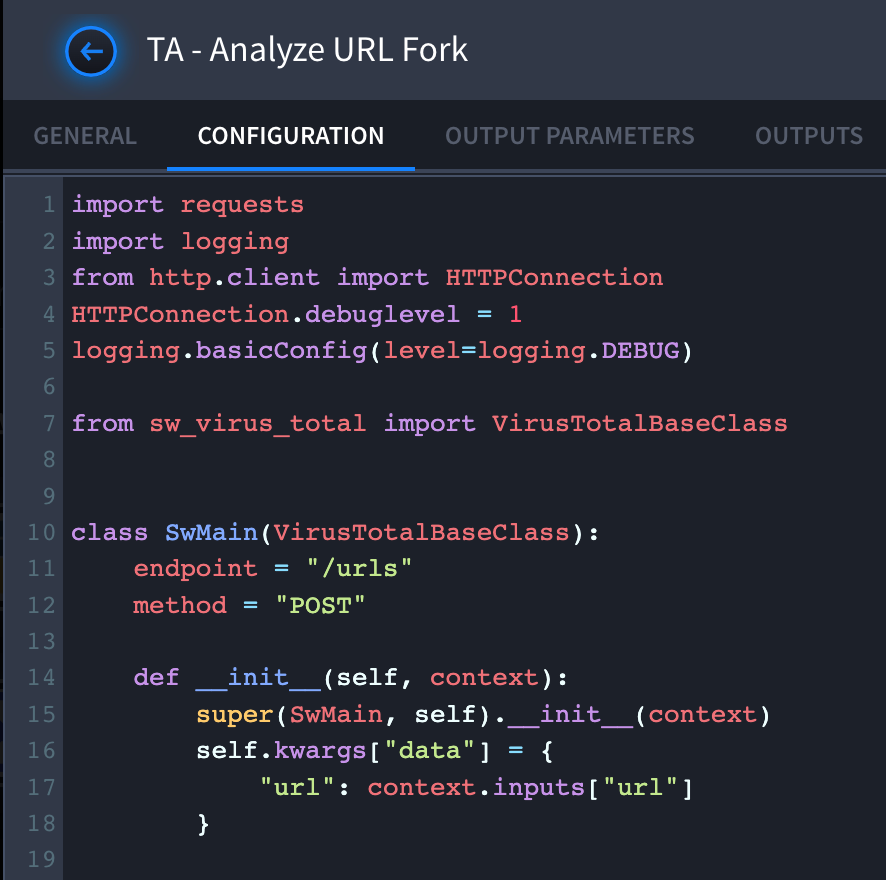
- Navigate to the newly forked task, go to the Configuration tab and add the following code to the beginning of the task:
import requests
import logging from http.client
import HTTPConnectionHTTPConnection.debuglevel = 1logging.basicConfig(level=logging.DEBUG)
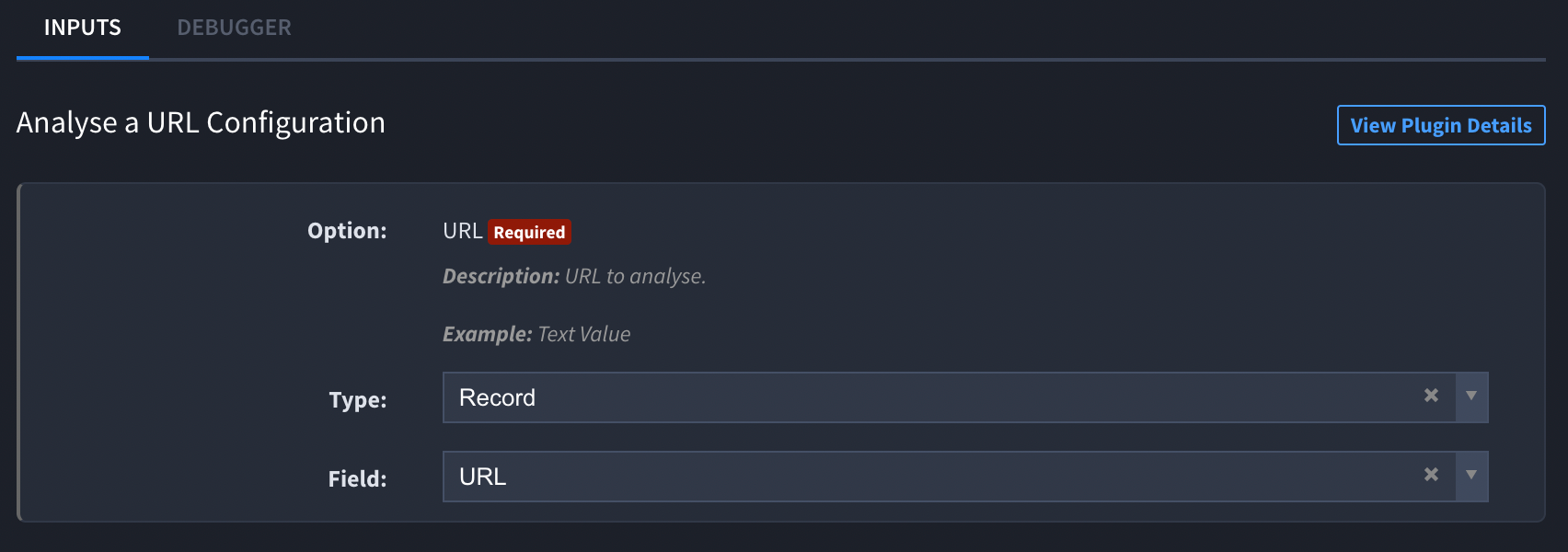
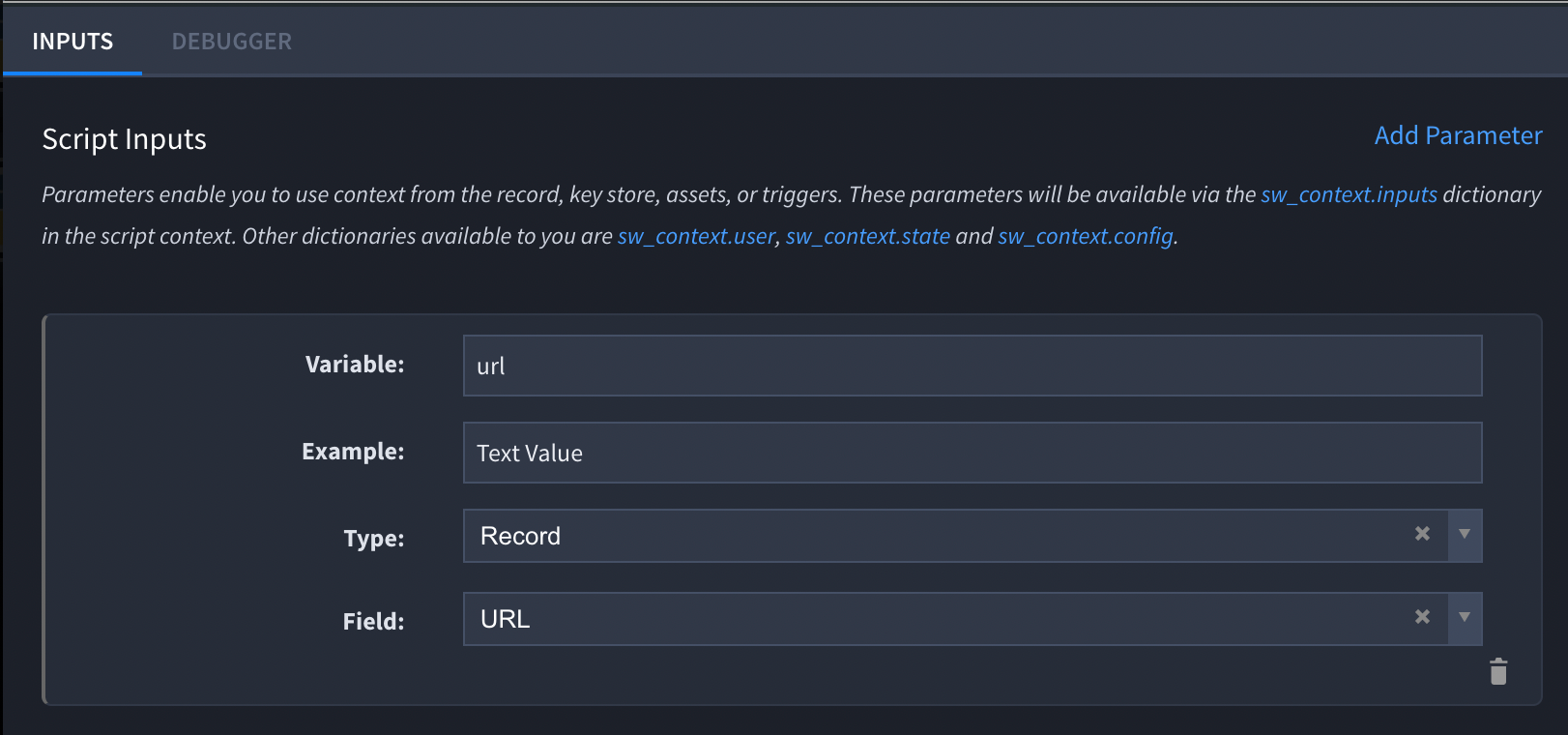
- Take note of the original task’s inputs and add them manually to the forked task.
For example, here is the original input from the problematic task:
Then, we add it manually to the forked task like so:
- Execute the forked task in the debugger and copy the output to a text file. Once complete, upload the resulting file.
NOTE: This applies to Swimlane 10.x
MongoDB logs and diagnostic information should be requested by a support engineer in the following situations:
- If any swimlane-sw-mongo-* pod is not in “Running” status (i.e. stuck in Init: 2/3, CrashLoopBackOff, etc.)
- To address general performance issues / slow queries
- To debug MongoDB-specific performance and configuration problems
To gather MongoDB diagnostics, perform the following steps:
- Determine the MongoDB primary by running the following command:
kubectl exec swimlane-sw-mongo-0 -- mongo -u Admin -p --authenticationDatabase admin --tls --tlsAllowInvalidHostnames --tlsAllowInvalidCertificates admin --eval='rs.isMaster().primary;'
- You should see output similar to the following: swimlane-sw-mongo-0.swimlane-sw-mongo.default.svc.cluster.local:27017. This example tells us that swimlane-sw-mongo-0 is the primary. Take note of this value.
- Create the script using the code file found at bottom of article and set user executable permissions like so:
chmod u+x mongo-collector.sh
- Execute the above script and provide it with the MongoDB primary when prompted (or press enter for default, swimlane-sw-mongo-0)
./mongo-collector.sh | tee mongo-collector-results.log
- Upload the resulting file, /tmp/HOSTNAME.mongo.logs.XXXXXXXXXX.tar.gz
The command below will generate a debug bundle file (bundle-<date>.tar.gz) which contains detail logs of the backup in question:
velero get backup velero debug --backup <backupname>
#!/bin/bash
# Set MongoDB Replicaset PRIMARY member #
read -p 'Enter the PRIMARY MongoDB Replicaset member [press enter for default: swimlane-sw-mongo-0]: ' MONGODB_PRIMARY
MONGODB_PRIMARY="${MONGODB_PRIMARY:-swimlane-sw-mongo-0}"
# Backup MongoDB logs
## Get current date ##
_now=$(date +"%s")
## Configure output location on the host ##
_loc="/tmp/mongo-logs-$_now"
mkdir -p $_loc
_file="/tmp/$(hostname).mongo.logs.$_now.tar.gz"
## Collect mongod logs and diagnostic.data content ##
for pod in $(kubectl get pods -l app=sw-mongo -o=name | cut -d "/" -f 2)
do
echo "Collect pod describe for: $pod"
echo "=============================="
kubectl describe pod $pod > $_loc/$pod.describe.txt
echo "Collecting mongod logs from $pod to $_loc/$pod.log"
echo. "====================================================================================================="
kubectl logs --since=24h $pod > $_loc/$pod.log
echo "Collecting diagnostic data from $pod to $_loc/$pod.diagnostic.data.tar.gz"
echo "============================================================================================================================"
kubectl exec $pod -- tar -zcvf /tmp/mongo.diagnostic.data.tar.gz /data/db/diagnostic.data --warning=no-file-changed
kubectl cp $pod:/tmp/mongo.diagnostic.data.tar.gz $_loc/$pod.diagnostic.data.tar.gz
echo "==========================================================="
echo "Deleting temporary diagnostic data from $pod"
echo "==========================================================="
kubectl exec $pod -- rm /tmp/mongo.diagnostic.data.tar.gz
done
## Collect general MongoDB information ##
echo "Collecting Records.stats"
echo "========================"
kubectl exec $MONGODB_PRIMARY -- mongo --quiet -u Admin -p --authenticationDatabase admin --tls --tlsAllowInvalidCertificates Swimlane --eval="db.Records.stats();" > $_loc/db.Records.stats.txt
echo "Collecting Records.getIndexes"
echo "============================="
kubectl exec $MONGODB_PRIMARY -- mongo --quiet -u Admin -p --authenticationDatabase admin --tls --tlsAllowInvalidCertificates Swimlane --eval="db.Records.getIndexes();" > $_loc/db.Records.getIndexes.txt
echo "Collecting rs.status"
echo "===================="
kubectl exec $MONGODB_PRIMARY -- mongo --quiet -u Admin -p --authenticationDatabase admin --tls --tlsAllowInvalidCertificates Swimlane --eval="rs.status();" > $_loc/rs.status.txt
echo "Collecting rs.config"
echo "===================="
kubectl exec $MONGODB_PRIMARY -- mongo --quiet -u Admin -p --authenticationDatabase admin --tls --tlsAllowInvalidCertificates Swimlane --eval="rs.config();" > $_loc/rs.config.txt
echo "Collecting rs.printReplicationInfo"
echo "=================================="
kubectl exec $MONGODB_PRIMARY -- mongo --quiet -u Admin -p --authenticationDatabase admin --tls --tlsAllowInvalidCertificates Swimlane --eval="rs.printReplicationInfo();" > $_loc/rs.printReplicationInfo.txt
echo "Collecting printSecondaryReplicationInfo"
echo "========================================"
kubectl exec $MONGODB_PRIMARY -- mongo --quiet -u Admin -p --authenticationDatabase admin --tls --tlsAllowInvalidCertificates Swimlane --eval="rs.printSecondaryReplicationInfo();" > $_loc/rs.printSecondaryReplicationInfo.txt
## Tar the $_loc folder ##
echo "Compressing mongo logs and information"echo "======================================"tar -zcvf $_file $_loc
echo "Removing $_loc"
echo "=========================="
rm -rf $_loc
echo "Completed:"
ls -lh $_file
echo
echo "Please upload $_file to our secure portal and update the Support ticket."
echo
mongo-collector_mongosh.sh
#!/bin/bash
# Set MongoDB Replicaset PRIMARY member #
read -p 'Enter the PRIMARY MongoDB Replicaset member [press enter for default: swimlane-sw-mongo-0]: ' MONGODB_PRIMARY
MONGODB_PRIMARY="${MONGODB_PRIMARY:-swimlane-sw-mongo-0}"
# Backup MongoDB logs
## Get current date ##
_now=$(date +"%s")
## Configure output location on the host #
_loc="/tmp/mongo-logs-$_now"
mkdir -p $_loc
_file="/tmp/$(hostname).mongo.logs.$_now.tar.gz"
## Collect mongod logs and diagnostic.data content ##
for pod in $(kubectl get pods -l app=sw-mongo -o=name | cut -d "/" -f 2)
do
echo "Collect pod describe for: $pod"
echo "=============================="
kubectl describe pod $pod > $_loc/$pod.describe.txt
echo "Collecting mongod logs from $pod to $_loc/$pod.log"
echo "====================================================================================================="
kubectl logs --since=24h $pod > $_loc/$pod.log
echo "Collecting diagnostic data from $pod to $_loc/$pod.diagnostic.data.tar.gz"
echo "============================================================================================================================"
kubectl exec $pod -- tar -zcvf /tmp/mongo.diagnostic.data.tar.gz /data/db/diagnostic.data --warning=no-file-changed
kubectl cp $pod:/tmp/mongo.diagnostic.data.tar.gz $_loc/$pod.diagnostic.data.tar.gz
echo "==========================================================="
echo "Deleting temporary diagnostic data from $pod"
echo "==========================================================="
kubectl exec $pod -- rm /tmp/mongo.diagnostic.data.tar.gz
done
## Collect general MongoDB information ##
echo "Collecting Records.stats"
echo "========================"
kubectl exec -n swimlane $MONGODB_PRIMARY -- mongosh --quiet -u Admin -p --authenticationDatabase admin --tls --tlsAllowInvalidCertificates Swimlane --eval="db.Records.stats();" > $_loc/db.Records.stats.txt
echo "Collecting Records.getIndexes"
echo "============================="
kubectl exec -n swimlane $MONGODB_PRIMARY -- mongosh --quiet -u Admin -p --authenticationDatabase admin --tls --tlsAllowInvalidCertificates Swimlane --eval="db.Records.getIndexes();" > $_loc/db.Records.getIndexes.txt
echo "Collecting rs.status"
echo "===================="
kubectl exec -n swimlane $MONGODB_PRIMARY -- mongosh --quiet -u Admin -p --authenticationDatabase admin --tls --tlsAllowInvalidCertificates Swimlane --eval="rs.status();" > $_loc/rs.status.txt
echo "Collecting rs.config"
echo "===================="
kubectl exec -n swimlane $MONGODB_PRIMARY -- mongosh --quiet -u Admin -p --authenticationDatabase admin --tls --tlsAllowInvalidCertificates Swimlane --eval="rs.config();" > $_loc/rs.config.txt
echo "Collecting rs.printReplicationInfo"
echo "=================================="
kubectl exec -n swimlane $MONGODB_PRIMARY -- mongosh --quiet -u Admin -p --authenticationDatabase admin --tls --tlsAllowInvalidCertificates Swimlane --eval="rs.printReplicationInfo();" > $_loc/rs.printReplicationInfo.txt
echo "Collecting printSecondaryReplicationInfo"
echo "========================================"
kubectl exec -n swimlane $MONGODB_PRIMARY -- mongosh --quiet -u Admin -p --authenticationDatabase admin --tls --tlsAllowInvalidCertificates Swimlane --eval="rs.printSecondaryReplicationInfo();" > $_loc/rs.printSecondaryReplicationInfo.txt
## Tar the $_loc folder ##
echo "Compressing mongo logs and information"
echo "======================================"
tar -zcvf $_file $_loc
echo "Removing $_loc"
echo "=========================="
rm -rf $_loc
echo "Completed:"
ls -lh $_file
echo
echo "Please upload $_file to our secure portal and update the Support ticket."
echo