Troubleshooting Directory Services Issues
This article is intended to ease the difficulty of the initial integration of Swimlane with Active Directory or Open LDAP, and provide some related best-practice tips for subsequent experiences. Many Swimlane Platform Administrators leverage the Platform’s Directory Services feature to
- Allow their SOC Engineers and Analysts to log in to Swimlane with Directory credentials established previously
- Increase the ease of administrative maintenance for groups of such Swimlane users
Unfortunately, most Admins encounter difficulty in their first attempts to integrate Swimlane with Active Directory or Open LDAP (the two supported Directory servers).
Initial Integration and Troubleshooting procedure
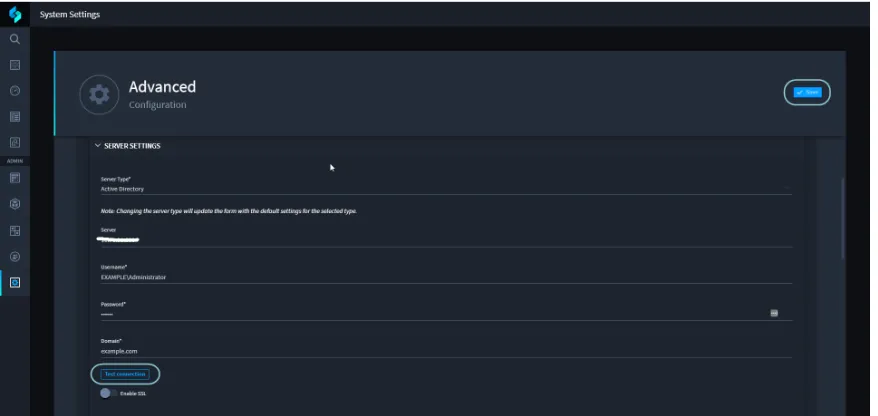
- Verify that SERVER SETTINGS are correct (Server (host name or IP Address), Username, Password, Domain) - use the Test Connection button to confirm.
- For Open LDAP, the Username must be an LDAP Distinguished Name (such as cn=Manager,dc=maxcrc,dc=com)
- See the Directory Structure section in https://en.wikipedia.org/wiki/Lightweight_Directory_Access_Protocol
Click the Save button in the upper right so that the Test Connection button appears. (The Save operation will not succeed if required portions of the entire form are not filled out. It will be necessary to add values (if only temporary values) in some portions of the form in order to proceed with the connectivity test.) Click the Test Connection button. If this test succeeds, then proceed to step 2. If it fails, then troubleshoot to establish TCP/IP and LDAP connectivity to the Director server. This involves double-checking the validity of all four of the Server Settings parameters, and it may also involve repeated trial-and-error connection attempts until the test connection operation succeeds. During this process it may be necessary to
- Open Chrome Developer Tools, click the Test Connection button, and inspect the reply received from the HTTP POST to /api/settings/ldap/test. If the response body contains the error message “The remote certificate is invalid according to the validation procedure“, then the connection failed because Swimlane doesn’t yet have access to a required TLS certificate.
- For Linux single-host deployments follow these instructions to provide the Directory Server’s certificate to Swimlane.
- For Linux HA deployments follow these instructions to upload a Third-Party Certificate.
- Confirm that Swimlane has TCP/IP connectivity to the Directory Server
- For Windows deployments, RDP to the Swimlane server and use ping and telnet (port 389) to test connectivity.
- For Linux deployments, SSH into the host and try this command from the host OS shell:
- openssl s_client -connect <server-name>:636
- openssl s_client -connect <server-name>:636 -CAfile ca.crt (to experiment with a specific certificate file in X.509 base64 format)
- Alternately (Linux), SSH into the host and then use docker exec -it sw_api /bin/bash (single host) or kubectl exec -it <api-pod-name> -n <namespace-name> /bin/bash (multi-host Kubernetes) to access the pertinent container/pod, and they try these commands
- Confirm that the chosen Directory user has sufficient privilege for the Swimlane Platform’s need to connect and traverse the Directory tree
- Disable any firewall that’s blocking access to the Directory server
- Use Wireshark (see https://www.wireshark.org/), an open source network transmission analysis tool, to inspect the LDAP packets sent between Swimlane and the Directory server to identify other obstacles
- Wireshark can be run on the Swimlane server, or on the Directory server, or on any third host that can gain access to the LDAP transmissions between the Swimlane server and the Directory server
- Note that if you’re Directory Services domain name collides with a name that’s registered publicly on the Internet (e.g. example.com), then the test connection may report a false-positive success
- Review the values in the USER SETTINGS section.
- The default values for both Active Directory and Open LDAP are often the most appropriate, but they may need to be altered to conform to your Directory server’s configuration
- Delete the default value for Member of Field Target - it should typically be empty
- Review the values in the FIELD MAPPING section. These values rarely need to deviate from defaults.
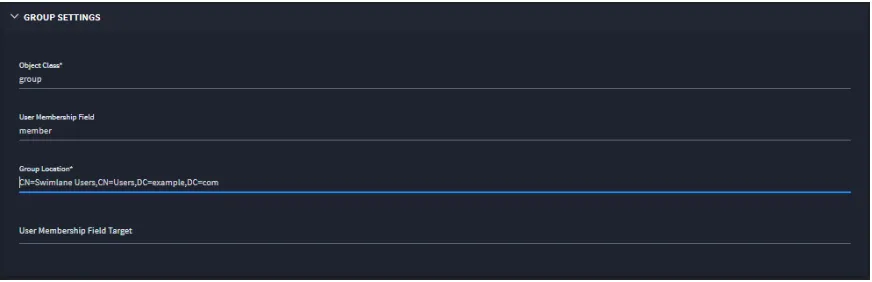
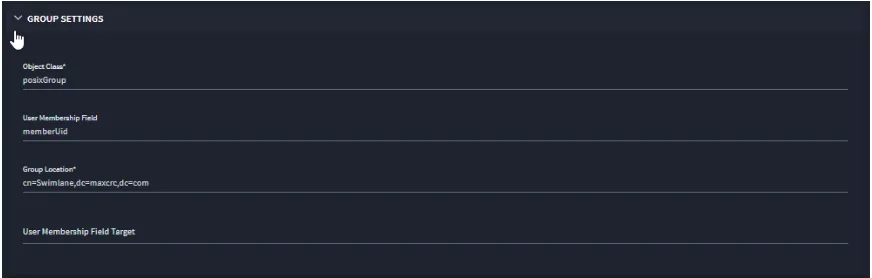
- Review the values in the GROUP SETTINGS section. Pay special attention to the following:
- Delete the default value for User Membership Field Target - it should typically be empty
- The Group Location field must contain a Distinguished Name (DN) that articulates the complete path to the container in which the targeted group(s) is/are defined (see below)
- See DN background information referenced in step 1 above
- Use an appropriate Directory Services client to inspect the targeted group(s) and make a note of the manner in which belonging users are affiliated to the group(s).
- Is it done through the groups' property named member or the users' property named memberOf, or through some other means?
Active Directory:
Open LDAP:
- Review the values in the GROUPS section. This is simply a list of hand-entered group names. (Note the need to click Add Value on far right when entering a new name for the first time.) Click the Save button again so that the Validate groups button appears. Click the Validate groups button. If it succeeds then proceed to section 6. If it fails, then troubleshoot by
- Confirming that group names are spelled correctly
- Confirming that group names are defined within the container specified in the Group Location value (a Distinguished Name) in GROUP SETTINGS
- Employing further trial and error experiments until group validation has succeeded.
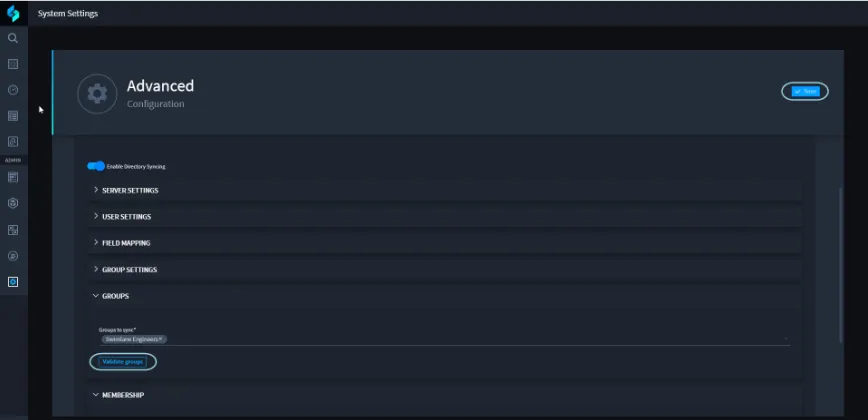
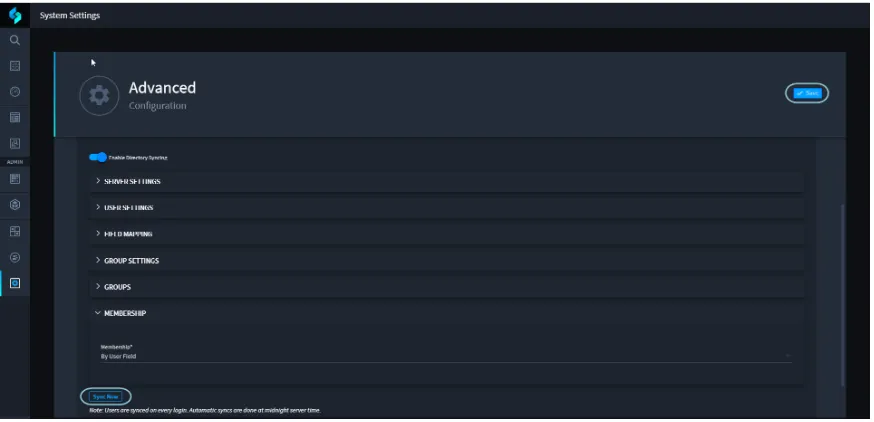
- Review the MEMBERSHIP settings. The Membership setting can assume only one of two values: By User Field or By Group Field. If, for example, the users are affiliated with their groups via the member property in each group, then choose By Group Field. Click the Save button again so that the Sync Now button appears. Click the Sync Now button. If it succeeds, then open the Swimlane Platform’s Users page and inspect it to see if some/all of the users from the targeted groups have been added to the Platform. (If only some of the users have been added by an apparently successful sync, that may be owing to the fact the some Admin-defined users have the same user names as persons in the targeted groups.) If the sync reports failure, then experiment with group names, Membership values, and the Group Location value, each time testing for group validity and sync success/failure. If trial and error does not succeed, then resort to Wireshark inspection of the sync’s transmissions (as this sometimes affords clues that can shed light on remediation steps).
Best Practices / Maintenance
There is limited support for nested sub-groups. Strive to ensure that all users to whom Swimlane access will be granted belong to the groups specified explicitly in the GROUPS section of the settings. The Swimlane Role-Based Access Control (RBAC) features allow for complex allocation of privileges within the Platform. Keep things simple by adding each user to only one group, and affiliating each group with only one role wherever possible. (Privileges are defined within roles, and these privileges are granted by affiliating the role with groups and/or users.) When a user inherits or is given multiple roles, the more permissive roles will win out in that user’s effective access privilege. Active Directory (AD) Explorer From: https://petri.com/test-connectivity-to-an-active-directory-domain-controller-from-pc
This is a tool created by Sysinternals, which is now a part of Microsoft. It’s a stand-alone tool that’s useful for querying AD and performing various tasks. The official Microsoft description states:
“Active Directory Explorer (AD Explorer) is an advanced Active Directory (AD) viewer and editor. You can use AD Explorer to easily navigate an AD database, define favorite locations, view object properties and attributes without having to open dialog boxes, edit permissions, view an object’s schema, and execute sophisticated searches that you can save and re-execute.”
In the context of this article, AD Explorer is also useful for AD connectivity tests.
Download AD Explorer
Once you’ve downloaded the Microsoft Sysinternals AD Explorer tool, simply run the ADExplorer.exe file.
Type in the name of the DC you want to connect to and the credentials you want to bind with.
Note: If you provide credentials for a user that has Domain Admin or Enterprise Admin rights, then you will be able to perform actions on the AD tree. This means that one wrong move and you may render your AD useless. Take caution, and best use a user account that has read-only permissions to the AD tree.