Share Records
You can share a record with others.
To share a record:
- Open the record in Swimlane.
- Ensure that you are in the old view of the record.
You may have switched to the enhanced view of records, but sharing a record has to be done in the old view, which is still accessible. With the record open, click Return to old view at the bottom of your screen.

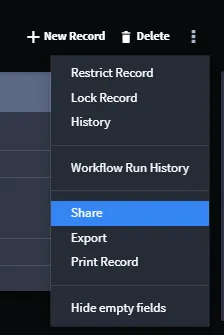
Access the ellipsis menu, and select Share.
- On Share Records, you can enter Swimlane usernames and email addresses.
If you would also like the record to be sent to you, select the Copy me box.
- Add additional comments, and then click Send.