Keyword Search and Filter
The keyword searching and filtering feature is located in the header of saved reports and the Default Report page. It allows you to sort through information in records based on the types of fields included in the application. These main field types are text, numeric, date & time, selection, and user/group.
Use Keyword Search and Filter
- Click in the search field at the top of the report page.
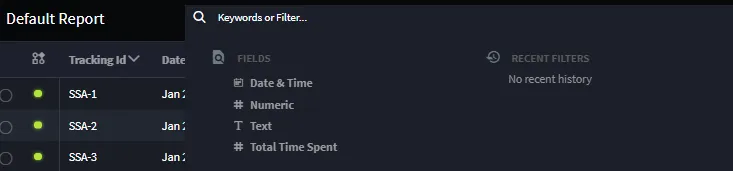
- To begin searching, either type information you are searching for or select a field to filter by.
+> Note: When searching or filtering in the Text List Field, if after clicking Apply the results display No Value in the search bar, press the Enter/Return key after inserting the search or filter phrase before clicking the Apply button.
Select your operator and insert the value you are filtering by. Click apply. For more information on operators and values, reference Filtering Field Types below.
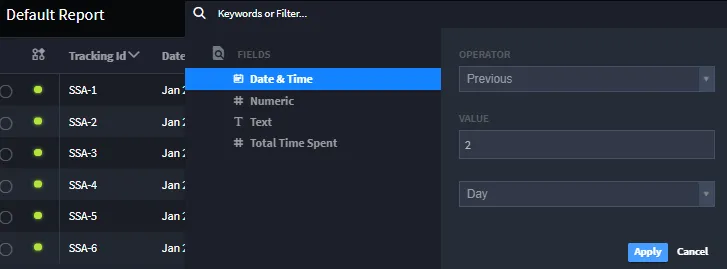
The report is now sorted. The filter will appear at the top of the page in the search field.
+> Note: To view the information contained in each record, click or Add/Remove Columns, on the report header. This allows you to add or remove columns of content.

+> Note: When you save the selected records on the Default Reports page as a report, you also save any filters applied.
Filter Field Types
When filtering reports, each section in the record appears and can be filtered individually. These main field types are text, numeric, date & time, selection, and user/group.
Text
Text filters are indicated by the symbol and only apply to sections that allow text entries.

Operator | Description |
|---|---|
Equals | Shows records that contain the exact filter entry. |
Does Not Equal | Shows records that do not contain the exact filter entry. |
Contains | Shows records that include the filter entry. |
Excludes | Shows records that do not contain the filter entry. |
Numeric
Numeric filters are indicated by the symbol and only apply to sections that allow numeric entries.

Operator | Description |
|---|---|
Equals | Shows records that contain the exact filter entry. |
Does Not Equal | Shows records that do not contain the exact filter entry. |
Contains | Shows records that include the filter entry. |
Excludes | Shows records that do not contain the filter entry. |
Less Than | Shows records that includes numbers smaller than the number entered. |
Less Than or Equal | Shows records that includes numbers smaller than or the same as the number entered. |
Greater Than | Shows records that include numbers larger than the number entered. |
Greater Than or Equal | Shows records that include numbers larger than or the same as the number entered. |
Date & Time
Date & Time filters are indicated by the symbol and only apply to sections that allow date entries.

Operator | Description |
|---|---|
Equals | Shows records that contain the exact filter entry. |
Does Not Equal | Shows records that do not contain the exact filter entry. |
Less Than | Shows records that include dates and times prior to the date and time entered. |
Less Than or Equal | Shows records that include dates and times prior to or the same as the date and time entered. |
Greater Than | Shows records that include dates and times later than the date and time entered. |
Greater Than or Equal | Shows records that include dates and times later than or the same as the date and time entered. |
Previous | Shows records that include dates and times prior to the date included. The value entered with this operator determines the number of time values prior to the date entered, such as 2 minutes, 1 day, or 7 months. |
Current | Shows records that include the same date and time as the date and time entered. The value selected with this operator determines the time value to sort by, such as minute, day, and month. |
Selection
Selection filters are indicated by the symbol and only apply to sections that allow date entries.

Operator | Description |
|---|---|
Equals | Shows records that contain the exact filter entry. |
Does Not Equal | Shows records that do not contain the exact filter entry. |
Contains | Shows records that include the filter entry. |
Excludes | Shows records that do not contain the filter entry. |
User/Group
User/Group filters are indicated by the symbol and only apply to the following operators.

Operator | Description |
|---|---|
Equals | Shows records that contain the exact user or group filter entry. |
Does Not Equal | Shows records that do not contain the exact user or group filter entry. |
Contains | Shows records that include the user or group filter entry. |
Excludes | Shows records that do not contain the user or group filter entry. |