Connect to MongoDB from Outside Kubernetes
The following procedure describes how to connect to a MongoDB resource deployed by Kubernetes from outside of the Kubernetes cluster.
- Create external MongoDB services
- Setup firewall
- Setup Robo3T
- Connecting to MongoDB replicaset PRIMARY member
Create external MongoDB services
By default, MongoDB is internally accessible on port 27017. In Kubernetes, if you want to expose a port to the outside world, you can use Service with Type NodePort.
Step 1: Lookup the swimlane namespace and save it as an environment variable
Step 2: Create new service for mongo pod 0
In line nodePort: 32000, we specified the external port. There, any port from the range 30000-32767 can be used.
Step 3: Create new service for mongo pod 1
In line nodePort: 32001, we specified the external port. There, any port from the range 30000-32767 can be used.
Step 4: Create new service for mongo pod 2
For the line "nodePort: 32002", we specified the external port. From there, any port from the range 30000-32767 can be used.
Setup firewall
Step 1: Lookup IP addresses
Step 2: Open firewall to nodePort(s)
You need to use the IP address of any node and grant TCP access to ports from the nodePort line, not from the port line. In our example, we need to open ports 32000, 320001, and 320002.
Setup Robo3T
Now, you can connect to MongoDB using Robo3T or any other client tools using the node IP addresses on which you opened ports 32000, 320001, and 320002. NOTE: Once Swimlane's Mongo version is updated to 4.2.2, you also need to upgrade Robo3T to 1.3.1. Older versions of Robo3T will be unable to connect to Mongo 4.2.2
Step 1 : Create a new MongoDB Connections for swimlane-sw-mongo-0
Name: swimlane-sw-mongo-0
Address: <node internal ip>:32000
Authentication: Enable
Step 2 : Create a new MongoDB Connections for swimlane-sw-mongo-1
Name: swimlane-sw-mongo-1
Address: <node internal ip>:32001
Step 3 : Create a new MongoDB Connections for swimlane-sw-mongo-2
Name: swimlane-sw-mongo-2
Address: <node internal ip>:32002
Note:
- Enable Authentication and SSL
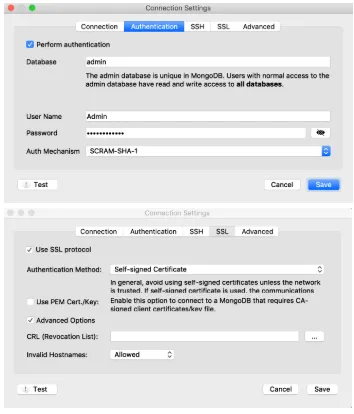
Connecting to MongoDB replicaset PRIMARY member
Step 1: Lookup the swimlane namespace and save it as an environment variable
Step 2: Lookup MongoDB Admin password
Step 3: Determine MongoDB replica set PRIMARY member
From the output, note the name of the mongo pod (swimlane-sw-mongo-0 or swimlane-sw-mongo-1 or swimlane-sw-mongo-2) with stateStr is equal to PRIMARY.
Step 4: Access MongoDB replicaset member PRIMARY from Robo3T
Now that you know which pod is running the MongoDB replicaset member PRIMARY, use the corresponding MongoDB connections created above to connect to the member.