Appsettings.json Password Obfuscation
By default, passwords are saved as plain text in the Tasks and API appsettings.json files. The following instructions detail how to allow obfuscation of these passwords, if desired.
Obfuscating passwords is not a security measure, instead it is available to those who would like to configure their install this way. Running the commands below will result in obfuscated passwords similar to this:
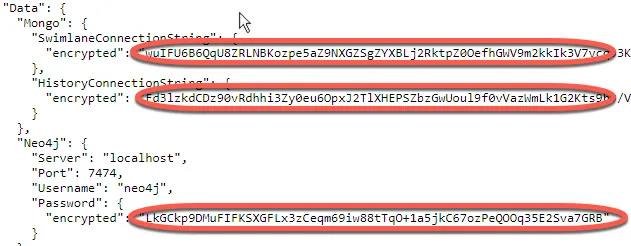
Tasks
Run the following commands from an administrator Command Line (cmd.exe):
- pushd "C:\Program Files\Swimlane"
- dotnet tasks.dll encryptinfile -f .\appsettings.json -s $.Data.Mongo.SwimlaneConnectionString
- dotnet tasks.dll encryptinfile -f .\appsettings.json -s $.Data.Mongo.HistoryConnectionString
Additional commands and options are described by typing the following:
- dotnet tasks.dll -h
- dotnet tasks.dll encryptinfile --help
- dotnet tasks.dll encrypttofile --help
API
Run the following commands from an administrator Command Line (cmd.exe):
- pushd C:\inetpub\API
- dotnet api.dll encryptinfile -f .\appsettings.json -s $.Data.Mongo.SwimlaneConnectionString
- dotnet api.dll encryptinfile -f .\appsettings.json -s $.Data.Mongo.HistoryConnectionString
View additional commands and options by typing the following:
- dotnet api.dll -h
- dotnet api.dll encryptinfile --help
- dotnet api.dll encrypttofile --help