Understanding Swimlane Turbine Super Admin
- Summary
Understanding Swimlane Turbine Super Admin: Architecture, Privileges, UI Matrix, and Differences from Account Admin
In Swimlane Turbine, administration is architecturally divided into distinct tiers to enforce least privilege, tenant boundaries, and platform security:
Account Admin (Day-to-Day Administrator).
The operational administrator responsible for managing users, groups, roles, workspaces, tenants, integrations (SAML, LDAP, Git), and day-to-day orchestration within authorized account boundaries.
Super Admin (Platform and Infrastructure Controller).
The highest-level administrative authority in the platform. Super Admin status is governed by an account-level database flag (IsSuperAdmin = true) created during cluster bootstrap. It manages platform-level feature flags, system-wide migrations, tenant feature toggles, and protected system parameters.
Standard User (Analyst / Engineer / Operator).
Day-to-day users whose interaction is strictly confined to applications, records, dashboards, and playbook execution as granted by assigned functional roles.
Key takeaway.
A user can be designated an Account Admin, hold a role named Administrator, and have the legacy toggle "Grant access to all Turbine Elements" turned on, yet still be unable to view or access screens that require Super Admin status. The Super Admin flag does not replace a functional role: application forms, records, and playbooks still follow that user's assigned roles and groups.
2. Key Architectural Differences: System Flag vs. Functional Role
Architectural dimension | Super Admin (IsSuperAdmin = true) | Account Admin (Normal Admin) | Standard User (Analyst / Engineer) |
|---|---|---|---|
Identity mechanism | System-level database flag on the user record | Role / RBAC profile assigned to the user | Standard RBAC role assignment |
Creation method | Built in during initial deployment/bootstrap | Created via Admin Panel → Users | Created via Admin Panel → Users |
UI grantability | ❌ Cannot be granted or removed in the UI | ✅ Assigned and modified in the UI | ✅ Assigned and modified in the UI |
Platform scope | System/infrastructure level across accounts | Account/tenant operational boundary | Workspace/application boundary |
Data and record access | Requires a functional role assignment | Governed by the assigned administrative role | Restricted to assigned roles and groups |
Enhanced RBAC seed | Migrates into the seeded Super Admin role | Migrates into the seeded Account Admin role | Retains migrated custom roles |
Authentication practice | Local authentication with mandatory 2FA / MFA | External SSO / SAML or local authentication | External SSO / SAML or local authentication |
3. Platform Architecture and UI Hierarchy
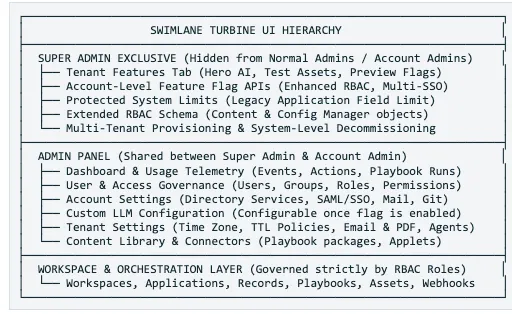
4. A to Z Capabilities and Privileges of a Super Admin
A. Feature Management and Tenant Flags
The Features tab is at Admin Panel → Settings → Tenant → Features. Under Legacy RBAC, this tab is hidden from Account Admins.
Hero AI governance. Turning off the Hero AI toggle hides:
- Orchestration → AI Agents
- The Hero AI action under playbook step creation (Add → Actions)
- The global Chat with Hero navigation icon
Test Asset Connection. Toggles visibility of the connection test button on connector assets. It is disabled by default and requires Assets → Test permission on Turbine 26.2.0 and later.
Security intelligence and preview modules. Enables or disables beta features, vulnerability management modules, and advanced event utilities (for example, CSV Utilities and Flow Emit Events).
B. Account-Level Feature Flag APIs (Platform 26.4+)
Account Admins cannot modify account-level architectural flags. Only a Super Admin session can execute these PUT requests:
PUT https://{host}/tenant/api/feature-flag/{account-id}/EnhancedRbac?enabled=true PUThttps://{host}/tenant/api/featureflag/{accountid}/EnhancedRbacDataMigration?enabled=true PUT https://{host}/tenant/api/feature-flag/{account-id}/MultiSso?enabled=true |
|---|
C. Tenant and Multi-Tenant Lifecycle Management
- Tenant provisioning: provision, rename, configure, or decommission tenant instances.
- Limits and thresholds: establish tenant execution limits, playbook concurrency caps, and tenant isolation policies.
D. System Infrastructure and Configuration
- License management: view, upload, update, and manage core product license keys. Enabling a feature toggle does not bypass contractual license boundaries.
- Base platform routing: define platform base URLs, external vanity hostnames, and ingress routing rules.
- Global mail and system templates: build and maintain global communication templates and system notification headers across tenants.
- Directory services and authentication: manage baseline LDAP / Active Directory profiles, global SAML IdP parameters, and global session security rules (password complexity, lockout thresholds).
- CA certificates and trust stores: manage trusted root authority certificates for internal corporate proxies and secure connector integrations.
E. Advanced RBAC and Matrix Visibility
- Extended permission matrix: when inspecting the role configuration editor, Super Admins can see lower-level schema objects (such as low-level Identity elements and Content and Config Manager permissions) that remain hidden from Account Admins.
- Application Field Limit: sets the maximum number of search-indexed fields in applications and applets (default 500). Under Legacy RBAC, only a Super Admin can edit this field under Tenant Settings → System.
F. Security, Record Locking, and Restriction Overrides
- Legacy access override: under Legacy RBAC, users with Grant access to all Turbine Elements, or Super Admin status, could bypass user/group record restrictions and manual record locks.
- Enhanced RBAC decoupling: under Enhanced RBAC, record restriction bypass is controlled by discrete, auditable role permissions rather than a global flag.
G. Global Library and Content Distribution
- Cross-tenant publishing: publish reusable solutions, applications, applets, and playbooks to the global library.
- Git version control: coordinate enterprise Git repository synchronization across accounts and tenants.
5. Comprehensive Feature Comparison Matrix
Platform area | Feature/capability | Super Admin | Account Admin | Standard User | Technical / permission gate |
|---|---|---|---|---|---|
Tenant Features | View and toggle the Features tab | ✅ Full access | ❌ Hidden (Legacy) ⚠️ With permission (Enhanced) | ❌ Hidden | Legacy: IsSuperAdmin = true Enhanced: Tenant Feature Flags → Read / Update |
System APIs | Account feature flags (Enhanced RBAC, Multi-SSO) | ✅ Full access | ❌ No access | ❌ No access | Requires isSuperAdmin: true in the user session token |
System Settings | Application Field Limit (default 500) | ✅ Full access | ❌ No (Legacy) ⚠️ With permission (Enhanced) | ❌ No access | Legacy: Super Admin only Enhanced: Tenant Settings → Protected Limit |
| General tenant settings (time zone, TTL, email / PDF) | ✅ Full access | ✅ Accessible | ❌ No access | Tenant Settings → Read / Update |
Account Settings | SAML / SSO, directory, security, mail, Git | ✅ Full access | ✅ Full access | ❌ No access | Account Settings permission |
| Custom LLM configuration | ✅ Configurable | ✅ Configurable | ❌ No access | Enabled via a Support flag; configured by Account Admin or Super Admin |
Admin Panel | Users, groups, roles, and tenants | ✅ Full access | ✅ Full access | ❌ No access | Administrative role assignment |
| Usage telemetry (events, actions, prompts, tokens) | ✅ Full access | ✅ Full access | ❌ No access | Usage → Read permission |
| Extended RBAC matrix (Content / Config Manager) | ✅ Visible | ❌ Hidden | ❌ Hidden | Super Admin status |
Infrastructure | Manage system platform licenses | ✅ Full access | ⚠️ View only | ❌ No access | License management permissions |
| CA certificates and system routing URLs | ✅ Full access | ⚠️ Restricted | ❌ No access | System configuration permissions |
Orchestration | Playbooks, connectors, webhooks, assets | ⚠️ Role-based | ⚠️ Role-based | ⚠️ Role-based | Governed by a functional role. The Super Admin flag alone does not grant access. |
| Test connector asset connections | ⚠️ Role-based | ⚠️ Role-based | ⚠️ Role-based | Requires Assets → Test permission (Turbine 26.2.0+) |
Applications | Application Studio and form builder | ⚠️ Role-based | ⚠️ Role-based | ⚠️ Role-based | Workspace/application builder permissions |
| Record editing and restriction bypass | ⚠️ Role-based | ⚠️ Role-based | ⚠️ Role-based | Role-based access control/record permissions |
6. How Super Admin Is Assigned, Stored, and Migrated
Assignment rules
- No UI promotion. There is intentionally no button, toggle, or workflow in the Turbine UI that promotes a user to Super Admin.
- Turbine Platform (on-premises). Another existing user can be granted Super Admin only through a Support-guided change on the cluster database. The user must already exist and have logged in at least once. After the database update, the user must log out and log back in.
- Turbine Cloud. Customer organizations submit an authorized request to Swimlane Support to change Super Admin status or account-level flags.
- Environment independence. The IsSuperAdmin flag is stored on that environment’s user record in the Users table. Backing up and restoring an environment preserves the flag on those records. The same email address can be a Super Admin in staging and an Account Admin in production.
Legacy RBAC and Enhanced RBAC migration
On Turbine Platform 26.4 and later, accounts can transition to Enhanced RBAC.
- API execution. Only an authenticated Super Admin can execute the migration API.
- Seeded role assignments. During migration, Turbine copies legacy roles and assigns every user with IsSuperAdmin = true to the seeded Super Admin role, and every legacy Account Admin user to the seeded Account Admin role.
- Decoupled governance. Under Enhanced RBAC, Account Admin is an editable, cloneable role rather than a fixed user toggle. Organizations can create specialized administrative roles that exclude sensitive permissions such as Tenant Feature Flags or Protected Limit.
- Session re-authentication. Privilege claims are embedded in the session token at login. Users must sign out and sign back in after a backend flag change or a migration.
7. How to Verify Which Privilege Level You Hold
Use the signed-in session to tell Super Admin from Account Admin.
Verify the Features tab
- Open Admin Panel → Settings → Tenant.
- Visible: the account has Super Admin status, or, under Enhanced RBAC, Tenant Feature Flags → Read / Update.
- Missing: the account is an Account Admin without Super Admin privileges.
Verify Application Field Limit
- Open Admin Panel → Settings → Tenant → System.
- If Application Field Limit is unavailable while Time Zone and History TTL can still be edited, the user lacks Super Admin status on Legacy RBAC, or lacks Tenant Settings → Protected Limit on Enhanced RBAC.
Inspect the authenticated session
In browser developer tools, check the response from /identity/api/user/me or the login response:
{ "userAccountAccessModels": [ { "accountId": "xxxxxxxx-xxxx-xxxx-xxxx-xxxxxxxxxxxx", "isSuperAdmin": true, "isSwimlaneUser": false } ] } |
|---|
8. Governance and Security Best Practices
- Least privilege. Do not use the installation Super Admin account for routine engineering, record review, or playbook drafting. Do that work with an Account Admin or a developer role.
- Just-in-time elevation. Reserve Super Admin for initial cluster configuration, feature-flag changes, and major RBAC migrations.
- Local MFA on Super Admin. Keep the Super Admin account on local credentials with two-factor authentication, including when Account Admins sign in through corporate SSO. That preserves an administrative path if the corporate identity provider is unavailable.
- Audit configuration changes. Review audit logs for updates under Tenant Settings → Features and for changes to Application Field Limit.
9. Frequently Asked Questions (FAQs)
Q1. Why can't I see the Features tab even though I am an Administrator with full access?
The Features tab (Admin Panel → Settings → Tenant → Features) is gated by the backend IsSuperAdmin = true flag under Legacy RBAC. Standard administrative roles, including the out-of-the-box Administrator role and users with “Grant access to all Turbine Elements,” are Account Admins, not Super Admins. Under Enhanced RBAC, this tab remains hidden unless the user has the Super Admin role or is explicitly assigned Tenant Feature Flags → Read / Update.
Q2. Can an Account Admin promote another user to Super Admin from the UI?
No. Turbine intentionally omits any user-interface controls for granting Super Admin status to prevent privilege escalation.
Q3. How is Super Admin access granted to an existing user?
Turbine Platform (on-premises)
An administrator with cluster shell access connects to the PostgreSQL leader pod (SwimlaneTenant database) under Support guidance and updates the user record:
UPDATE "Users" SET "IsSuperAdmin" = 't' WHERE "Email" = '[email protected]'; |
|---|
The user must have logged in at least once before this command is run, and must log out and back in afterward.
Turbine Cloud
Super Admin elevation is performed exclusively by Swimlane Support through formal change management.
Q4. Does a Super Admin bypass Single Sign-On (SSO)?
Super Admin accounts can authenticate via SSO if they are mapped. Keep the primary Super Admin account on local credentials secured by two-factor authentication (2FA). That avoids an administrative lockout if enterprise SAML or IdP configuration breaks, or if a certificate expires.
Q5. Does being a Super Admin automatically grant access to all applications and records?
No. Super Admin is an infrastructure and platform configuration flag. Access to workspaces, applications, records, and playbooks is governed by functional role and group assignments. A Super Admin without an application-level role cannot build forms or view restricted records.
Q6. Can an Account Admin configure Custom LLMs?
Yes. Configuring a Custom LLM under Admin Panel → Settings → Account → Custom LLM (such as LiteLLM or Amazon Bedrock) does not require Super Admin access. Once Swimlane Support has enabled the Custom LLM feature flag on the account, any user with Account Settings administrative permissions can complete the configuration.
Q7. Does turning on a toggle in the Features tab grant features our contract does not include?
No. The Features tab toggles platform functionality on or off at the software level. It does not alter contractual license limits or grant features that are not in the enterprise license file. If an unlicensed feature is toggled on, it stays unavailable or returns a licensing validation error.
Q8. If we restore our database from a backup, what happens to Super Admin users?
The IsSuperAdmin flag is stored on each environment’s database user records. A full database restore restores the flag as it existed when the snapshot was taken. Because the flag is environment-specific, a user who is a Super Admin in Staging does not automatically become a Super Admin in Production unless that production user record is updated.
Q9. Can an Account Admin access Admin Panel → Usage?
Yes. Access to Admin Panel → Usage (metrics for actions, events, playbook executions, and Hero AI token and credit consumption) is controlled by the Usage → Read permission. The default Account Admin role includes this permission.