Configuring and Calculating Risk Score
To configure and calculate the risk score:
- Open the VRM - Calculate Turbine Risk Score component
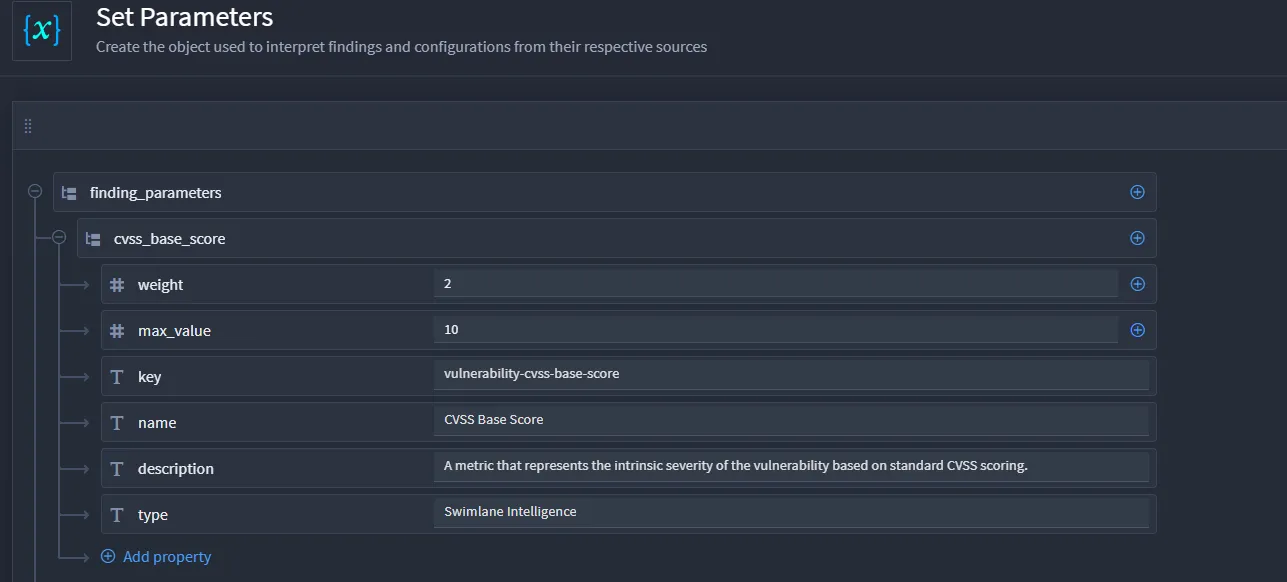
- Edit the Set Parameters Create Variable action.
- To change weight:
- Modify the weight value for any existing scoring object to an integer between 0 and 10.
- To remove scoring objects from the calculation
- Delete any of the objects within the finding_parameters parent object
- To add a new scoring object
- Create a new scoring object under the finding_parameters base object
- Give it a unique name
- Create a new integer value called “weight” and give it any value 0 or greater
- Create a new integer value called “max_value” and assign the maximum value that the first can possibly have.
- For booleans, use 1 as a max_value.
- Create a string value with the name of "key" and assign to it the field name from the vulnerability_finding object that is being added
- Create a string value called "name" and assign the display name of the new scoring object.
If the new scoring object is a boolean, do the following:
- Save the component.