Enable additional logging using the application runtime environment - aspNetCore
The Application runtime environment parameter, "aspNetCoreEnvironment" can be set to Development, Staging, or Production. For example, once you set to Development, you should be able to see an exception stack trace in the Response section of the Chrome Developer Tool's Network tab.
Important: Remember to remove it once you're done with debugging the application, especially in Production.
Linux Swimlane Platform Installer (SPI)
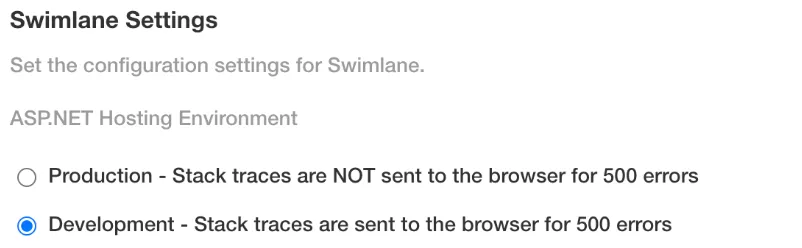
On Swimlane Settings under logging, you can set the ASP.NET Hosting Environment:
Linux HA (Kubernetes / Helm)
Swimlane's Kubernetes Helm Chart version 0.9.0 and above has a parameter, 'aspnetcoreEnvironment', in the values.yaml for this purpose. There are three possible options to update the parameter value.
Option 1: Update values.yaml
- Update the parameter value for aspnetcoreEnvironment to Development in the API section.
- Run the following command to make the changes:
Option 2: Override by --set parameter
Set the value of aspnetcoreEnvironment to Development as part of the command:
Option 3: Older Helm Chart
Swimlane Helm Chart Version 0.1.0 doesn’t have the `aspnetcoreEnvironment` parameter in values.yaml. It's best to update the chart, otherwise, follow the steps below:
- Get the name of the swimlane-api deployment.
- Add the environment variable with:
- Now check the value of ASPNETCORE_ENVIRONMENT inside the swimlane-api deployment.
- Restart the api pods. The next pod created would pull in that environment variable.
- Wait for all pods to terminate.
- Scale back to 3.
- Wait for all pods to start back up again.
- Now check to see if the value of ASPNETCORE_ENVIRONMENT has been updated inside the api pod.