Deploy with an External MongoDB Cluster
Due to ongoing incompatibilities, Swimlane does not support using Amazon DocumentDB as an option for external MongoDB Cluster deployment.
The physical location of the external Mongo deployment, as it pertains to latency between the Swimlane cluster and the standalone Mongo instance, performs best with a latency delay of less than 5 milliseconds. Be aware that with every added millisecond of latency, Swimlane's performance drops linearly.
There are two primary deployment models for using an external MongoDB cluster with Swimlane:
General Requirements
- MongoDB version 6.0.14 is currently the only supported version for any external deployment.
Self-Hosted MongoDB Cluster
Customer-maintained MongoDB clusters are supported as long as the external MongoDB cluster meets the requirements listed in the System RequirementsSystem Requirements for existing clusters.
To help with troubleshooting, Swimlane recommends that you name your databases Swimlane and SwimlaneHistory in your deployment. In each database, also create a Swimlane user and ensure that it is assigned the dbOwner role.
MongoDB Atlas
You can use MongoDB Atlas as an external MongoDB cluster as long as the cluster has been configured to use a compute tier that aligns with the System Requirements for an Existing Cluster InstallSystem Requirements for an Existing Cluster Install. Dedicated M40 clusters are the minimum compute tier required for an external MongoDB cluster.
After creating your Atlas cluster, you must create two databases along with two users for those databases. Swimlane recommends that you name your databases Swimlane and SwimlaneHistory in your deployment. In each database, also create a Swimlane user.
Users, databases, and roles are all managed through the Atlas UI. Atlas does not have a "dbOwner" role that would be used in self-hosted clusters. Instead, your created users should be assigned the specific advanced privileges dbAdmin and readWrite. Additionally, you can scope the permissions of each user to their respective databases, although it is not required.
The built-in role "Read and write to any database" is not sufficient, as Swimlane requires the ability to create indexes in MongoDB, which is a dbAdmin privilege.
Configuring External Mongo in the Swimlane Platform Installer
When you select the Use an external MongoDB deployment option, the SPI UI hides all of the embedded mongo options and displays these sections MongoDB Swimlane Database Settings and MongoDB Swimlane History Database Settings.
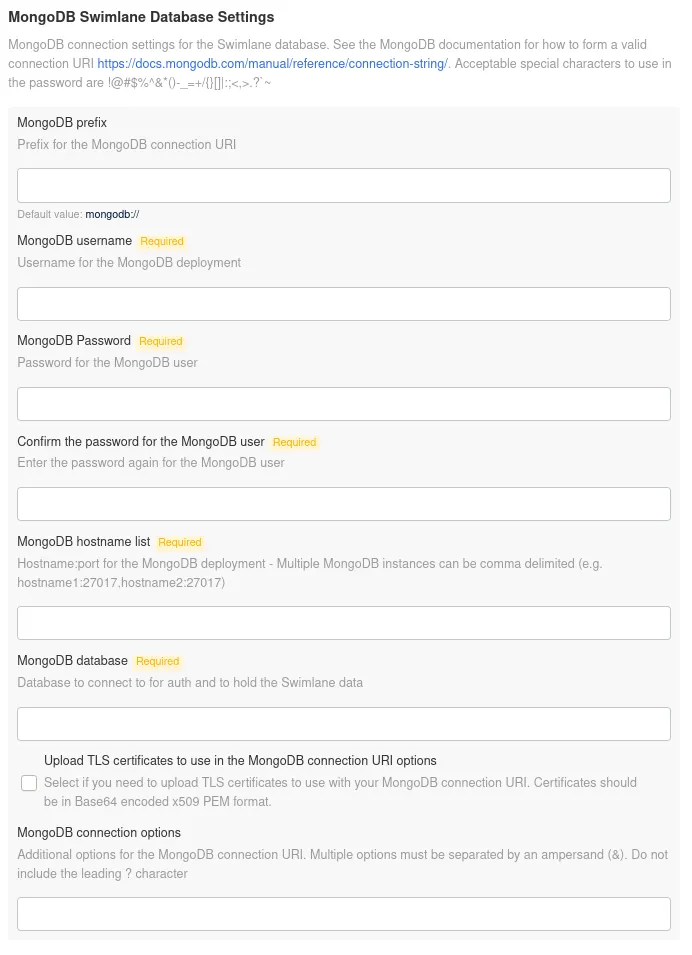
Both of these sections set their respective database's configuration and contain the same options as described here:
MongoDB prefix: Describes the prefix of the MongoDB connection string. The default value is mongodb://, however mongodb+srv:// is also a valid prefix. This prefix is common when using MongoDB Atlas.
MongoDB username: The username for the user associated with the relevant database that is being configured, either Swimlane or SwimlaneHistory.
MongoDB Password: The password for the user associated with the relevant database that's being configured, either Swimlane or SwimlaneHistory.
MongoDB hostname list: The hostname or set of hostnames for the MongoDB cluster. For multi-node clusters, this is usually in the form of a comma-separated list of hostnames and ports. In Atlas deployments, this can be the SRV record for the cluster provided by the Atlas UI.
MongoDB database: The database name relevant to the database that's being configured, either Swimlane or SwimlaneHistory.
Upload TLS certificates to use in the MongoDB connection URI options: Enables the uploading of a CA certificate if the MongoDB cluster uses an internal CA.
MongoDB connection options: Provide additional options to the connection string. Currently, the only supported options are ssl and sslVerifyCertificates.