JumpCloud SCIM Integration
Swimlane Turbine supports SCIM 2.0 integration with JumpCloud. This integration enables administrators to automatically provision and de-provision users via groups from JumpCloud to Swimlane Turbine using the SCIM standard.
SCIM helps customers manage onboarding and off-boarding of users centrally in JumpCloud without logging in to Swimlane Turbine for manual user management.
Users are managed in Swimlane Turbine through their membership in SCIM-provisioned user groups.
Groups are synced automatically through SCIM. However, roles are not provisioned through SCIM and must be assigned manually to each group in Swimlane Turbine. After roles are assigned, the group can be reused for ongoing provisioning.
Choose Your Path
Goal | Go to |
|---|---|
Configure JumpCloud SCIM for Swimlane | |
Understand attribute mapping | |
Provision users and groups | |
Remove users or groups | |
SCIM limits and direction of sync |
How to Configure JumpCloud SCIM
To create and configure a SCIM application in JumpCloud for Swimlane Turbine:
- Sign in to the JumpCloud Administrator Console.
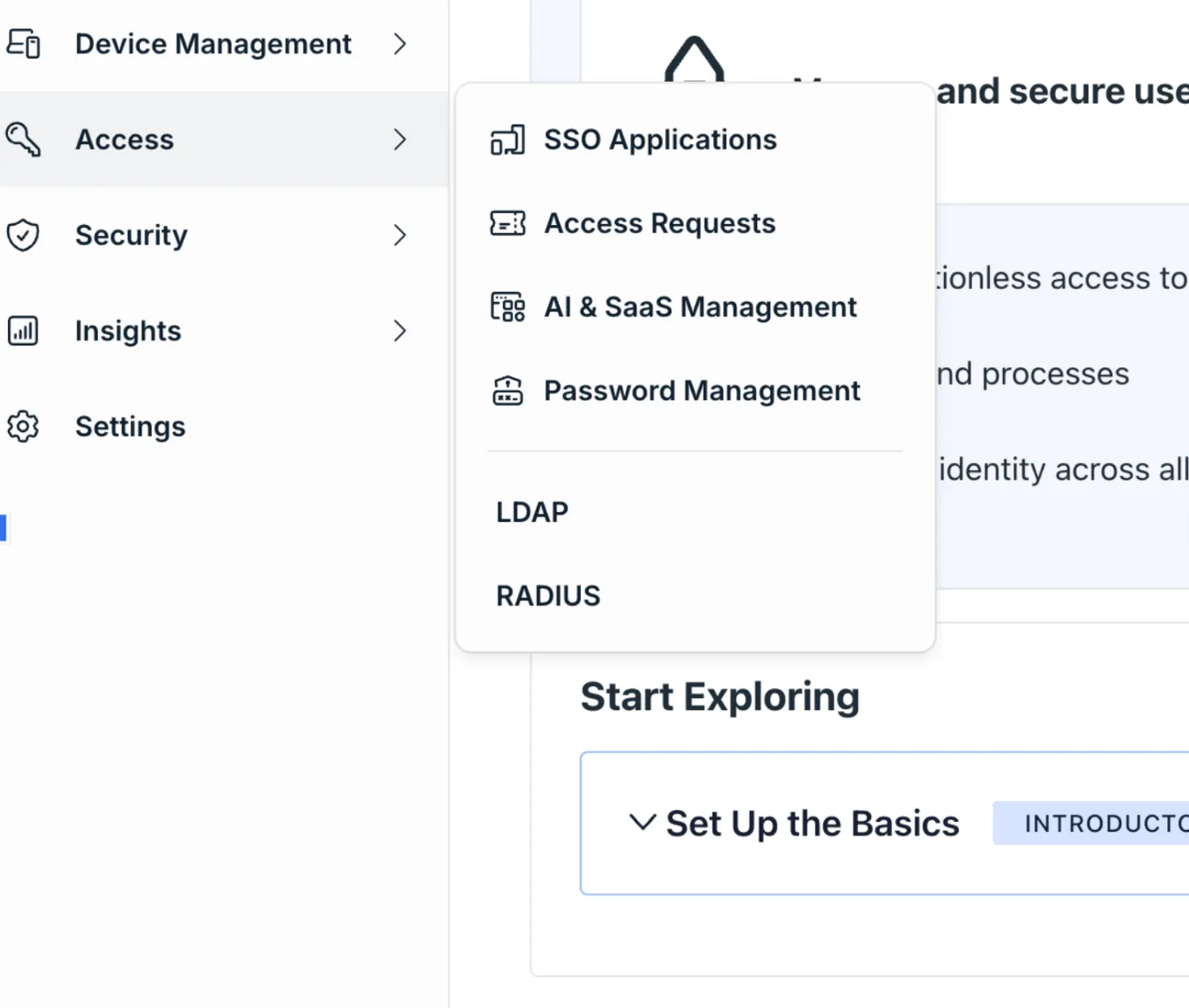
- In the left navigation menu, hover over Access, and click SSO Applications. OR, In the left navigation menu, under User Authentication, click SSO Applications, if you are on an old user interface.
- Click + Add New Application.
- Select Custom Application, and then click Next.
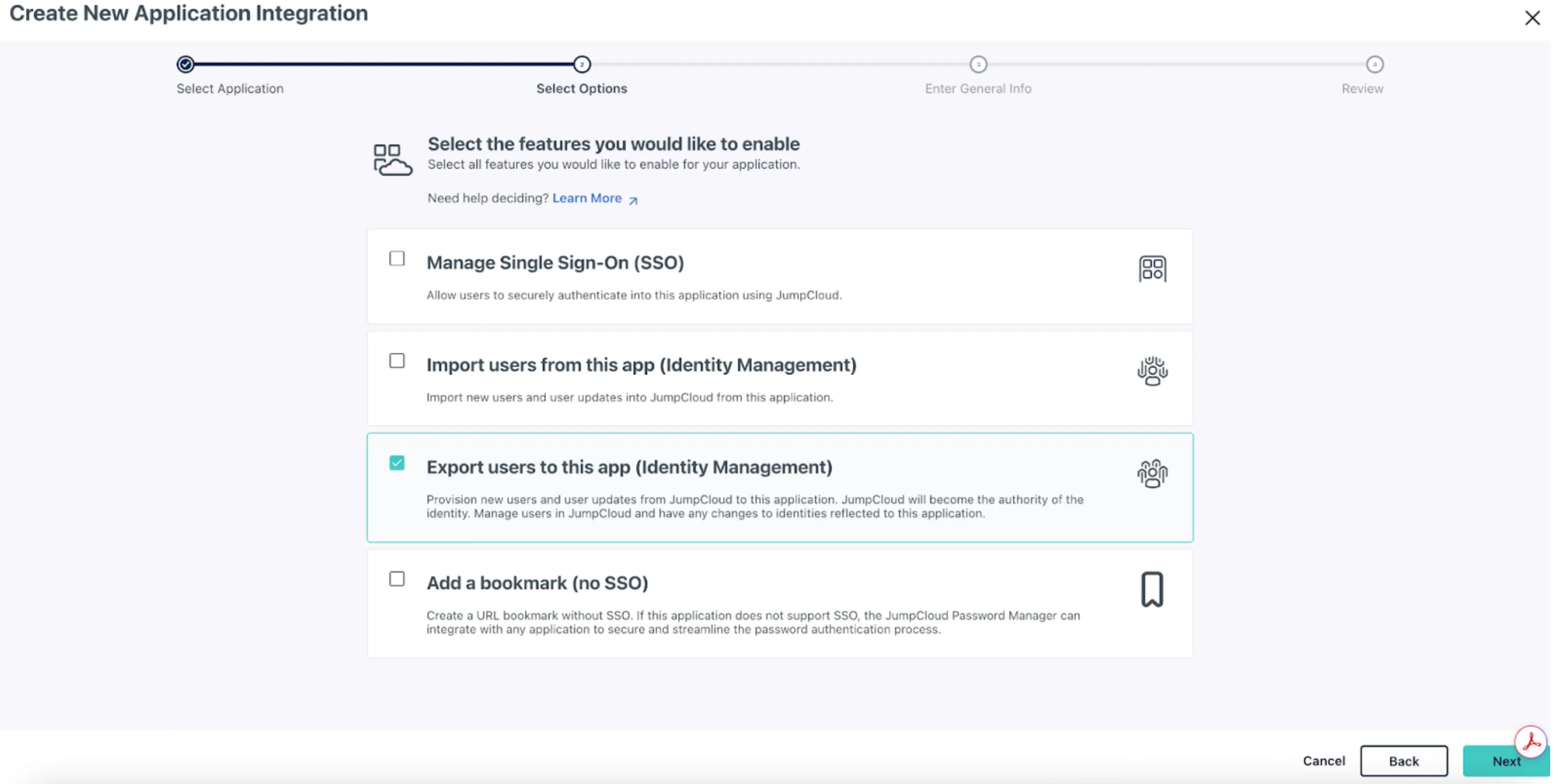
- Select the required application features.
- Select Export users to this app.
- Click Next.
- Enter the general application details, including:
- Display label
- Description
- Any additional required fields
- Click Save Application.
- Click Configure Application, then configure the SCIM connection with the following values:
SCIM Configuration
Field | Value |
|---|---|
Base URL | https://<your-swimlane-host>/tenant/api/account/<ACCOUNT_ID>/scim/v2 |
Token | Swimlane Personal Access Token (PAT) |
Replace <your-swimlane-host> with your Swimlane Turbine hostname (for example, acme.swimlane.com). Replace <ACCOUNT_ID> with your Swimlane account UUID. JumpCloud sends the token as a Bearer value; Swimlane maps it for SCIM authentication. Use a PAT for a user with permission to manage users and groups at the account level. See Provisioning with SCIM IntegrationProvisioning with SCIM Integration for authentication, authorization, and REST endpoint details.
- Click Test Connection.
- When the connection succeeds, click Activate.
- The created application is activated. Click Save.
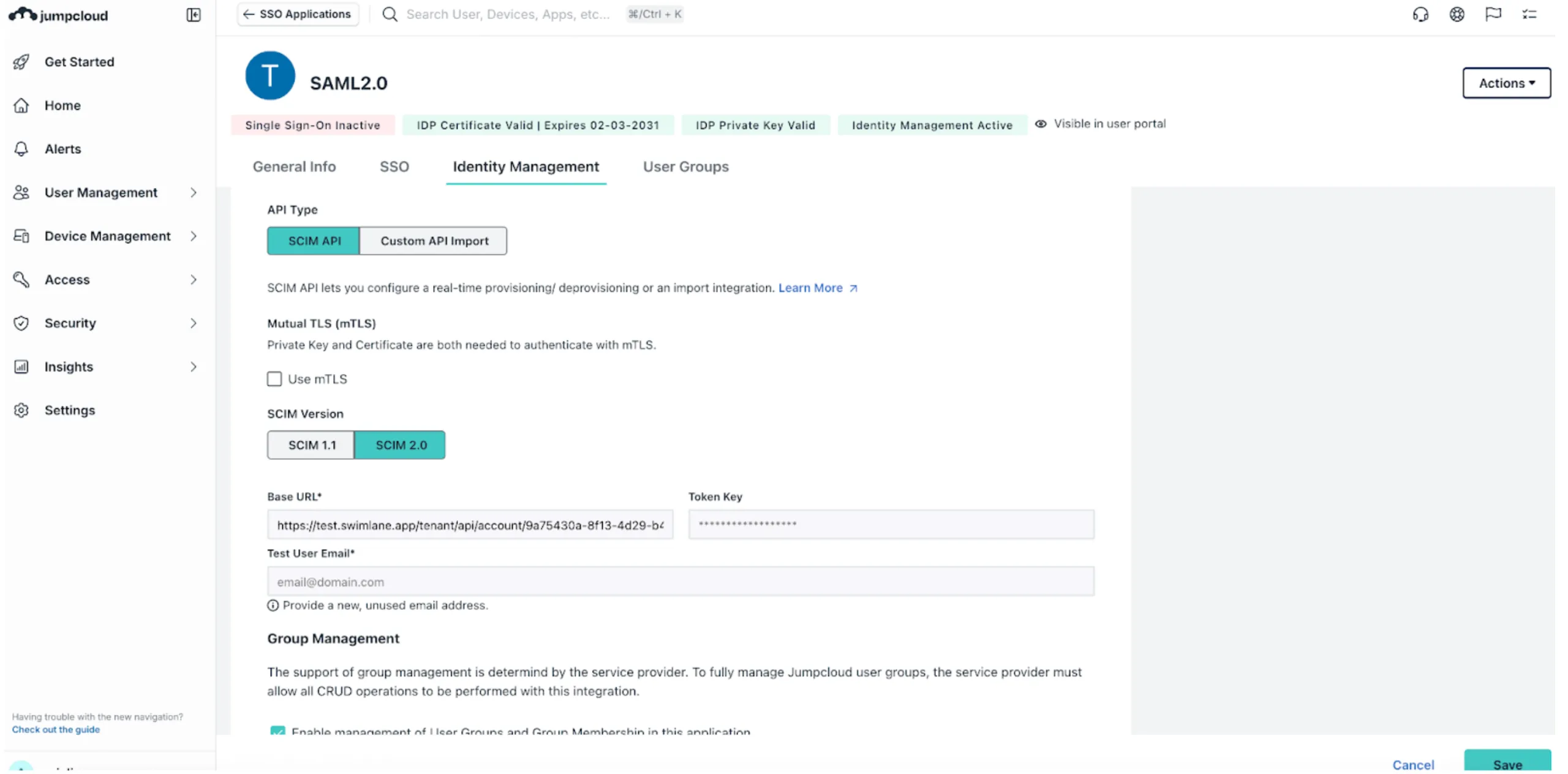
Once the connection is successful, JumpCloud begins managing user groups and users in Swimlane Turbine through SCIM.
For detailed, step-by-step instructions on creating, configuring, and managing a SCIM application in JumpCloud, see the JumpCloud SCIM documentation.
Field Mapping
JumpCloud sends user attributes via SCIM that must be mapped to Swimlane's user model. Swimlane requires the following mandatory fields:
- First name
- Last name
- Display name
If any required attributes are missing, Swimlane populates them automatically where possible.
JumpCloud SCIM Attribute Mapping
JumpCloud SCIM Attribute | Swimlane Field |
|---|---|
userName | |
name.givenName | First Name |
name.familyName | Last Name |
displayName | Display Name |
active | Enabled / Disabled |
groups | Groups |
No manual attribute mapping is required in JumpCloud. Swimlane uses the incoming email value as the unique user identifier. If both userName and emails are present, the email attribute is used for user creation and synchronization.
User Provisioning
JumpCloud provisions users to Swimlane only through SCIM-provisioned user groups. Individual users cannot be provisioned directly.
Both the user and the group must be in an Active state in JumpCloud for the user to sync.
- In the JumpCloud console, navigate to User Groups.
- Assign users to User Groups.
- Select one or more user groups that you want to provision to Swimlane.
- Click Save.
Groups along with the users are now synced to Swimlane Turbine.
Outcome in Swimlane
- The selected groups are synced to Swimlane Turbine.
- All users associated with those groups are configured in Swimlane.
- If a group already exists in Swimlane:
- New users are associated with the group.
- New users are created.
- If a group does not exist in Swimlane:
- The group is created automatically.
- Users are associated with the group.
Group Deselection
- If you deselect a user group in JumpCloud and save:
- The group remains visible in Swimlane.
- Users are removed from that group in Swimlane.
- If the deselected group is the user's only SCIM-provisioned group:
- The user is disabled in Swimlane Turbine.
- Existing user-group associations are removed.
- If the user is later re-added to a SCIM-provisioned group:
- The user is re-enabled in Swimlane Turbine.
- The applicable group associations are restored.
Group Provisioning
Group Synchronisation Outcome
- When a user group is created and assigned to the SCIM application in JumpCloud, the group is synced to Swimlane Turbine.
- If the group does not already exist in Swimlane, it is created automatically.
- If the group already exists, Swimlane updates the group membership without overwriting existing roles or permissions.
Important
- Role assignment is not managed through SCIM.
- After a group is synced, roles must be assigned manually to the group within Swimlane Turbine.
User De-provisioning
Removing a User from a Group
Removing a user from a group in JumpCloud affects the user's group association in Swimlane Turbine.
- When a user is removed from a SCIM-provisioned group:
- The user–group association is removed in Swimlane.
- The user remains active if they are still associated with another SCIM-provisioned group.
- If the removed group is the user's only SCIM-provisioned group:
- The user is disabled in Swimlane Turbine.
- Existing user-group associations are removed.
Re-adding the User
Re-adding the user to a SCIM-provisioned group re-enables the user in Swimlane Turbine and restores the applicable group associations.
Suspending and Reactivating a User
When a user is suspended in JumpCloud:
- The user is disabled in Swimlane Turbine.
- Existing user-group memberships remain associated with the user.
When the user is reactivated:
- The user is re-enabled in Swimlane Turbine.
- Previous group memberships are restored automatically.
If a suspended user is added to another SCIM-provisioned group before reactivation:
- The user is re-enabled in Swimlane Turbine.
- The new group association is added.
- Previously associated group memberships are restored.
Group De-provisioning
Deleting a User Group
Deleting a user group in JumpCloud removes the group from Swimlane Turbine.
- The group is deleted in Swimlane.
- All user–group associations are removed.
- Users are not deleted and remain in Swimlane if they belong to other SCIM-provisioned groups.
Update Groups
Re-Provisioning Groups
If a group is deleted in Swimlane and later re-provisioned from JumpCloud:
- The group is recreated in Swimlane Turbine.
- User associations are restored successfully.
Disabling Group Management
When Enable management of User Groups and Group Membership is disabled:
- JumpCloud stops sending group and membership updates.
- Existing groups and memberships remain unchanged in Swimlane.
- User identities continue to be managed through SCIM.
Group Un-mapping Behaviour
If a group is unmapped from the SCIM application:
- The group remains in Swimlane.
- Users who belonged only to that group are disabled in Swimlane Turbine.
- Users who are members of other SCIM-provisioned groups remain in Swimlane.
- Further changes to the group in JumpCloud do not affect Swimlane.
- SCIM does not manage high-privilege roles such as SuperAdmin or Account Admin. These roles must be assigned manually within Swimlane.
- Role creation and modification are not supported through SCIM.
- SCIM synchronisation is one-way: JumpCloud → Swimlane Turbine.
- Users who no longer belong to any SCIM-provisioned groups are disabled in Swimlane Turbine. Reassigning the user to a SCIM-provisioned group re-enables the account and restores the applicable group memberships.
See Also
- Provisioning with SCIM IntegrationProvisioning with SCIM Integration — Prerequisites, PAT authentication, REST endpoints, and field mapping reference