VMWare Carbon Black Cloud
Introduction
This guide explains how to authenticate the VMware Carbon Black Cloud connector in Swimlane using API credentials. You will create an API key in the Carbon Black Cloud console, collect the required identifiers, and configure the connector asset in Swimlane Turbine.
Prerequisites
Carbon Black Cloud Access Requirements
You must have access to the VMware Carbon Black Cloud console with permissions to:
- Create API Keys
- Access the Carbon Black Cloud Platform APIs
- Manage alerts, devices, and security actions through the API
Required Credentials
During setup you will collect:
- Carbon Black Cloud API URL
- API ID
- API Secret Key
Authentication Method Overview
The VMware Carbon Black Cloud APIs authenticate using the X-Auth-Token header. The value of this header is constructed using the API Secret Key and API ID.
Carbon Black Cloud API Setup
Take the following steps to create an API key in Carbon Black Cloud:
- Log in to the VMware Carbon Black Cloud console.
- From the left navigation menu, open Settings.
- Navigate to API Access.
- Open the API Keys tab.
- Click Add API Key.
- Enter a unique name for the API key.
- Select the appropriate Access Level or create a custom role with required permissions.
- Click Save to create the API key.
- Copy the generated API ID and API Secret Key.
- Store these credentials securely for use in Swimlane.
Connector Configuration in Swimlane
Take the following steps to configure the VMware Carbon Black Cloud connector asset in Swimlane.
- Log in to Turbine.
- From the left-hand navigation pane click ORCHESTRATION and then Assets. The Asset homepage opens.
- Click the Plus Icon (+) to open the Configure your Connector Asset window.
- Select VMware Carbon Black Cloud from the Asset Type list.
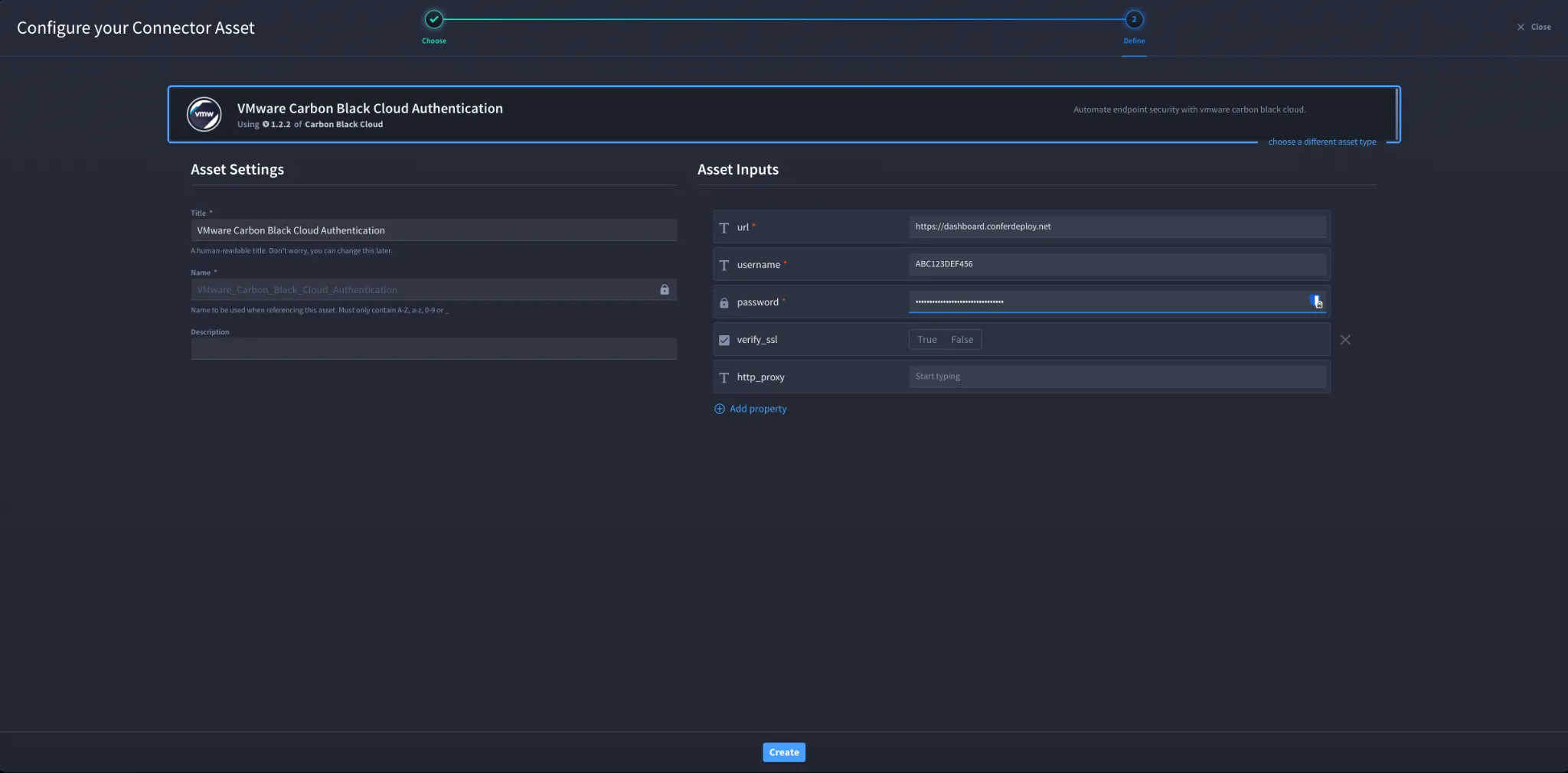
- Fill in the Asset Settings and Asset Input fields as shown below.
Configuration Parameters
Field | Description | Required |
|---|---|---|
url | Base URL for the Carbon Black Cloud API endpoint | Required |
username | API ID generated in Carbon Black Cloud | Required |
password | API Secret Key generated in Carbon Black Cloud | Required |
verify_ssl | Enable or disable SSL certificate verification | Optional |
http_proxy | Proxy configuration if requests must pass through a proxy | Optional |
Troubleshooting
If authentication fails:
- Ensure the API ID and API Secret Key are copied correctly.
- Verify the Carbon Black Cloud API URL matches your tenant environment.
- Confirm the API key has the required access permissions.
- Ensure the API key has not been regenerated or revoked.
- Check SSL verification settings if SSL inspection is enabled.
- Validate proxy configuration if outbound API traffic must pass through a proxy.
Sources
- VMware Carbon Black Cloud Platform API Documentation: https://developer.carbonblack.com/reference/carbon-black-cloud/platform-apis
- VMware Carbon Black Cloud Authentication Documentation: https://developer.carbonblack.com/reference/carbon-black-cloud/authentication
Result
You have successfully authenticated the VMware Carbon Black Cloud connector in Swimlane.