VirusTotal Analysis
Introduction
This guide tells you how to authenticate the VirusTotal Analysis connector in Swimlane using API Key Authentication.
You will obtain a VirusTotal API key (public or premium) and configure the connector asset in Swimlane.
Prerequisites
VirusTotal Access Requirements
You must have VirusTotal permissions to:
- Register a VirusTotal account
- Access your API key from the VirusTotal portal
- Request a premium API key (optional)
Required Credentials
During setup, you will collect:
- URL
- API Key (x-apikey)
VirusTotal Setup
Public API Key
Take the following steps to obtain a public API key:
- Register with the VirusTotal Community by going to the VirusTotal website and clicking New? Join the community.
- Provide a name, email, username, and password. Once complete, click Join us.
- An activation link will be sent to the email you provided. Click on the activation link to activate your VirusTotal Community membership.
- Return to the VirusTotal homepage and click the blue message icon on the lower right-hand corner of the homepage to open the VirusTotal Bot window.
- Click the option, I have a feed of new files that I can upload, I want free API quota to do so.
- A window opens where you can create a message to VirusTotal. Complete the Subject and Email fields and then include a simple message stating why you need a free API Key.
- Once VirusTotal reviews your message, you can sign into your account and find your public API in the corresponding menu item, API key, under your username.

Premium API Key
Take the following steps to request a premium API key:
- Login to your account. Click your username and then click API key.
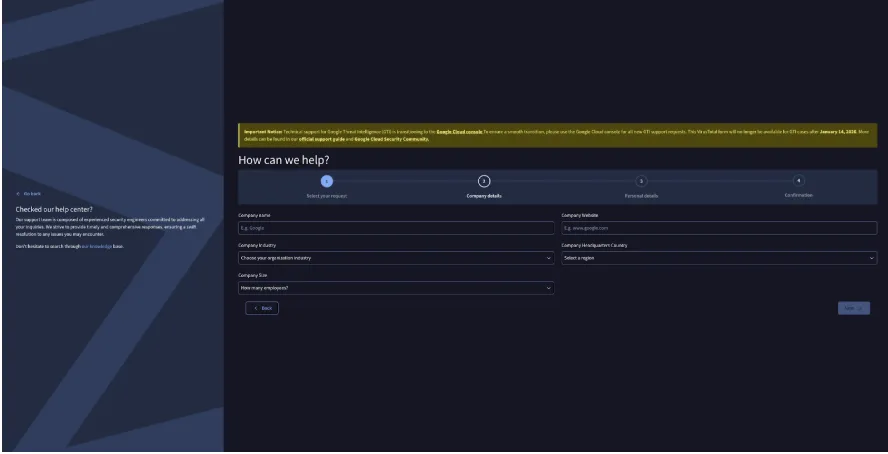
- Click Request premium API key.
- Fill out the request prompt on this page. Required fields include "Company size", "Company country", and "Already paying customer?".
- Virus Total will respond to your request.
Asset Setup
The asset requires an API key to use. If your organization requires the use of a proxy, then that proxy can be used during the asset setup.
The Public API:
- is limited to 500 requests per day and a rate of 4 requests per minute
- must not be used in commercial products or servicesmust not be used in business workflows that do not contribute new files
Connector configuration in Swimlane
- Log in to Turbine.
- From the left-hand navigation pane, click ORCHESTRATION and click Assets.
- Asset homepage opens.
- Click the plus icon to open the Configure your Connector Asset window.
- Select VirusTotal Analysis from the Asset type list.
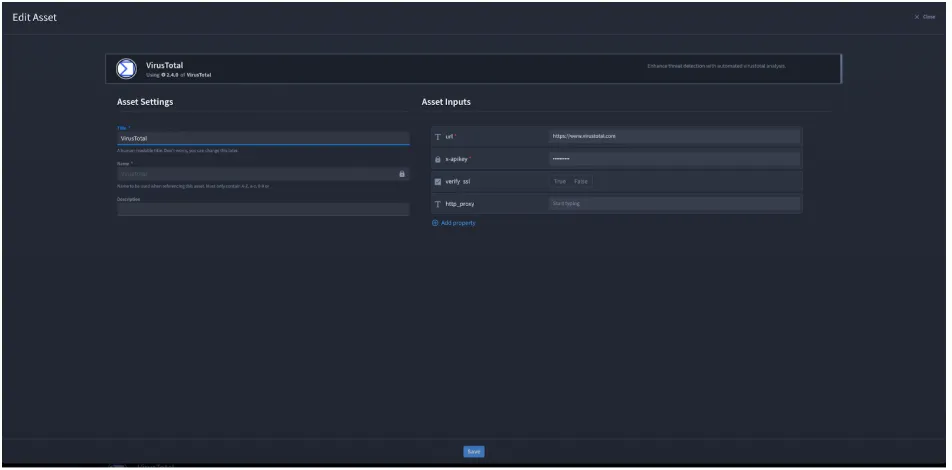
- Fill in the Asset Settings and Asset Input as shown:
Field | Description | Required/Optional |
|---|---|---|
url | A URL to the target host (VirusTotal API endpoint URL). | Required |
x-apikey | API key provided by VirusTotal. | Required |
error_status_code | The Status codes more than 300 can also be used. | Optional |
verify_ssl | Verify SSL certificate. | Optional |
http_proxy | A proxy to route requests through. | Optional |
Fields with * marks are required.
- Click Create.
Troubleshooting
If you encounter an authentication error:
- Verify the API key is correct and active.
- Confirm the URL is correct for the VirusTotal API services you are using.
- If using the Public API, verify you have not exceeded rate limits.
- If required, configure http_proxy and verify outbound connectivity.
You have successfully authenticated the VirusTotal Analysis Connector in Swimlane.